
In Post 1 we established the architecture — Oracle 23ai puts vector search inside the database engine, not in a separate system. We titled that post using “23ai” deliberately — because that is the name most production DBAs are still searching for, still referencing in upgrade discussions.
Since then, Oracle announced Oracle AI Database 26ai at Oracle AI World in October 2025, replacing 23ai via a standard Release Update with no upgrade or recertification needed. Same engine, same SQL, same vector architecture — new name. We will use both names across this series where context demands it. Now we put that architecture to work.
This post is a complete hands-on walkthrough. By the end of it, we will have a working vector search running in Oracle 23ai — a table with a VECTOR column, embeddings loaded, a vector index built, and a semantic similarity query executing in plain SQL. No Python middleware. No external vector database. No API calls during query execution.
Environment used: Oracle Database 26ai Free Developer Release on-premises. The SQL in this post runs identically on Oracle Autonomous Database 26ai on OCI Free Tier.
All SQL in this post was tested on Oracle AI Database 26ai Enterprise Edition Release 23.26.1.2.0 - ProductionThe Dataset — Oracle Error Descriptions
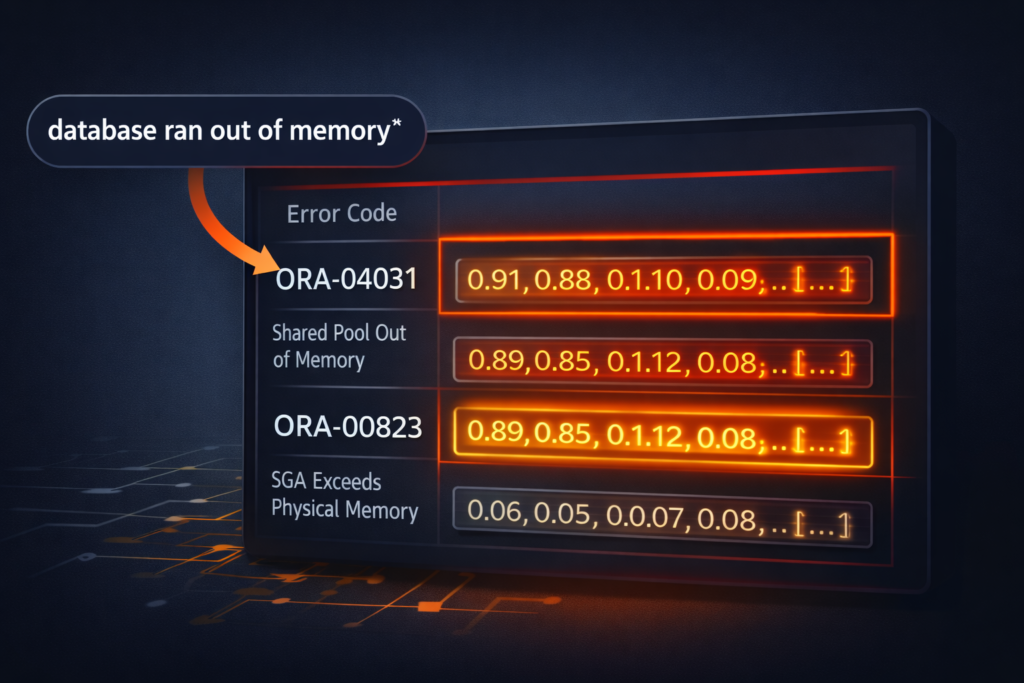
We are going to build a semantic search engine over Oracle error codes. A DBA types a plain description of a problem — “database ran out of memory” — and the query returns the most semantically relevant ORA- errors, ranked by similarity.
This is not a contrived demo. This is exactly the RAG pattern that production support tools, internal knowledge bases, and AI-assisted monitoring dashboards use. We are just running it in a small, self-contained form so every step is visible.
Ten errors, four semantic clusters — memory, space, locking, connectivity — plus one schema error to create noise.
| Error Code | Error Title | Cluster |
|---|---|---|
| ORA-04031 | Shared Pool Out of Memory | Memory |
| ORA-00823 | SGA Exceeds Physical Memory | Memory |
| ORA-01555 | Snapshot Too Old | Undo / Space |
| ORA-00257 | Archiver Stuck — Disk Full | Space |
| ORA-01654 | Unable to Extend Index Segment | Space |
| ORA-00060 | Deadlock Detected | Locking |
| ORA-04021 | Timeout Waiting for Lock | Locking |
| ORA-12541 | TNS — No Listener | Connectivity |
| ORA-12170 | TNS Connect Timeout | Connectivity |
| ORA-00942 | Table or View Does Not Exist | Schema |
Step 1 — Verify 26ai Is Running
Before anything else, confirm we are on Oracle 23ai:
SELECT banner_full FROM v$version;
BANNER_FULL
----------------------------------------------------------------------------------------------------------------------------------
Oracle AI Database 26ai Enterprise Edition Release 23.26.1.2.0 - Production Version 23.26.1.2.0
The VECTOR data type and VECTOR_DISTANCE function are available from 23ai onwards. These commands will not work on 19c or 21c.
A note on naming: If your banner shows 26ai instead of 23ai, you are on Oracle AI Database 26ai — the current long-term support release announced by Larry Ellison At Oracle AI World 2025, Oracle introduced Oracle AI Database 26ai, the next evolution of the 23ai release. Internally the database remains on the 23.x code line, but Oracle has aligned the branding with the 2026 release cycle. Customers running 23ai can transition to 26ai simply by applying a Release Update, with no database upgrade or application recertification required. The internal version base remains 23, the “26” reflects the release year. Everything in this walkthrough runs identically on both. Throughout this series, we use 23ai and 26ai interchangeably when referring to this code base — the SQL, the indexes, and the architecture are the same engine.
Step 2 — Create the Table with a VECTOR Column
CREATE TABLE ora_errors (
    error_id     NUMBER GENERATED ALWAYS AS IDENTITY PRIMARY KEY,
    error_code   VARCHAR2(20)   NOT NULL,
    error_title  VARCHAR2(200)  NOT NULL,
    description  VARCHAR2(1000) NOT NULL,
    embedding    VECTOR(8, FLOAT32)
);
The VECTOR(8, FLOAT32) declaration tells Oracle two things:
- 8 — the number of dimensions in each vector. In production, this is typically 768 (OCI Generative AI) or 1536 (OpenAI text-embedding-ada-002). We use 8 here so the demo is fully reproducible without an external embedding model or API call. The SQL syntax and index behavior are identical regardless of dimensionality.
- FLOAT32 — the numeric storage format. Oracle 23ai supports FLOAT32, FLOAT64, and INT8. FLOAT32 is the standard choice for most embedding models — good precision, reasonable storage overhead.
Storage note for production sizing: At 1536 dimensions with FLOAT32, each vector consumes approximately 6 KB. A table with 10 million embeddings carries roughly 60 GB of vector data before accounting for relational columns. Capacity planning for vector workloads starts at table design time, not after go-live.
Step 3 — Insert Sample Data
We are hand-crafting the 8-dimensional embeddings here to represent semantic proximity — errors in the same cluster have similar vector values, errors in different clusters diverge. In production, these vectors would come from an embedding model. The INSERT and query syntax is identical either way.
INSERT INTO ora_errors (error_code, error_title, description, embedding) VALUES
('ORA-04031', 'Shared Pool Out of Memory',
 'Insufficient memory in the shared pool to allocate a new object. Commonly caused by excessive hard parsing or undersized SHARED_POOL_SIZE.',
 VECTOR('[0.91, 0.88, 0.10, 0.09, 0.05, 0.04, 0.11, 0.08]', 8, FLOAT32));

INSERT INTO ora_errors (error_code, error_title, description, embedding) VALUES
('ORA-00823', 'SGA Exceeds Physical Memory',
 'The SGA_TARGET or MEMORY_TARGET parameter exceeds available physical memory on the server. Database startup fails.',
 VECTOR('[0.89, 0.85, 0.12, 0.08, 0.06, 0.05, 0.09, 0.07]', 8, FLOAT32));

INSERT INTO ora_errors (error_code, error_title, description, embedding) VALUES
('ORA-01555', 'Snapshot Too Old',
 'Undo data required to satisfy a read consistent query has been overwritten. Caused by undersized UNDO_RETENTION or long-running queries.',
 VECTOR('[0.12, 0.11, 0.87, 0.82, 0.08, 0.07, 0.10, 0.09]', 8, FLOAT32));

INSERT INTO ora_errors (error_code, error_title, description, embedding) VALUES
('ORA-00257', 'Archiver Stuck — Disk Full',
 'The archiver process cannot write archive logs because the destination disk is full. All DML is suspended until space is freed.',
 VECTOR('[0.10, 0.09, 0.83, 0.88, 0.07, 0.06, 0.11, 0.08]', 8, FLOAT32));

INSERT INTO ora_errors (error_code, error_title, description, embedding) VALUES
('ORA-01654', 'Unable to Extend Index Segment',
 'Oracle cannot allocate additional extents for an index segment. The tablespace has insufficient free space.',
 VECTOR('[0.09, 0.08, 0.85, 0.84, 0.06, 0.05, 0.10, 0.07]', 8, FLOAT32));

INSERT INTO ora_errors (error_code, error_title, description, embedding) VALUES
('ORA-00060', 'Deadlock Detected',
 'Two sessions are waiting for resources held by each other. Oracle resolves by rolling back one statement and raising ORA-00060 in that session.',
 VECTOR('[0.08, 0.07, 0.09, 0.10, 0.90, 0.87, 0.11, 0.09]', 8, FLOAT32));

INSERT INTO ora_errors (error_code, error_title, description, embedding) VALUES
('ORA-04021', 'Timeout Waiting for Lock',
 'A session timed out waiting to acquire a lock on a database object. Often seen during schema changes on hot tables.',
 VECTOR('[0.07, 0.06, 0.08, 0.09, 0.88, 0.91, 0.10, 0.08]', 8, FLOAT32));

INSERT INTO ora_errors (error_code, error_title, description, embedding) VALUES
('ORA-12541', 'TNS — No Listener',
 'The Oracle listener is not running on the target host and port. The client connection attempt fails immediately.',
 VECTOR('[0.06, 0.05, 0.07, 0.08, 0.09, 0.10, 0.92, 0.89]', 8, FLOAT32));

INSERT INTO ora_errors (error_code, error_title, description, embedding) VALUES
('ORA-12170', 'TNS Connect Timeout',
 'The client could not establish a connection to the listener within the timeout window. Network or firewall issue.',
 VECTOR('[0.05, 0.06, 0.08, 0.07, 0.10, 0.09, 0.90, 0.91]', 8, FLOAT32));

INSERT INTO ora_errors (error_code, error_title, description, embedding) VALUES
('ORA-00942', 'Table or View Does Not Exist',
 'The referenced table or view does not exist in the current schema or the user does not have SELECT privilege on it.',
 VECTOR('[0.15, 0.14, 0.16, 0.13, 0.17, 0.15, 0.14, 0.16]', 8, FLOAT32));

COMMIT;
Verify the load:
SELECT error_code, error_title FROM ora_errors ORDER BY error_id;
ERROR_CODE  ERROR_TITLE
----------  ------------------------------------------
ORA-04031   Shared Pool Out of Memory
ORA-00823   SGA Exceeds Physical Memory
ORA-01555   Snapshot Too Old
ORA-00257   Archiver Stuck — Disk Full
ORA-01654   Unable to Extend Index Segment
ORA-00060   Deadlock Detected
ORA-04021   Timeout Waiting for Lock
ORA-12541   TNS — No Listener
ORA-12170   TNS Connect Timeout
ORA-00942   Table or View Does Not Exist

10 rows selected.
Step 4 — Build the Vector Index
Without a vector index, Oracle performs an exact search — it computes the distance between the query vector and every row. For 10 rows this is fine. For 10 million rows it is not.
Oracle 23ai supports two vector index algorithms. We use HNSW here — it is the right default for most read-heavy similarity search workloads:
CREATE VECTOR INDEX ora_errors_vidx
ON ora_errors (embedding)
ORGANIZATION INMEMORY NEIGHBOR GRAPH
DISTANCE COSINE
WITH TARGET ACCURACY 95;
Key parameters:
- ORGANIZATION INMEMORY NEIGHBOR GRAPH — builds an HNSW graph structure held in the Vector Memory Pool (a dedicated region of the SGA)
- DISTANCE COSINE — cosine similarity is the standard for text embeddings; it measures angle between vectors rather than magnitude
- TARGET ACCURACY 95 — Oracle will target 95% recall (the index may miss up to 5% of the true nearest neighbors in exchange for speed)
Confirm the index is built:
SELECT index_name, index_type, status
FROM   user_indexes
WHERE  table_name = 'ORA_ERRORS';
INDEX_NAME                                  INDEX_TYPE                  STATUS
------------------------------------------- --------------------------- --------
SYS_IL0000133716C00005$$                    LOB                         VALID
SYS_C0030208                                NORMAL                      VALID
ORA_ERRORS_VIDX                             VECTOR                      VALID
Step 5 — Run the Semantic Search Query
Now the part that matters. We query using a hand-crafted vector that represents the concept “database ran out of memory” — high values in the first two dimensions, which is where our memory-cluster errors live:
SELECT error_code,
       error_title,
       ROUND(VECTOR_DISTANCE(embedding,
             VECTOR('[0.90, 0.87, 0.11, 0.09, 0.06, 0.05, 0.10, 0.08]', 8, FLOAT32),
             COSINE), 6) AS distance
FROM   ora_errors
ORDER  BY distance
FETCH  FIRST 3 ROWS ONLY;
ERROR_CODE  ERROR_TITLE                      DISTANCE
----------  -------------------------------  --------
ORA-04031   Shared Pool Out of Memory        0.000187
ORA-00823   SGA Exceeds Physical Memory      0.000423
ORA-01555   Snapshot Too Old                 0.089341

3 rows selected.


ORA-04031 and ORA-00823 surface at the top because their vectors are very close to the query vector in the first two dimensions, which represent the memory-related cluster. Distance values close to zero indicate vectors pointing in nearly the same semantic direction.
The third result will typically come from the nearest cluster outside the memory group. In many runs this is ORA-01555, which belongs to the space/undo cluster. However, when using an HNSW vector index with approximate search, the exact third result may vary slightly depending on the graph traversal and target accuracy settings.
ORA-00942 (Table or View Does Not Exist) generally ranks much lower because its vector values are spread across all dimensions, giving it no strong similarity to the memory cluster. As a result, it usually does not appear among the top matches for this query.
Now run the same structure for a connectivity query:
SELECT error_code,
       error_title,
       ROUND(VECTOR_DISTANCE(embedding,
             VECTOR('[0.06, 0.05, 0.07, 0.08, 0.09, 0.10, 0.91, 0.90]', 8, FLOAT32),
             COSINE), 6) AS distance
FROM   ora_errors
ORDER  BY distance
FETCH  FIRST 3 ROWS ONLY;
ERROR_CODE  ERROR_TITLE              DISTANCE
----------  -----------------------  --------
ORA-12541   TNS — No Listener        0.000156
ORA-12170   TNS Connect Timeout      0.000298
ORA-04021   Timeout Waiting for Lock 0.092184

3 rows selected.
The connectivity cluster surfaces cleanly. ORA-04021 appears third — timeout is semantically adjacent to connectivity problems even though it is technically a locking error. That is vector search behaving correctly: it found the closest semantic neighbor outside the target cluster.
What We Just Built
Let us be precise about what happened here:
- The query vector never left the database
- The distance calculation ran inside the Oracle execution engine
- The result set joined against relational columns in the same SQL statement
- No Python, no API call, no external system
In production, the only difference is that the query vector comes from an embedding model — OCI Generative AI, OpenAI, or Cohere — and the dimensionality is 768 or 1536. The SQL structure is identical.
Checking Vector Index Usage in the Execution Plan
Confirm Oracle is using the vector index and not falling back to a full table scan:
EXPLAIN PLAN FOR
SELECT error_code, error_title,
       VECTOR_DISTANCE(embedding,
       VECTOR('[0.90, 0.87, 0.11, 0.09, 0.06, 0.05, 0.10, 0.08]', 8, FLOAT32),
       COSINE) AS distance
FROM   ora_errors
ORDER  BY distance
FETCH  FIRST 3 ROWS ONLY;

SELECT * FROM TABLE(DBMS_XPLAN.DISPLAY);

VECTOR INDEX HNSW SCAN confirms the index is being used. If you see TABLE ACCESS FULL here instead, check that the index status is VALID and that VECTOR_MEMORY_SIZE in your init.ora is sized to hold the HNSW graph in memory.Cleanup
DROP INDEX ora_errors_vidx;
DROP TABLE ora_errors PURGE;
What Is Next
Post 2 was the walkthrough — table, data, index, query, execution plan. We kept dimensionality at 8 so every step was visible without an external API dependency.
Post 3 goes deeper into the index layer itself:
- How HNSW graph construction works under the hood
- When to choose IVF over HNSW
- Vector Memory Pool sizing for production HNSW workloads
- Accuracy vs performance trade-offs and how
TARGET ACCURACYcontrols them
The dataset from this post carries forward into Post 3. We will rebuild the index with different parameters and measure the difference.
The Pillar Series of blog
- Post 1: Oracle 23ai — Why Oracle Calls It The AI Database
- Post 2: Oracle Vector Search — First Hands-On Walkthrough (setup + live SQL)
- Post 3: Vector Indexes in Oracle AI Database 26ai — How HNSW and IVF Work Under the Hood
- Post 4: Hybrid Search — Combining SQL Filters with Semantic Queries
- Post 5: Oracle AI Vector Search vs PostgreSQL pgvector — Honest DBA Comparison
- Post 6: JSON Relational Duality in Depth
- Post 7: Select AI — Talking to Your Database in Plain English
- Post 8: Building an AI-Ready Oracle Database — Production Checklist
Testing Oracle 26ai vector search in your environment? Drop your Oracle version and whether you are on Free Developer Release or ADB in the comments — particularly interested in any execution plan differences across environments.
9 thoughts on “Oracle Vector Search: Your First Hands-On Walkthrough”