
A few months ago, we were in an architecture review when the solutions architect put up a slide titled “AI Stack — Proposed.” Oracle was in the middle tier, doing what it always does — transactions, reporting, the core workload. Sitting beside it, in its own separate box, was a vector database. Pinecone, specifically. The argument was straightforward: Oracle is the relational system, we add a dedicated vector store for the AI layer, and the application glues them together.
We pushed back. Not because of vendor preference — because the premise was already outdated.
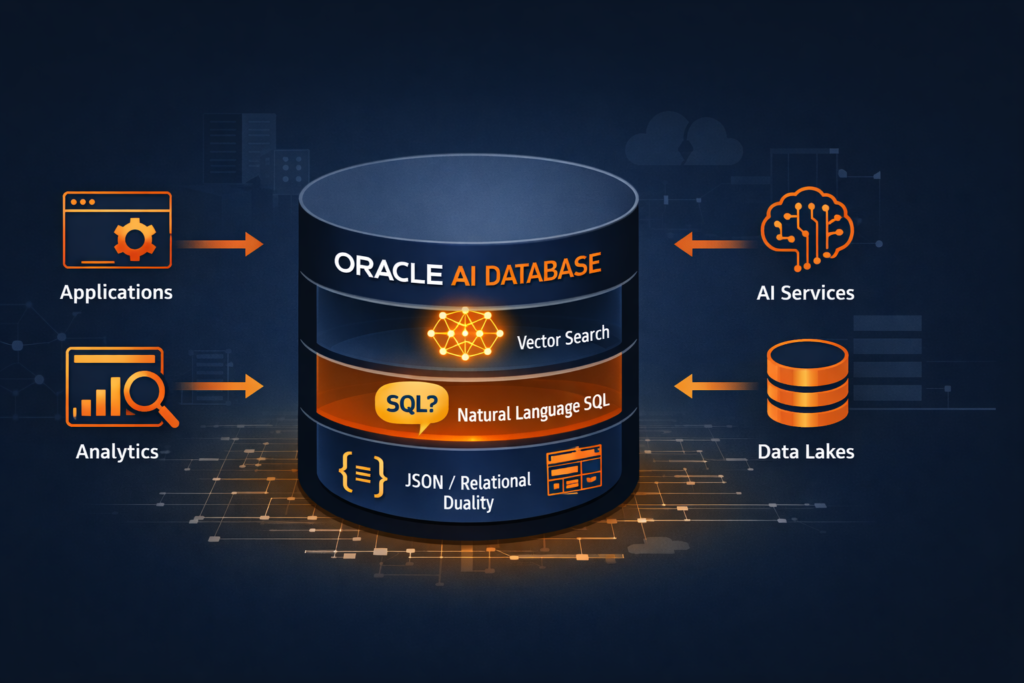
There is no separate install needed. In Oracle 23ai, vector search is the database. It is not a bolt-on feature. It is baked into the storage engine, the SQL parser, and the index layer. Oracle did not just add an AI feature. They rebuilt the database around it.
That is exactly why Oracle renamed 23c to 23ai before GA. The version name change was a signal, not a marketing exercise.
Let us break down what that actually means from a production DBA’s perspective.
What Changed Between Oracle 19c / 21c and 23ai
If you have spent the last several years managing Oracle 19c in production — which most of us have — the jump to 23ai is not just a version upgrade. Oracle 23ai introduces a set of capabilities that fundamentally change how the database participates in application architecture.
Here is the honest short list of what is genuinely new:
| Capability | What It Is | Why DBAs Need to Know |
|---|---|---|
| AI Vector Search | Native vector data type + vector indexes in the SQL engine | We manage the indexes, memory, and storage — just like any other index |
| JSON Relational Duality | Single object exposed as both a JSON document and relational table simultaneously | Schema design and locking behavior changes |
| Select AI | Natural language to SQL, built into the database | DBAs control the AI profile and model access |
| True Cache | Read-only in-memory cache that extends the buffer cache | Sizing and invalidation become our problem |
| Operational Properties | Schema-level annotations, domains, usage tracking | More metadata to manage, more observability |
We will cover each of these in separate posts. Post 1 here is about the foundation — understanding why Oracle structured the release this way before we dig into the hands-on.
The Core Architectural Shift — AI Inside the Data Layer
We covered the broader GenAI database landscape earlier. This post is specifically about what Oracle built natively into 23ai
Most AI implementations today follow the same pattern. Application code sends data to an external AI service — OpenAI, a Hugging Face endpoint, a vector database like Pinecone or Weaviate — gets a result back, and then uses that result to query the relational database separately.
That means two network hops, two systems to maintain, two places for data consistency to break.
Oracle’s argument with 23ai is straightforward: what if the AI operations happened inside the database itself, next to the data, with no external round trip?
That is the architectural bet Oracle has placed. The vector embeddings live in Oracle tables as VECTOR columns. The similarity search runs as a standard SQL query. The results join against relational data in the same query, in the same execution plan, under the same transaction.
Here is what that looks like at the SQL level — the simplest possible vector similarity query in 23ai:
SELECT product_name, description
FROM   products
ORDER  BY VECTOR_DISTANCE(embedding, :query_vector, COSINE)
FETCH  FIRST 10 ROWS ONLY;
No external API call. No Python middleware. The distance calculation happens in the Oracle execution engine. The FETCH FIRST clause makes this an efficient top-K retrieval, not a full table scan — provided we have the right vector index in place, which we will cover in Post 3.
The VECTOR Data Type — What DBAs Actually Manage
When Oracle says vector search is native, the first concrete thing it means is that VECTOR is now a first-class SQL data type. We create it in a DDL statement like any other column.
CREATE TABLE products (
    product_id   NUMBER GENERATED ALWAYS AS IDENTITY PRIMARY KEY,
    product_name VARCHAR2(200),
    description  CLOB,
    embedding    VECTOR(1536, FLOAT32)
);
The VECTOR(1536, FLOAT32) declaration tells Oracle two things: the dimensionality of the vector (1536 dimensions is typical for OpenAI’s text-embedding-ada-002 model) and the numeric storage format (FLOAT32 here; FLOAT64, INT8 are also supported).
As DBAs, this immediately raises practical questions we need answers to before production:
- Storage overhead: A 1536-dimension FLOAT32 vector consumes roughly 6 KB per row. A table with 10 million embeddings is carrying approximately 60 GB of vector data before we even account for the relational columns. Capacity planning changes.
- Index type selection: Oracle 23ai supports two vector index algorithms — HNSW (Hierarchical Navigable Small World) and IVF (Inverted File Index). Wrong choice for the workload will hurt both accuracy and performance. We cover this in Post 3.
- Memory requirements: HNSW indexes are graph structures that Oracle holds in memory. Vector Memory Pool sizing becomes a new
init.oraconcern.
These are not developer problems. These are DBA problems. And Oracle designed them to be managed through the same tools we already use — AWR, V$ views, DBCA, and SQL tuning advisor.
Select AI — Natural Language Hits the Database Layer
One of the more striking features in Oracle 23ai is Select AI. It allows end users to run natural language queries against the database and get back SQL-executed results, without a BI layer or a middleware application handling the translation.
Here is a minimal example of what that looks like after the AI profile is configured:
SELECT AI What are the top 5 products by revenue this quarter?;
Oracle takes that English prompt, sends it to a configured LLM (OpenAI, Cohere, or Oracle’s own OCI Generative AI), gets back a SQL statement, validates it against the schema metadata it knows, and executes it — returning real data.
As DBAs, the Select AI configuration sits in our domain. We create and manage the AI Profile, which controls which LLM endpoint is used, which schemas and tables are visible to the AI, and what credentials govern the outbound connection to the model provider:
BEGIN
  DBMS_CLOUD_AI.CREATE_PROFILE(
    profile_name => 'OPENAI_PROD',
    attributes   => '{
      "provider": "openai",
      "credential_name": "OPENAI_CRED",
      "object_list": [{"owner": "SALES", "name": "ORDERS"},
                      {"owner": "SALES", "name": "PRODUCTS"}]
    }'
  );
END;
/
The object_list is our access control boundary. The LLM only sees schema metadata for the objects we explicitly include. This is not a security afterthought — it is a DBA-controlled configuration gate.
JSON Relational Duality — Why Schema Design Just Got More Interesting
JSON Relational Duality Views are Oracle 23ai’s answer to a problem that has frustrated hybrid application teams for years: some parts of the application want to work with data as a JSON document, others want to query it as rows and columns.
Traditionally, this forced a choice — normalize the schema for SQL users, or store JSON for the document-store consumers, and then reconcile the two.
In 23ai, we can create a Duality View that exposes the same underlying relational tables as a JSON document endpoint:
CREATE OR REPLACE JSON RELATIONAL DUALITY VIEW order_dv AS
SELECT JSON {
    'orderId'    : o.order_id,
    'orderDate'  : o.order_date,
    'customer'   : o.customer_name,
    'lineItems'  : [
        SELECT JSON {
            'product' : li.product_name,
            'qty'     : li.quantity,
            'price'   : li.unit_price
        }
        FROM   order_lines li WITH INSERT UPDATE DELETE
        WHERE  li.order_id = o.order_id
    ]
}
FROM orders o WITH INSERT UPDATE DELETE;
The relational tables stay normalized. Applications accessing order_dv see and manipulate JSON. Locking and consistency are maintained at the relational row level. We do not manage two copies of the data.
For DBAs, the immediate implication is that we need to understand the locking granularity of duality views before they hit production — a write through a JSON duality view does generate row-level locks on the underlying tables, and that affects our wait event analysis if those tables are hot.
Why the 23c → 23ai Rename Matters
Oracle shipped 23c for developer preview and renamed it 23ai for GA. That is not a trivial rebranding. It reflected a decision to fully commit to the positioning — to signal that the version’s defining purpose is AI workload support, not just incremental feature addition.
From a roadmap perspective, that has consequences for how Oracle will prioritize performance improvements, licensing packaging, and tooling integration going forward. Future Oracle releases will be built on the 23ai foundation. Cloud features like Oracle Database 23ai on OCI, Autonomous Database, and Base Database Service already reflect this.
For those of us managing Oracle estates on-premises, 23ai is available as the long-term supported version replacing the 19c track eventually. Planning upgrade paths from 19c to 23ai is a conversation most production shops will need to have in the next 18–24 months.
Where We Go From Here
Post 1 was the foundation — understanding the architecture and the intent before we touch a single command.
The rest of the Pillar 1 series goes hands-on, in this order:
- Post 2: Oracle Vector Search — First Hands-On Walkthrough (setup + live SQL)
- Post 3: Vector Indexes in Oracle AI Database 26ai — How HNSW and IVF Work Under the Hood
- Post 4: Hybrid Search — Combining SQL Filters with Semantic Queries
- Post 5: Oracle AI Vector Search vs PostgreSQL pgvector — Honest DBA Comparison
- Post 6: JSON Relational Duality in Depth
- Post 7: Select AI — Talking to Your Database in Plain English
- Post 8: Building an AI-Ready Oracle Database — Production Checklist
If you are running Oracle 19c in production today and trying to understand what the 23ai upgrade actually requires of the DBA team — not the developers, not the architects, the DBA team — this series is built for that conversation.
Running Oracle 23ai in production or exploring it in a sandbox? Drop your experience in the comments. Specifically interested in what surprises you found that the documentation did not prepare you for.
9 thoughts on “Oracle 23ai — Why Oracle Calls It The AI Database”