
Last Updated: May 2026 Tested On: PostgreSQL 16.1 + 17.x, pgvector 0.8.1 / 0.8.2 Platforms: RHEL 9 / Rocky Linux, Ubuntu 22.04 / 24.04
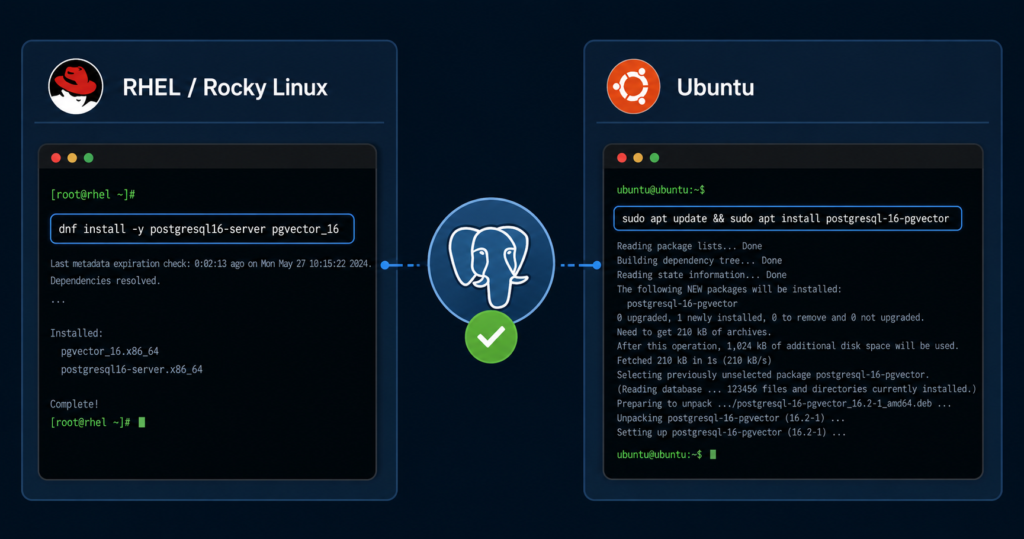
Installing pgvector is not complicated. Two commands on most Linux distributions and you’re done. But I’ve seen enough production incidents — wrong package, wrong schema, extension loaded in the right database but wrong search path — to know that “not complicated” doesn’t mean “nothing can go wrong.”
This post is the install and configure reference I keep pointing people to. If you’re on PostgreSQL 16, follow it exactly. If you’re on PostgreSQL 17, there are a few version-specific notes to check before you start — I’ll flag them clearly.
Common install errors covered in this guide:
type "vector" does not exist- Extension not found after install
- Library not found
- HNSW index not used by planner
Before You Start: Version Check
pgvector works on PostgreSQL 12 and above. Verify your running version first:
sql
SELECT version();Expected output on PG 17:
PostgreSQL 17.4 on x86_64-pc-linux-gnu ...If compiling from source on PostgreSQL 17, verify compatibility with your installed pgvector version and review current upstream issues at github.com/pgvector/pgvector before deployment. Package-based installs from PGDG are tested against each minor version and are the safer path for production.
Method 1: Install from Package Repository (Recommended)
This is the recommended path for most deployments. No compilation, no build toolchain, one command.
RHEL 9 / Rocky Linux 9
PostgreSQL 16:
bash
# Install PGDG repository (if not already installed)
sudo dnf install -y https://download.postgresql.org/pub/repos/yum/reporpms/EL-9-x86_64/pgdg-redhat-repo-latest.noarch.rpm

# Disable built-in PostgreSQL module
sudo dnf -qy module disable postgresql

# Install pgvector for PostgreSQL 16
sudo dnf install -y pgvector_16
PostgreSQL 17 — package name suffix changes:
bash
sudo dnf install -y pgvector_17Verify the library is in place:
bash
# PG 16
ls -l /usr/pgsql-16/lib/vector.so

# PG 17
ls -l /usr/pgsql-17/lib/vector.so
Expected output:
-rwxr-xr-x 1 root root 245680 Nov 28 10:30 /usr/pgsql-17/lib/vector.soUbuntu 22.04 / 24.04
Modern Ubuntu uses the signed-by approach for APT repositories. The older apt-key add method is deprecated — use this instead:
bash
# Add PostgreSQL APT repository (modern signed-by method)
sudo apt install -y curl ca-certificates
sudo install -d /usr/share/postgresql-common/pgdg
sudo curl -o /usr/share/postgresql-common/pgdg/apt.postgresql.org.asc \
  --fail https://www.postgresql.org/media/keys/ACCC4CF8.asc

sudo sh -c 'echo "deb [signed-by=/usr/share/postgresql-common/pgdg/apt.postgresql.org.asc] \
  https://apt.postgresql.org/pub/repos/apt $(lsb_release -cs)-pgdg main" \
  > /etc/apt/sources.list.d/pgdg.list'

sudo apt update
PostgreSQL 16:
bash
sudo apt install -y postgresql-16-pgvectorPostgreSQL 17:
bash
sudo apt install -y postgresql-17-pgvectorVerify:
bash
# PG 16
ls -l /usr/lib/postgresql/16/lib/vector.so

# PG 17
ls -l /usr/lib/postgresql/17/lib/vector.so
Method 2: Compile from Source
Use this when your environment can’t reach external package repos, or you need a specific pgvector release.
Install build dependencies:
bash
# RHEL / Rocky Linux (PG 16)
sudo dnf install -y gcc make postgresql16-devel git
# For PG 17: postgresql17-devel

# Ubuntu (PG 16)
sudo apt install -y build-essential postgresql-server-dev-16 git
# For PG 17: postgresql-server-dev-17
Clone and compile:
bash
cd /tmp
git clone --branch v0.8.2 https://github.com/pgvector/pgvector.git
cd pgvector

make
sudo make install
Verify extension files:
bash
ls -l /usr/pgsql-16/share/extension/vector*Expected output:
-rw-r--r-- 1 root root   180 Dec 10 14:23 vector--0.8.2.sql
-rw-r--r-- 1 root root   150 Dec 10 14:23 vector.control
Enable the Extension
Installation puts the binary in place. Enabling is a per-database operation — pgvector does not auto-enable across all databases on the instance.
bash
psql -U postgres -d your_databasesql
CREATE EXTENSION vector;Expected output:
CREATE EXTENSIONVerify it loaded correctly:
sql
SELECT * FROM pg_extension WHERE extname = 'vector';Expected output:
 oid  | extname | extowner | extnamespace | extrelocatable | extversion
------+---------+----------+--------------+----------------+------------
16384 | vector  |       10 |         2200 | f              | 0.8.2
Sanity check — available functions:
sql
\df *vector*You should see cosine_distance, l2_distance, inner_product, vector_dims, vector_norm. If this list is empty, the extension did not load into the expected schema — see Troubleshooting below.
Create Your First Vector Table
sql
CREATE TABLE documents (
    id BIGSERIAL PRIMARY KEY,
    product_id INTEGER NOT NULL,
    product_name TEXT,
    category VARCHAR(100),
    price DECIMAL(10,2),
    in_stock BOOLEAN DEFAULT true,
    embedding VECTOR(1536),
    created_at TIMESTAMP DEFAULT NOW(),
    updated_at TIMESTAMP DEFAULT NOW()
);

-- Standard B-tree indexes for relational filtering
CREATE INDEX idx_doc_category ON documents(category);
CREATE INDEX idx_doc_stock ON documents(in_stock) WHERE in_stock = true;
Dimension sizing by embedding model:
| Model | Dimensions |
|---|---|
| OpenAI text-embedding-3-small | 1536 |
| OpenAI text-embedding-3-large | 3072 |
| Cohere embed-english-v3.0 | 1024 |
| Sentence Transformers (all-MiniLM-L6-v2) | 384 |
Match VECTOR(n) exactly to your model. Mismatched dimensions at insert time throw an error immediately — covered in detail in Post 4 (pgvector Gotchas).
Insert Test Data and Verify
sql
-- Generate 1000 random 384-dimension test vectors
INSERT INTO documents (product_id, product_name, embedding)
SELECT
    i,
    'Document ' || i,
    ARRAY(SELECT random() FROM generate_series(1, 384))::vector
FROM generate_series(1, 1000) i;

-- Verify count
SELECT count(*) FROM documents;
Expected output:
 count
-------
  1000
Verify dimensions stored correctly:
sql
SELECT id, product_name, vector_dims(embedding) as dimensions
FROM documents
LIMIT 5;
Expected output:
 id |   product_name | dimensions
----+----------------+------------
  1 | Document 1     |        384
  2 | Document 2     |        384
  3 | Document 3     |        384
Create the HNSW Index
Without an index, pgvector performs an exact sequential scan — accurate but does not scale. Build the HNSW index after initial data load:
sql
-- Increase maintenance_work_mem before index build on large tables
SET maintenance_work_mem = '4GB';

-- HNSW index — recommended for most production workloads
CREATE INDEX ON documents
USING hnsw (embedding vector_cosine_ops)
WITH (m = 16, ef_construction = 64);
CREATE INDEX CONCURRENTLY is supported with HNSW in pgvector — verify against your specific pgvector and PostgreSQL version combination before using in production, as concurrent build behavior can vary across minor releases.
Tune query-time recall:
sql
SET hnsw.ef_search = 200;Verify the Index Is Being Used
This is where most setups quietly break. Always validate with EXPLAIN ANALYZE before calling it production-ready:
sql
EXPLAIN ANALYZE
SELECT id, product_name,
       embedding <=> ARRAY(SELECT random() FROM generate_series(1,384))::vector AS distance
FROM documents
ORDER BY distance
LIMIT 10;
Expected output (index in use):
Limit (cost=... rows=10 ...)
  ->  Index Scan using documents_embedding_idx on documents
        Order By: (embedding <=> '...'::vector)
Planning Time: 0.5 ms
Execution Time: 2.3 ms
If you see Seq Scan instead of Index Scan, the planner is bypassing the index. This can be caused by table size, cost estimation, query selectivity, or enable_seqscan settings — review the full EXPLAIN ANALYZE output before assuming the index is misconfigured.
Check index scan stats:
sql
SELECT schemaname, tablename, indexname, idx_scan, idx_tup_read
FROM pg_stat_user_indexes
WHERE indexname LIKE '%embedding%';
Production Configuration Checklist
Autovacuum tuning — high-churn embedding workloads can generate significant dead tuples. Configure per table:
sql
ALTER TABLE documents SET (
    autovacuum_vacuum_scale_factor = 0.05,
    autovacuum_analyze_scale_factor = 0.02
);
Monitor autovacuum effectiveness and schedule manual VACUUM ANALYZE during heavy bulk-load or high-churn periods if needed.
Partition large tables:
sql
CREATE TABLE documents (
    id BIGSERIAL,
    category VARCHAR(50),
    embedding VECTOR(1536),
    created_at DATE
) PARTITION BY RANGE (created_at);

CREATE TABLE documents_2025 PARTITION OF documents
FOR VALUES FROM ('2025-01-01') TO ('2026-01-01');

-- Create HNSW index on each partition
CREATE INDEX ON documents_2025 USING hnsw (embedding vector_cosine_ops);
Troubleshooting: The Three You’ll Actually Hit
type "vector" does not exist after CREATE EXTENSION
Extension loaded into a different schema than your search_path. Check and fix:
sql
-- Which schema has the extension?
\dx vector

-- Fix search path
SET search_path TO public, your_schema;
Extension won’t load / library not found
pgvector binary not in the correct PostgreSQL lib path. Verify the .so file location matches your running PostgreSQL version — especially relevant if multiple PostgreSQL versions are installed on the same host.
Index build fails with Out of Memory
sql
SET maintenance_work_mem = '4GB';For parallel HNSW builds, ensure shared memory is at least as large as maintenance_work_mem. Set in postgresql.conf for persistence rather than session-level only.
For the full troubleshooting catalogue — dimension mismatch, ALTER TABLE, casting errors — see Post 4 in this series.
PG 16 vs PG 17: What Actually Changes
| Item | PG 16 | PG 17 |
|---|---|---|
| Package name (RHEL) | pgvector_16 | pgvector_17 |
| Package name (Ubuntu) | postgresql-16-pgvector | postgresql-17-pgvector |
| Library path | /usr/pgsql-16/lib/ | /usr/pgsql-17/lib/ |
| Dev package (source build) | postgresql16-devel | postgresql17-devel |
| Source build note | None | Verify upstream compatibility |
| pgvector behavior | Identical | Identical |
The extension SQL, index syntax, distance operators, and all configuration parameters are identical across both versions. Once installed, your DBA workflow does not change.
Related Posts in This pgvector Series
- Hub: pgvector Complete Guide — Installation, HNSW Tuning, Hybrid Search
- Part 1: pgvector Release Notes & Updates [2025–2026]
- Part 2: pgvector vs Pinecone vs Weaviate — Production DBA’s Verdict
- Part 3: Install and Configure pgvector on PostgreSQL 16/17
- Part 4: pgvector Gotchas — Dimension Mismatch, Casting, ALTER TABLE Solved
Hit a version-specific install issue not covered here? Drop it in the comments.
1 thought on “Install and Configure pgvector on PostgreSQL 16 and 17: Step-by-Step Guide [2026]”