
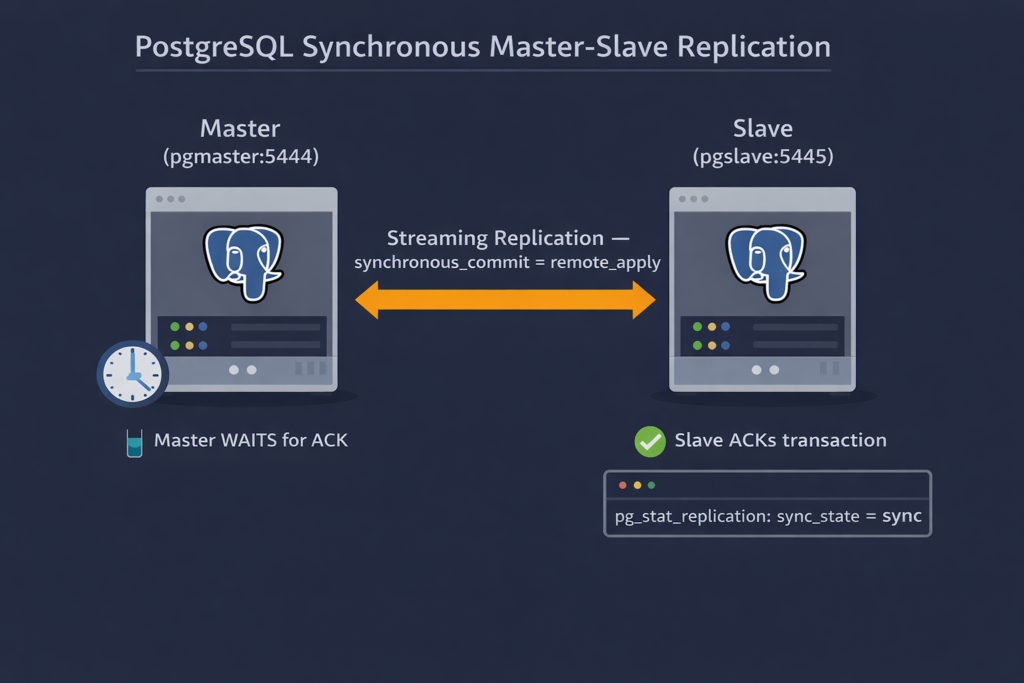
In this final blog of our PostgreSQL synchronous replication setup series, we close the loop on Master-Slave replication — and we save the best for last. Through the previous three blogs, we built our foundation, configured the async node, and watched streaming replication come alive. Async worked beautifully — but async also means the master does not wait. It commits and moves on, trusting the slave will catch up eventually. In production environments where data loss is simply not an option — financial transactions, order management, critical audit trails — “eventually” is not a guarantee you can take to your stakeholders.
That is exactly where synchronous replication steps in. With sync mode, the master does not release the commit until the slave has received, written, and applied the transaction. The database itself enforces the guarantee — no application-level workaround needed, no middleware in between.
We will use the same automation script that carried us through the async setup, with just two changes on the master and one change on the slave. Minimal delta, maximum impact — that is the beauty of a well-designed automation script.
Let’s start with master.
pgcreatemaster:
   # Set of work for command
   mkdir /home/sanjeeva/postgres/Archivelogs/$(pgname)
   pg_createcluster 11 $(pgname) -- --data-checksums
   cp pgrepl.conf /etc/postgresql/11/$(pgname)/
   sed -i "s|^#include = '…'|include = 'pgrepl.conf'|g" /etc/postgresql/11/$(pgname)/postgresql.conf
   sed -i "s|^# archive_command =|archive_command = 'cp %p /home/sanjeeva/postgres/Archivelogs/$(pgname)/%f'|g" /etc/postgresql/11/$(pgname)/pgrepl.conf
   sed -i "s|^# synchronous_standby_names =|synchronous_standby_names = $(pgcgname)|g" /etc/postgresql/11/$(pgname)/pgrepl.conf
   sed -i "s|^synchronous_commit = local|synchronous_commit = remote_apply |g" /etc/postgresql/11/$(pgname)/pgrepl.conf
   pg_ctlcluster 11 $(pgname) start
   pg_lsclusters

Image of Script with line numberThe first change is highlighted in bold. Yes, We have to set value for synchronous_standby_names. This parameter is string and can take multiple values as comma separated. We will set this parameter using $(pgcgname). Line no 6 is defining this.
Second change is the parameter synchronous_commit which we are setting in line no 7. We are setting this value to remote_apply
We should run our automation script to create the node. The extra parameter added to the automation script is pgcgname which is highlighted here in bold-italics. This is used to set synchronous_standby_names
postgres@sanjeeva:/home/sanjeeva/postgres$ make pgcreatemaster pgname=pgmaster pgcgname=pgsyncnode
Set of work for command
mkdir /home/sanjeeva/postgres/Archivelogs/pgmaster
pg_createcluster 11 pgmaster -- --data-checksums
Creating new PostgreSQL cluster 11/pgmaster …
/usr/lib/postgresql/11/bin/initdb -D /var/lib/postgresql/11/pgmaster --auth-local peer --auth-host md5 --data-checksums
The files belonging to this database system will be owned by user "postgres".
This user must also own the server process.
The database cluster will be initialized with locale "C.UTF-8".
The default database encoding has accordingly been set to "UTF8".
The default text search configuration will be set to "english".
Data page checksums are enabled.
fixing permissions on existing directory /var/lib/postgresql/11/pgmaster … ok
creating subdirectories … ok
selecting default max_connections … 100
selecting default shared_buffers … 128MB
selecting default timezone … Asia/Calcutta
selecting dynamic shared memory implementation … posix
creating configuration files … ok
running bootstrap script … ok
performing post-bootstrap initialization … ok
syncing data to disk … ok
Success. You can now start the database server using:
pg_ctlcluster 11 pgmaster start
Ver Cluster Port Status Owner Data directory Log file
11 pgmaster 5444 down postgres /var/lib/postgresql/11/pgmaster /var/log/postgresql/postgresql-11-pgmaster.log
cp pgrepl.conf /etc/postgresql/11/pgmaster/
sed -i "s|^#include = '…'|include = 'pgrepl.conf'|g" /etc/postgresql/11/pgmaster/postgresql.conf
sed -i "s|^# archive_command =|archive_command = 'cp %p /home/sanjeeva/postgres/Archivelogs/pgmaster/%f'|g" /etc/postgresql/11/pgmaster/pgrepl.conf
sed -i "s|^# synchronous_standby_names =|synchronous_standby_names = pgsyncnode|g" /etc/postgresql/11/pgmaster/pgrepl.conf
sed -i "s|^synchronous_commit = local|synchronous_commit = remote_apply |g" /etc/postgresql/11/pgmaster/pgrepl.conf
pg_ctlcluster 11 pgmaster start
pg_lsclusters
Ver Cluster Port Status Owner Data directory Log file
11 main 5432 down postgres /var/lib/postgresql/11/main /var/log/postgresql/postgresql-11-main.log
11 pgmaster 5444 online postgres /var/lib/postgresql/11/pgmaster /var/log/postgresql/postgresql-11-pgmaster.log
postgres@sanjeeva:/home/sanjeeva/postgres$
So our master is ready, now its time to create slave. For Slave there is no change in slave. We will update replication.conf once it will be created which we can do this using our automation script as well.
postgres@Sanjeeva4156:/home/sanjeeva/postgres$ make pgcreateslave pgslavename=pgslave pgmastername=pgmaster masterport=5444
Set of work for command
pg_createcluster 11 pgslave -- --data-checksums
Creating new PostgreSQL cluster 11/pgslave …
/usr/lib/postgresql/11/bin/initdb -D /var/lib/postgresql/11/pgslave --auth-local peer --auth-host md5 --data-checksums
The files belonging to this database system will be owned by user "postgres".
This user must also own the server process.
The database cluster will be initialized with locale "C.UTF-8".
The default database encoding has accordingly been set to "UTF8".
The default text search configuration will be set to "english".
Data page checksums are enabled.
fixing permissions on existing directory /var/lib/postgresql/11/pgslave … ok
creating subdirectories … ok
selecting default max_connections … 100
selecting default shared_buffers … 128MB
selecting default timezone … Asia/Calcutta
selecting dynamic shared memory implementation … posix
creating configuration files … ok
running bootstrap script … ok
performing post-bootstrap initialization … ok
syncing data to disk … ok
Success. You can now start the database server using:
pg_ctlcluster 11 pgslave start
Ver Cluster Port Status Owner Data directory Log file
11 pgslave 5445 down postgres /var/lib/postgresql/11/pgslave /var/log/postgresql/postgresql-11-pgslave.log
cp pgrepl.conf /etc/postgresql/11/pgslave/
mv /var/lib/postgresql/11/pgslave /var/lib/postgresql/11/pgslave.org
pg_basebackup -U postgres -p 5444 -D /var/lib/postgresql/11/pgslave -P -R
23771/23771 kB (100%), 1/1 tablespace
echo "restore_command = 'cp %p /home/sanjeeva/postgres/Archivelogs/pgmaster/%f %p'" >> /var/lib/postgresql/11/pgslave/recovery.conf
echo "recovery_target_timeline = 'latest'" >> /var/lib/postgresql/11/pgslave/recovery.conf
pg_lsclusters
Ver Cluster Port Status Owner Data directory Log file
11 main 5432 down postgres /var/lib/postgresql/11/main /var/log/postgresql/postgresql-11-main.log
11 pgmaster 5444 online postgres /var/lib/postgresql/11/pgmaster /var/log/postgresql/postgresql-11-pgmaster.log
11 pgslave 5445 down,recovery postgres /var/lib/postgresql/11/pgslave /var/log/postgresql/postgresql-11-pgslave.log
rm -Rf /var/lib/postgresql/11/pgslave.org
pg_ctlcluster 11 pgslave start
pg_lsclusters
Ver Cluster Port Status Owner Data directory Log file
11 main 5432 down postgres /var/lib/postgresql/11/main /var/log/postgresql/postgresql-11-main.log
11 pgmaster 5444 online postgres /var/lib/postgresql/11/pgmaster /var/log/postgresql/postgresql-11-pgmaster.log
11 pgslave 5445 online,recovery postgres /var/lib/postgresql/11/pgslave /var/log/postgresql/postgresql-11-pgslave.log
postgres@Sanjeeva4156:/home/sanjeeva/postgres$
Slave is created, up and running, but we have to make changes. Use Vi editor to edited the file. Add the text (host=localhost port=5444 application_name=pgsyncnode) as underlined in this image.

Image of edited replication.conf Restart both master and slave node and we are done with Sync slave setup.
We can see the details after logging into the database. Logging into master and check the replication status.
postgres=# select pid, application_name, state, sync_state from pg_stat_replication;
pid | application_name | state | sync_state
-------+------------------+-----------+------------
27870 | pgsyncnode | streaming | sync
(1 row)
Another way to test that the Sync node is working in remote_apply mode, we can stop the slave node and then perform transaction on master node.
root@Sanjeeva4156:/home/sanjeeva/postgres# make pgstopdb pgname=pgslave
pg_ctlcluster 11 pgslave stop
pg_lsclusters
Ver Cluster Port Status Owner Data directory Log file
11 main 5432 down postgres /var/lib/postgresql/11/main /var/log/postgresql/postgresql-11-main.log
11 pgmaster 5444 online postgres /var/lib/postgresql/11/pgmaster /var/log/postgresql/postgresql-11-pgmaster.log
11 pgslave 5445 down,recovery postgres /var/lib/postgresql/11/pgslave /var/log/postgresql/postgresql-11-pgslave.log
root@Sanjeeva4156:/home/sanjeeva/postgres#
The impact on master is, if we create a table, master will wait for slave to come online and acknowledge the transaction. In this image master is waiting and not releasing the prompt
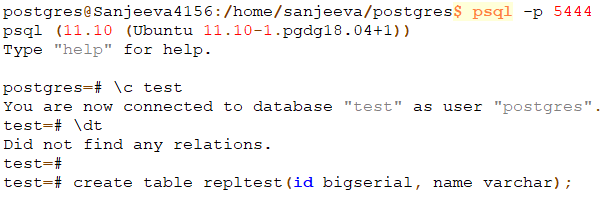
Once slave will be up, the transaction will be completed.

We can also validate that the state of the replication is streaming and sync state of the replication is “sync“
The Replication series blogs are:
- Data Replication Setup Using Master and Slave: PostgreSQL – I
- Data Replication Setup Using Master and Slave: PostgreSQL – II
- Data Replication Setup Using Master and Slave: PostgreSQL- III
- Data Replication Setup Using Master and Slave: PostgreSQL- IV
- PostgreSQL Meta-Command using psql: Command Information -IV
5 thoughts on “Data Replication Setup Using Master and Slave: PostgreSQL- IV”