
Last Updated: May 2026 Tested On: PostgreSQL 16.1, pgvector 0.8.1 / 0.8.2
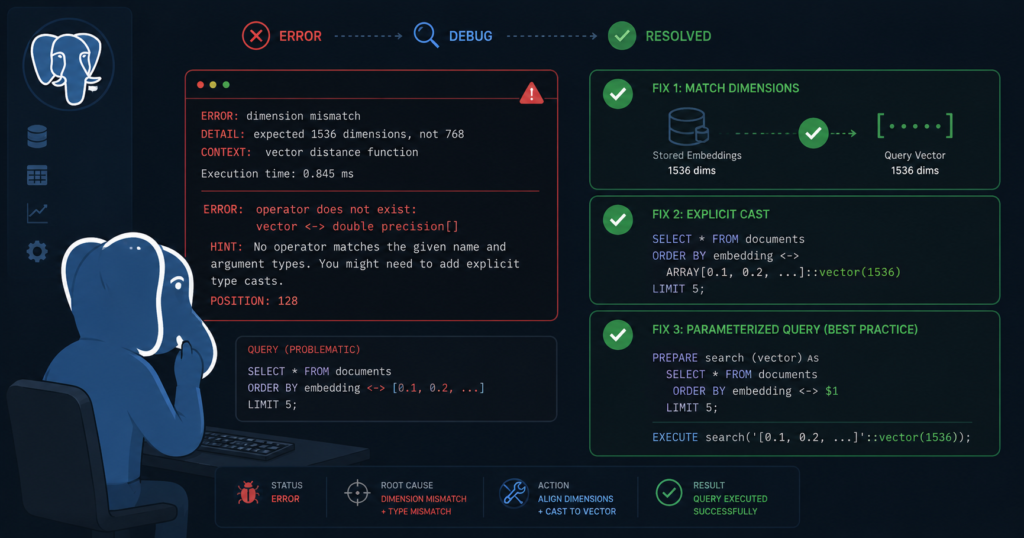
The most common pgvector dimension mismatch error lands within the first hour of setup. After that come casting failures, ALTER TABLE dead-ends, and indexes that exist but never get used. Some are obvious — wrong dimension count, missing cast. Some are subtle — the index exists but queries are scanning sequentially, or recall drops silently after a schema change. Most have a pattern I’ve seen repeat across enough production setups that writing this post was inevitable.
This is the pgvector gotcha catalogue. Exact errors, exact causes, exact fixes.
Gotcha 1: pgvector Dimension Mismatch on Insert
The error:
Example error:
ERROR:  expected 1536 dimensions, not 3
What happened:
Your table column is defined as VECTOR(1536) — matching OpenAI’s text-embedding-3-small — but the insert is sending 384-dimension vectors, probably from a Sentence Transformers model. pgvector enforces dimension count strictly at write time. No implicit truncation, no padding, hard error.
Reproduce it:
Note: Small vectors are used here intentionally to reproduce the error clearly. In production your dimension count will match your embedding model.
sql
CREATE TABLE documents (
    id BIGSERIAL PRIMARY KEY,
    content TEXT,
    embedding VECTOR(1536)
);

-- Insert with wrong dimension count — this fails
INSERT INTO documents (content, embedding)
VALUES ('Test document', ARRAY[0.1, 0.2, 0.3]::vector);
Example error output:
ERROR:  expected 1536 dimensions, not 3
LINE 2: VALUES ('Test document', ARRAY[0.1, 0.2, 0.3]::vector);
Fix 1 — Match the column to your model at table creation:
From the Hub guide, dimension sizing by model:
| Model | Dimensions |
|---|---|
| OpenAI text-embedding-3-small | 1536 |
| OpenAI text-embedding-3-large | 3072 |
| Cohere embed-english-v3.0 | 1024 |
| Sentence Transformers (all-MiniLM-L6-v2) | 384 |
Get this right at CREATE TABLE. Changing it later costs you (see Gotcha 3 — ALTER TABLE).
Fix 2 — Verify what your pipeline is actually sending before insert:
sql
SELECT vector_dims(ARRAY[0.1, 0.2, 0.3]::vector);Output:
 vector_dims
-------------
           3
Build this check into your ingestion pipeline. Catching dimension mismatch at the application layer is cheaper than catching it at the database error handler.
Fix 3 — If you genuinely need multiple models, use a model_version column:
sql
CREATE TABLE documents (
    id BIGSERIAL PRIMARY KEY,
    content TEXT,
    model_version VARCHAR(50),   -- 'openai-3-small', 'cohere-v3', etc.
    embedding VECTOR(1536),
    created_at TIMESTAMP DEFAULT NOW()
);
For production indexed similarity search, avoid storing mixed-dimension vectors in the same vector(n) column. If you genuinely need multiple models with different dimensions, use unconstrained vector type — but note that indexing then requires model-specific partial or expression indexes per dimension group.
Gotcha 2: Casting Errors — ::vector vs ARRAY[]::vector
The error:
Example error:
ERROR:  malformed vector literal: "0.1,0.2,0.3"
or:
Example error:
ERROR:  cannot cast type text to vector
What happened:
pgvector accepts vectors in two syntaxes. Getting either wrong throws a cast error.
Bracket notation — string literal cast:
sql
INSERT INTO documents (content, embedding)
VALUES ('PostgreSQL database', '[0.1, 0.2, 0.3]'::vector);
ARRAY notation:
sql
INSERT INTO documents (content, embedding)
VALUES ('Vector search engine', ARRAY[0.2, 0.3, 0.4]::vector);
Common mistakes that break the cast:
sql
-- WRONG: Missing brackets in string literal
VALUES ('doc', '0.1, 0.2, 0.3'::vector);       -- malformed literal

-- WRONG: PostgreSQL array syntax — not vector syntax
VALUES ('doc', '{0.1, 0.2, 0.3}');

-- WRONG: Missing ::vector cast entirely
VALUES ('doc', '[0.1, 0.2, 0.3]');              -- stored as text, not vector
The safe rule: bracket notation for hardcoded values ('[0.1, 0.2, 0.3]'::vector), ARRAY notation for dynamically constructed vectors in SQL (ARRAY[...]::vector). Pick one and be consistent across your codebase.
Verify a cast is working before wiring it into a pipeline:
sql
SELECT '[0.1, 0.2, 0.3]'::vector;Expected output:
    vector
---------------
 [0.1,0.2,0.3]
Gotcha 3: ALTER TABLE to Change Vector Dimensions
The error:
sql
ALTER TABLE documents ALTER COLUMN embedding TYPE VECTOR(1536);Example error output:
ERROR: column "embedding" cannot be cast automatically to type vector(1536)What happened:
PostgreSQL cannot implicitly cast from vector(384) to vector(1536). There is no automatic conversion path — and there shouldn’t be. There is no mathematically valid way to promote a 384-dimensional embedding to 1536 dimensions while preserving semantic meaning.
The correct approach — add a new column, backfill, drop old:
sql
-- Step 1: Add new column for the new model
ALTER TABLE documents ADD COLUMN embedding_v2 VECTOR(1536);

-- Step 2: Backfill from your embedding pipeline
-- (re-embed documents through your new model outside PostgreSQL)
-- UPDATE documents SET embedding_v2 = <new_embedding> WHERE id = <id>;

-- Step 3: Verify backfill is complete
SELECT
    COUNT(*) FILTER (WHERE embedding_v2 IS NULL) AS not_backfilled,
    COUNT(*) FILTER (WHERE embedding_v2 IS NOT NULL) AS backfilled
FROM documents;
Expected output after complete backfill:
 not_backfilled | backfilled
----------------+------------
              0 |       1000
sql
-- Step 4: Drop the old HNSW index
DROP INDEX IF EXISTS idx_documents_embedding;

-- Step 5: Create HNSW index on the new column
CREATE INDEX idx_documents_embedding ON documents
USING hnsw (embedding_v2 vector_cosine_ops)
WITH (m = 16, ef_construction = 64);

-- Step 6: Validate queries against new column before dropping old
-- Step 7: Drop old column
ALTER TABLE documents DROP COLUMN embedding;

-- Step 8: Rename new column
ALTER TABLE documents RENAME COLUMN embedding_v2 TO embedding;
Operational lesson: treat embedding model upgrades the same way you treat a major schema migration — plan the backfill window, validate before cutover, don’t expect it to be a one-liner.
Gotcha 4: HNSW Index Exists But Queries Are Still Sequential
The symptom:
You created the HNSW index. You run EXPLAIN ANALYZE and see:
Seq Scan on documents (cost=0.00..18.50 rows=1000 ...)instead of:
Index Scan using idx_documents_embedding on documents ...Important — index usage requirement:
For pgvector indexes to be used, the query must have ORDER BY with a distance operator directly, in ascending order, plus LIMIT. This is an explicit pgvector requirement.
sql
-- Correct — index eligible
SELECT id, content,
       embedding <=> '[0.1, 0.2, ...]'::vector AS distance
FROM documents
ORDER BY embedding <=> '[0.1, 0.2, ...]'::vector
LIMIT 10;

-- Wrong — index will NOT be used
SELECT id, content
FROM documents
ORDER BY 1 - (embedding <=> '[0.1, 0.2, ...]'::vector) DESC
LIMIT 10;
Cause 1 — Table is too small:
Below a few hundred rows, PostgreSQL’s planner correctly chooses sequential scan over index traversal. This is correct behavior. Test with a larger dataset before debugging the index.
Cause 2 — Planner cost estimates favor sequential scan:
sql
SET enable_seqscan = off;

EXPLAIN ANALYZE
SELECT id, content,
       embedding <=> '[0.1, 0.2, ...]'::vector AS distance
FROM documents
ORDER BY embedding <=> '[0.1, 0.2, ...]'::vector
LIMIT 10;

SET enable_seqscan = on;
If the index appears after disabling seqscan, the planner is choosing sequential scan on cost estimates — not because the index is broken.
Cause 3 — Index built on wrong operator class:
sql
SELECT indexname, indexdef
FROM pg_indexes
WHERE tablename = 'documents';
Operator class must match the distance operator in your query:
| Query operator | Required index operator class |
|---|---|
<=> (cosine) | vector_cosine_ops |
<-> (L2/Euclidean) | vector_l2_ops |
<#> (inner product) | vector_ip_ops |
Cause 4 — hnsw.ef_search too low:
Low ef_search values can reduce recall quality and influence overall query behavior:
sql
SHOW hnsw.ef_search;
SET hnsw.ef_search = 200;
Verify the index is working post-fix (timing varies by dataset and hardware):
sql
EXPLAIN ANALYZE
SELECT id, content,
       embedding <=> '[0.1, 0.2, ...]'::vector AS distance
FROM documents
ORDER BY embedding <=> '[0.1, 0.2, ...]'::vector
LIMIT 10;
Expected healthy output:
Limit  (cost=... rows=10 ...)
  ->  Index Scan using idx_documents_embedding on documents
        Order By: (embedding <=> '...'::vector)
Gotcha 5: Low Recall After Index Build
The symptom:
Index is being used. Queries are fast. But the results are wrong — semantically unrelated documents appearing in the top 10.
What happened:
HNSW is an approximate nearest neighbor algorithm. It trades perfect recall for speed. If ef_search is too low, the graph search exits early and misses true nearest neighbors.
Diagnose with a brute-force comparison using SET LOCAL inside a transaction:
sql
-- Exact search inside transaction — guaranteed correct results
BEGIN;
SET LOCAL enable_indexscan = off;
SET LOCAL enable_bitmapscan = off;

SELECT id, content,
       embedding <=> '[0.1, 0.2, ...]'::vector AS distance
FROM documents
ORDER BY embedding <=> '[0.1, 0.2, ...]'::vector
LIMIT 10;

COMMIT;

-- Indexed search at default ef_search — compare result sets
SET hnsw.ef_search = 40;
SELECT id, content,
       embedding <=> '[0.1, 0.2, ...]'::vector AS distance
FROM documents
ORDER BY embedding <=> '[0.1, 0.2, ...]'::vector
LIMIT 10;
If the result sets diverge significantly, increase ef_search and retest.
Fix:
sql
SET hnsw.ef_search = 200;Make it permanent in postgresql.conf:
hnsw.ef_search = 200Index rebuild with better parameters if recall is still insufficient:
sql
DROP INDEX IF EXISTS idx_documents_embedding;

CREATE INDEX idx_documents_embedding ON documents
USING hnsw (embedding vector_cosine_ops)
WITH (m = 32, ef_construction = 128);
Higher m builds a denser graph — better recall at the cost of index size and build time. For 1536-dimension embeddings, m = 32 is worth evaluating if m = 16 is not meeting your recall target.
Gotcha 6: Distance Threshold Confusion
The symptom:
You’re filtering results by distance but getting unexpected rows in or out of your result set.
What happened:
Distance metrics in pgvector are not normalized the same way. For normalized embeddings, cosine distance typically ranges from 0 (identical) toward higher values as vectors diverge. L2 distance is unbounded — it scales with dimensionality and vector magnitude. Inner product is reversed in pgvector — lower is more similar (stored as negative).
sql
-- Cosine distance: 0 = identical, increases as vectors diverge
SELECT embedding <=> '[0.1, 0.2, 0.3]'::vector AS cosine_distance
FROM documents LIMIT 5;

-- L2 distance: 0 = identical, unbounded upward
SELECT embedding <-> '[0.1, 0.2, 0.3]'::vector AS l2_distance
FROM documents LIMIT 5;

-- Inner product: pgvector returns negative, lower = more similar
SELECT embedding <#> '[0.1, 0.2, 0.3]'::vector AS inner_product
FROM documents LIMIT 5;
Threshold usage example:
sql
SELECT id, content,
       embedding <=> '[0.1, 0.2, ...]'::vector AS distance
FROM documents
WHERE embedding <=> '[0.1, 0.2, ...]'::vector < 0.3
ORDER BY embedding <=> '[0.1, 0.2, ...]'::vector
LIMIT 10;
DBA takeaway: threshold calibration must always be tested against your own embedding model and dataset characteristics. What counts as “similar” varies heavily by model, domain, chunking strategy, and normalization — measure against your data before hardcoding any value.
Gotcha 7: Autovacuum Falling Behind on High-Churn Tables
The symptom:
Queries gradually slow down on a vector table with frequent updates or deletes — even though the HNSW index exists and ef_search is correctly tuned.
What happened:
High-churn workloads can introduce table and index bloat over time, making VACUUM and autovacuum behavior especially important for sustained pgvector performance.
Diagnose dead tuple accumulation:
sql
SELECT relname, n_live_tup, n_dead_tup,
       round(n_dead_tup::numeric/nullif(n_live_tup,0)*100, 2) AS dead_pct,
       last_autovacuum
FROM pg_stat_user_tables
WHERE relname = 'documents';
Expected healthy output:
  relname  | n_live_tup | n_dead_tup | dead_pct | last_autovacuum
-----------+------------+------------+----------+-------------------------
 documents |     100000 |        120 |     0.12 | 2026-05-26 04:00:01+00
If dead_pct is climbing and last_autovacuum is stale, autovacuum is not keeping pace.
Fix — tune autovacuum per table:
sql
ALTER TABLE documents SET (
    autovacuum_vacuum_scale_factor = 0.05,
    autovacuum_analyze_scale_factor = 0.02
);
Manual VACUUM during heavy bulk-load or high-churn periods:
sql
VACUUM ANALYZE documents;REINDEX consideration:
For heavily updated vector tables, periodically review index size and query behavior to determine whether REINDEX CONCURRENTLY is appropriate during a maintenance window:
sql
REINDEX INDEX CONCURRENTLY idx_documents_embedding;This rebuilds the HNSW graph cleanly without locking the table. Use it when sustained churn has degraded index quality and VACUUM alone is not restoring expected query performance.
Quick Reference: Error → Fix
| Error / Symptom | Root Cause | Fix |
|---|---|---|
expected N dimensions, not M | Column/insert dimension mismatch | Match VECTOR(n) to your model at table creation |
malformed vector literal | Wrong cast syntax | Use '[...]'::vector or ARRAY[...]::vector |
cannot cast type text to vector | Missing cast operator | Add explicit ::vector cast |
column cannot be cast to vector(N) | ALTER TABLE dimension change | Add new column, backfill, drop old |
| Index exists but Seq Scan used | Table too small, wrong op class, ORDER BY/LIMIT missing | Check EXPLAIN, operator class, query structure |
| Fast queries but wrong results | ef_search too low | Increase hnsw.ef_search, rebuild with higher m |
| Distance filter unexpected rows | Metric range misunderstood | Calibrate thresholds per model and dataset |
| Gradual query slowdown | Table/index bloat from churn | Tune autovacuum, VACUUM ANALYZE, REINDEX CONCURRENTLY |
FAQ
Why does pgvector require fixed dimensions per column?
Because vector similarity math requires all vectors being compared to live in the same dimensional space. A 384-dimension vector and a 1536-dimension vector cannot be meaningfully compared — there is no valid distance calculation between them. The fixed dimension constraint is by design, not a limitation.
Can I store multiple embedding models in one table?
Not in the same vector(n) column — dimensions must be consistent. If you need multiple models, use separate columns per model (embedding_v1 VECTOR(384), embedding_v2 VECTOR(1536)) or the unconstrained vector type with model-specific partial indexes. Separate tables per model is the cleanest production pattern.
Why is my HNSW index not being used?
Three most common causes: query is missing ORDER BY <distance_operator> ... LIMIT in the correct form, table is too small, or operator class mismatch between index and query. Run EXPLAIN ANALYZE and check pg_indexes for the operator class first.
Does VACUUM affect pgvector performance?
Yes. High-churn embedding workloads accumulate bloat over time. Aggressive autovacuum tuning per table and periodic manual VACUUM ANALYZE during heavy-load periods are both important for sustained vector query performance.
Should I use cosine or L2 distance?
For semantic similarity with text embeddings, cosine distance is the most commonly used and typically the most intuitive. For normalized embeddings (magnitude = 1), cosine and L2 produce equivalent rankings. Match the distance metric to how your embedding model was trained — most model documentation specifies which to use.
When should I consider REINDEX CONCURRENTLY for a vector table?
When sustained update/delete churn has degraded HNSW index quality and VACUUM alone is not restoring query performance. REINDEX CONCURRENTLY rebuilds the graph without locking the table, making it safe for production maintenance windows.
Related Posts in This pgvector Series
- Hub: pgvector Complete Guide — Installation, HNSW Tuning, Hybrid Search
- Part 1: pgvector Release Notes & Updates [2025–2026]
- Part 2: pgvector vs Pinecone vs Weaviate — Production DBA’s Verdict
- Part 3: Install and Configure pgvector on PostgreSQL 16/17 — Step-by-Step
- Part 4: pgvector Gotchas
Hit a pgvector error not in this list? Drop it in the comments — I’ll add it to the catalogue
2 thoughts on “pgvector Gotchas: Dimension Mismatch, Casting Errors, and ALTER TABLE Solved [2026]”