
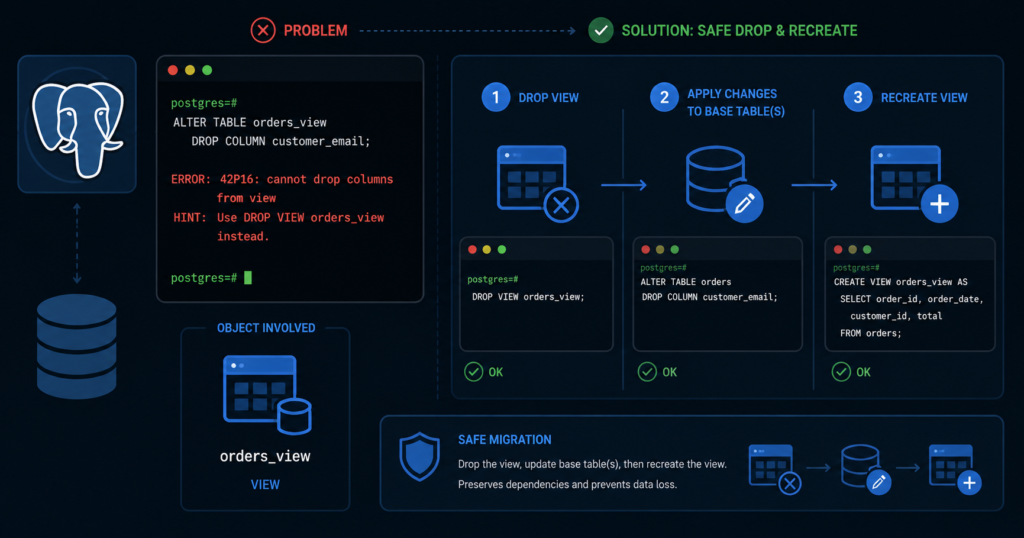
You added a column to a PostgreSQL view. Now you want it gone. You ran CREATE OR REPLACE VIEW with fewer columns and PostgreSQL stopped you cold:
SQL Error [42P16]: ERROR: cannot drop columns from viewYour table is fine. Your data is safe. But CREATE OR REPLACE VIEW has one hard rule — it can add columns at the end, but it cannot remove existing columns. Here’s the only fix that works.
The Fix — Drop and Recreate the View
sql
BEGIN;

DROP VIEW public.your_view_name;

CREATE VIEW public.your_view_name AS
SELECT
    col1,
    col2,
    col3        -- omit the column you want removed
FROM your_table
WHERE your_conditions;

COMMIT;
This does not touch your underlying table or data. It only replaces the view definition. Rollback is available until you COMMIT — a safety net for production changes.
Before You Drop — Check Dependents First
If another view, function, or rule sits on top of this view, DROP will fail. Run this before touching anything:
sql
SELECT
    dep.deptype,
    n.nspname    AS dependent_schema,
    cl.relname   AS dependent_object,
    cl.relkind   AS object_type
FROM pg_depend dep
JOIN pg_class cl
  ON cl.oid = dep.objid
JOIN pg_namespace n
  ON n.oid = cl.relnamespace
WHERE dep.refobjid = 'public.your_view_name'::regclass
  AND dep.deptype = 'n'
ORDER BY dependent_schema, dependent_object;
Replace public.your_view_name with your actual schema-qualified view name.
Zero rows — safe to drop directly. Run the fix above.
Rows returned — dependents exist. Do not use CASCADE blindly. Script every dependent object first, then drop and recreate the full dependency chain in one migration:
sql
DROP VIEW public.your_view_name CASCADE;CASCADE automatically drops dependent objects — child views, rules, and anything further down the chain. It is not the fix by itself. It is only part of a controlled migration. Recreate every dependent object in the same migration script. Nothing should be left dangling after your COMMIT.
Why PostgreSQL Blocks This
CREATE OR REPLACE VIEW is additive only — by design:
| Operation with CREATE OR REPLACE VIEW | Allowed |
|---|---|
| Add columns at the end | ✅ Yes |
| Change expression behind an existing column | ✅ Yes — if name, order, and type remain compatible |
| Rename existing columns | ❌ No — use ALTER VIEW ... RENAME COLUMN |
| Drop existing columns | ❌ Never |
| Reorder existing columns | ❌ No |
| Change existing column data type | ❌ No |
PostgreSQL protects downstream objects — functions, rules, child views — that depend on this view’s column structure. There is no flag, no ALTER VIEW DROP COLUMN syntax in PostgreSQL. The DROP → CREATE path is the only path. Always.
Verify It Worked
sql
SELECT column_name, data_type
FROM information_schema.columns
WHERE table_schema = 'public'
  AND table_name   = 'your_view_name'
ORDER BY ordinal_position;
Dropped column gone. Remaining columns intact. You’re done.
Materialized Views — Same Rule, Two Scenarios
Scenario 1 — Default CREATE (populates immediately):
sql
DROP MATERIALIZED VIEW public.your_matview_name;

CREATE MATERIALIZED VIEW public.your_matview_name AS
SELECT col1, col2, col3
FROM your_table;
CREATE MATERIALIZED VIEW populates the data immediately by default. No separate REFRESH needed.
Scenario 2 — WITH NO DATA (populate later):
sql
DROP MATERIALIZED VIEW public.your_matview_name;

CREATE MATERIALIZED VIEW public.your_matview_name AS
SELECT col1, col2, col3
FROM your_table
WITH NO DATA;

-- Populate when ready
REFRESH MATERIALIZED VIEW public.your_matview_name;
Use WITH NO DATA when recreating during a migration window and you want to defer population until off-peak hours.
⚠️ If the old materialized view had indexes or grants, recreate them after recreating the materialized view. DROP MATERIALIZED VIEW removes the object and all its indexes. They do not come back automatically.
How to Never Hit This Again
Three habits that eliminate this error permanently:
1. Never use SELECT * in view definitions
sql
-- ❌ Hard to control and review
CREATE VIEW risky_view AS
SELECT * FROM your_table;

-- ✅ Explicit column list — intentional and stable
CREATE VIEW safe_view AS
SELECT id, name, status, created_at
FROM your_table;
SELECT * in a view makes the view definition harder to control and review. Explicit column lists make the exposed columns intentional, stable, and easier to maintain.
2. Script view changes in versioned migration files — never patch live
sql
-- migration_042_fix_customer_view.sql

DROP VIEW IF EXISTS public.customer_summary;

CREATE VIEW public.customer_summary AS
SELECT customer_id, name, region
FROM customers
WHERE active = true;
Ad-hoc CREATE OR REPLACE on live views is how you end up fighting 42P16 at midnight. Every view change belongs in a versioned, reviewed migration script.
3. Run the dependency check before any schema change — make it a reflex
Before dropping any column from any table or view, run the pg_depend query above. Five seconds of checking saves forty-five minutes of incident recovery.
Tested on: PostgreSQL 15 · PostgreSQL 16 · RHEL 9 Scenario validated: CREATE OR REPLACE VIEW column removal → dependency check → DROP VIEW → CREATE VIEW round-trip confirmed on live environment.