
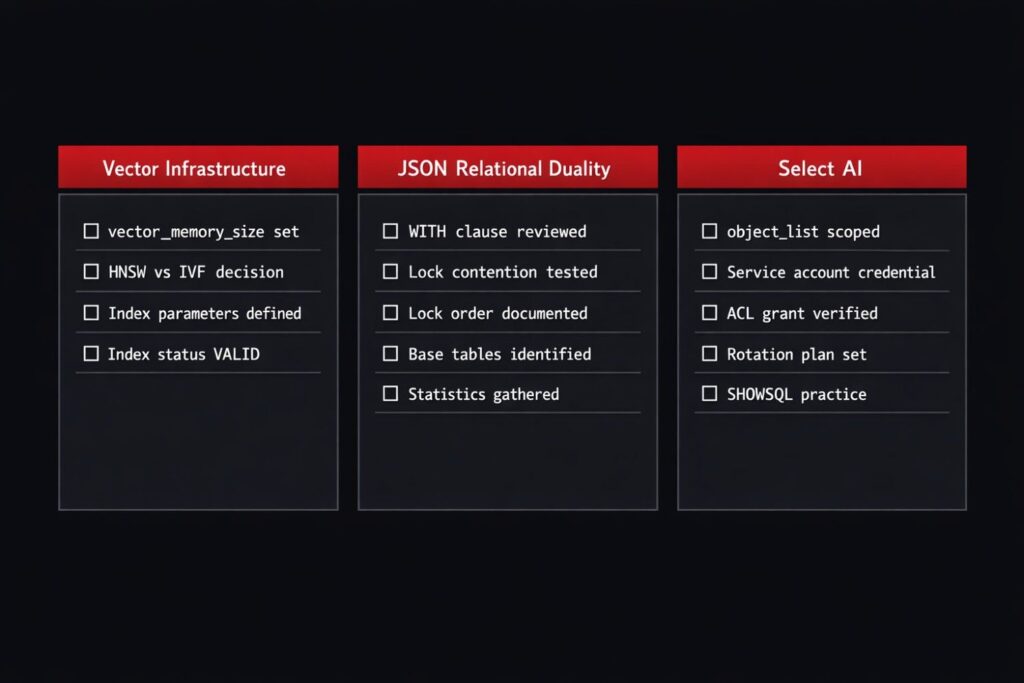
Three weeks before go-live on an Oracle AI Database 26ai deployment, we ran a readiness review mostly with the help of Oracle AI Database 26ai production DBA checklist.
At the surface level, things looked stable. Vector search was working in staging. JSON Relational Duality Views were serving the REST layer. Select AI was configured against a sandbox LLM endpoint.
But once we reviewed the database layer, a different picture emerged.
Vector Memory Pool was still at default. Duality views had full INSERT UPDATE DELETE access without review. The Select AI object_list included the entire schema. The network ACL was tied to a development user that would not exist in production.
None of these issues showed up in functional testing. All of them were operational risks.
This checklist comes from that gap — what works in staging versus what holds under production conditions.
Validated on: Oracle AI Database 26ai Enterprise Edition Release 23.26.1.2.0 — Production
Area 1 — Vector Infrastructure
Vector Memory Pool — Set It Before Load Tests, Not After
HNSW indexes rely on memory-resident graph structures. That memory comes from the Vector Memory Pool.
Check the current configuration:
SELECT name,
       value
FROM   v$parameter
WHERE  name = 'vector_memory_size';

-- NAME                VALUE
-- ------------------- -----
-- vector_memory_size  0
If the value is 0, Oracle allocates memory opportunistically from the SGA. In low-load environments this may not surface immediately. Under concurrency it can show up as increased query latency, memory pressure across SGA components, and unstable performance patterns that are difficult to trace back to the root cause.
Set it explicitly before production load testing:
ALTER SYSTEM SET vector_memory_size = 8G SCOPE=BOTH;
Sizing baseline:
dimensions × 4 bytes × row_count × ~1.3 overhead
This is not exact sizing — it is a starting point for capacity planning. Adjust based on workload observations after the first load test cycle.
Verify the actual vector columns in scope before estimating:
SELECT t.table_name,
       c.column_name,
       c.data_type,
       t.num_rows,
       t.last_analyzed
FROM   user_tables  t
JOIN   user_columns c
    ON c.table_name = t.table_name
WHERE  c.data_type LIKE 'VECTOR%'
ORDER  BY t.table_name;
HNSW vs IVF — Choose Based on Constraints, Not Preference
Both index types are valid. The difference is operational behavior under production conditions.
| Condition | Preferred Index |
|---|---|
| Smaller datasets, latency-sensitive | HNSW |
| Larger datasets, memory constrained | IVF |
| Frequent inserts or updates | IVF |
| Mostly read-heavy, static data | HNSW |
Verify index type and status before go-live:
SELECT index_name,
       index_type,
       status,
       last_analyzed
FROM   user_indexes
WHERE  index_type = 'VECTOR'
ORDER  BY table_name;

-- INDEX_NAME                  INDEX_TYPE  STATUS  LAST_ANALYZED
-- --------------------------- ----------- ------- -------------------
-- VIDX_ORA_ERRORS_HNSW        VECTOR      VALID   2026-03-20 14:32:11
Avoid leaving index parameters at defaults in production. Defaults are tuned for general workloads. Production workloads have known characteristics:
-- HNSW with explicit parameters
CREATE VECTOR INDEX vidx_ora_errors_hnsw
ON ora_errors(embedding)
ORGANIZATION INMEMORY NEIGHBOR GRAPH
WITH TARGET ACCURACY 95
PARAMETERS (type HNSW, neighbors 32, efconstruction 200);

-- IVF with explicit parameters
CREATE VECTOR INDEX vidx_ora_errors_ivf
ON ora_errors(embedding)
ORGANIZATION NEIGHBOR PARTITIONS
WITH TARGET ACCURACY 90
PARAMETERS (type IVF, neighbor partitions 64);
A VALID status with a recent last_analyzed confirms the index is built and statistics are current. A NULL last_analyzed means statistics were never gathered after creation — gather them before go-live.
Area 2 — JSON Relational Duality
Gate 1 — WITH Clause Review
Development patterns often default to full WITH INSERT UPDATE DELETE because it simplifies testing. In production that expands write access beyond what most consuming layers actually require.
Audit all duality views before deployment:
SELECT view_name,
       text
FROM   user_views
WHERE  view_name LIKE '%_DV'
ORDER  BY view_name;
Align access to actual usage for each consuming layer:
| Consuming Layer | WITH Clause |
|---|---|
| Reporting / read-only API | WITH READ ONLY |
| Status update only | WITH UPDATE |
| Full record lifecycle | WITH INSERT UPDATE DELETE |
Full access is justified only when the consuming layer owns the complete lifecycle of those records.
Gate 2 — Lock Contention Baseline
Duality views introduce implicit locking patterns at the base table level. A write through a duality view generates standard row-level DML — which means standard row lock contention under concurrent access.
Test under realistic concurrency and check for lock wait events:
SELECT s.sid,
       s.username,
       s.event,
       s.seconds_in_wait,
       s.blocking_session
FROM   v$session s
WHERE  s.event LIKE '%row lock%'
AND    s.username IS NOT NULL
ORDER  BY s.seconds_in_wait DESC;
If contention appears during staging load tests, it will appear earlier in production. Identify the blocking pattern and address it before go-live — whether that means separating write windows, adjusting the duality view structure, or reviewing concurrent access from batch jobs on the same base tables.
Gate 3 — Lock Order Awareness
Parent-child relationships in multi-table duality views define lock acquisition order. Oracle locks parent before child, following the nesting structure in the view definition.
Risk arises when the same base tables appear in multiple duality views with different nesting orders, or when batch jobs access those tables in a different order. That combination can produce deadlocks that surface in AWR pointing at the base tables — with no obvious connection to the duality view above.
Check which base tables are shared across duality views:
SELECT v.view_name,
       d.referenced_owner,
       d.referenced_name
FROM   user_views        v
JOIN   user_dependencies d
    ON d.name = v.view_name
   AND d.type = 'VIEW'
WHERE  v.view_name LIKE '%_DV'
ORDER  BY d.referenced_name,
          v.view_name;
Any table appearing in more than one duality view should be flagged for lock order review before go-live. This is not always a problem — but it should be a known quantity, not a surprise.
Gate 4 — Statistics Freshness
New access patterns introduced by duality views require current statistics on the base tables. Stale statistics produce unstable execution plans from day one.
-- Gather statistics before go-live
BEGIN
  DBMS_STATS.GATHER_TABLE_STATS(
    ownname => 'DBAVERSE',
    tabname => 'ORA_ERRORS',
    cascade => TRUE
  );
END;
/

-- Verify
SELECT table_name,
       num_rows,
       last_analyzed
FROM   user_tables
WHERE  table_name IN ('ORA_ERRORS', 'ORA_RESOLUTIONS')
ORDER  BY table_name;

-- TABLE_NAME       NUM_ROWS  LAST_ANALYZED
-- ---------------- --------- -------------------
-- ORA_ERRORS             10  2026-03-20 14:45:22
-- ORA_RESOLUTIONS        30  2026-03-20 14:45:23
last_analyzed within 24 hours of go-live is the bar we set. Anything older gets re-gathered.
Area 3 — Select AI: Governance Before Enablement
Select AI is the one area where the most important DBA work happens before the feature is enabled, not after. Once a profile is active and users are issuing natural language queries, the governance boundaries are set. Changing them mid-flight — dropping profiles, revoking ACLs, updating object lists — carries service impact risk.
Decision 1 — object_list scope. Limit to the minimum set of tables the use case requires. Avoid the schema-level wildcard entry. Review the object_list each time a new table is added to the schema — schema growth can silently expand the LLM’s view of the data model if nobody is watching.
"object_list": [
  {"owner": "DBAVERSE", "name": "ORA_ERRORS"}
]
Decision 2 — Credential ownership. Use a service account, not a personal DBA account. Define the rotation schedule upfront. DBMS_CLOUD.UPDATE_CREDENTIAL handles rotation without dropping the credential — profiles referencing the credential name continue without interruption.
Decision 3 — Network ACL alignment. The ACL grant should be tied to the schema user that owns the AI profile, not to a DBA or development account. Verify the principal matches before go-live:
SELECT host,
       principal,
       privilege
FROM   dba_host_aces
WHERE  principal = 'DBAVERSE'
ORDER  BY host;
Misaligned ACLs are one of the most common silent failure points — the profile creates without error, and the failure only appears at the first SELECT AI call.
Decision 4 — SHOWSQL discipline. Agree with the team before go-live that ad-hoc natural language queries against production-scale tables are run through SHOWSQL before RUNSQL. Generated SQL is syntactically valid. It is not always logically optimal — a missing filter on a large table is a full scan waiting to happen.
EXEC DBMS_CLOUD_AI.SET_PROFILE('DBAVERSE_OCI');
SELECT AI SHOWSQL list all critical errors in the memory category;
Consolidated Pre-Go-Live Checklist
Vector Infrastructure
- [ ]
vector_memory_sizeset explicitly — not left at 0 - [ ] Index type decision documented with rationale
- [ ] Index parameters defined — not left at defaults
- [ ] Index status
VALIDwith recentlast_analyzed - [ ] Capacity estimate reviewed for vector column storage
JSON Relational Duality
- [ ] Every duality view
WITHclause reviewed against consuming layer - [ ] Lock contention tested under realistic concurrency
- [ ] Multi-table lock order understood and documented
- [ ] Base tables shared across multiple duality views identified
- [ ] Optimizer statistics gathered within 24 hours of go-live
Select AI
- [ ]
object_listscoped to minimum required tables - [ ] Credential created under service account — not personal DBA account
- [ ] Rotation schedule defined and calendared
- [ ] Network ACL principal verified against profile owner schema user
- [ ] SHOWSQL discipline agreed with the team and in the runbook
Closing This Pillar
The features in Oracle AI Database 26ai integrate into existing database mechanics. Indexes behave like indexes. DML behaves like DML. AWR, V$ views, execution plans — the tools remain the same.
What changes is the operational surface. There are more configuration points, and more areas where default settings are acceptable in development but insufficient under production load.
This checklist is not exhaustive. It is a starting point based on one deployment path. It will evolve as more production environments expose patterns we have not seen yet.
The other pillars in this series — Performance and AWR, RMAN and Recovery, Multitenant, and ORA-Error troubleshooting — continue from here with the same approach: what the feature actually does from a DBA’s perspective, validated on a live instance.
If you have taken any of these checklist items into your own environment and found something that needed adjusting — drop it in the comments.
All posts of this series:
- Post 1: Oracle 23ai — Why Oracle Calls It The AI Database
- Post 2: Oracle Vector Search — First Hands-On Walkthrough (setup + live SQL)
- Post 3: Vector Indexes in Oracle AI Database 26ai — How HNSW and IVF Work Under the Hood
- Post 4: Hybrid Search in Oracle AI Database 26ai — Combining SQL and Semantic Queries
- Post 5: Oracle AI Database 26ai Vector Search vs PostgreSQL pgvector — A DBA’s Perspective
- Post 6: 5 Things DBAs Must Know About JSON Relational Duality in Oracle AI Database 26ai
- Post 7: Select AI: Talking to Your Database in Plain English
- Post 8: Building an AI-Ready Oracle Database — Production Checklist
1 thought on “Building an AI-Ready Oracle Database: A Production DBA Checklist”