
A developer on our team sent a message last week: “Is there a way to just ask the database how many Critical errors are in the Memory category without writing SQL?” He had heard about Oracle Select AI 26ai and wanted to know if it was live on our instance.
That question is exactly the right one to ask — but the answer is not just “yes” or “no.” Select AI is not a feature the developer enables. It is a feature the DBA configures, governs, and controls. The credential to the LLM lives in our domain. The network ACL that allows the database to call out to the model endpoint lives in our domain. The AI profile that controls which schema objects the LLM can see lives in our domain.
If we have not set it up, nobody uses it. If we set it up carelessly, the LLM can see schema metadata we never intended to expose.
This post covers the full setup from scratch — credential, network ACL, AI profile, session activation — and walks through the four Select AI modes using our ora_errors dataset. All structure, no live LLM connection required to follow along.
Validated on: Oracle AI Database 26ai Enterprise Edition Release 23.26.1.2.0 — Production
What Select AI Actually Is — The DBA Version
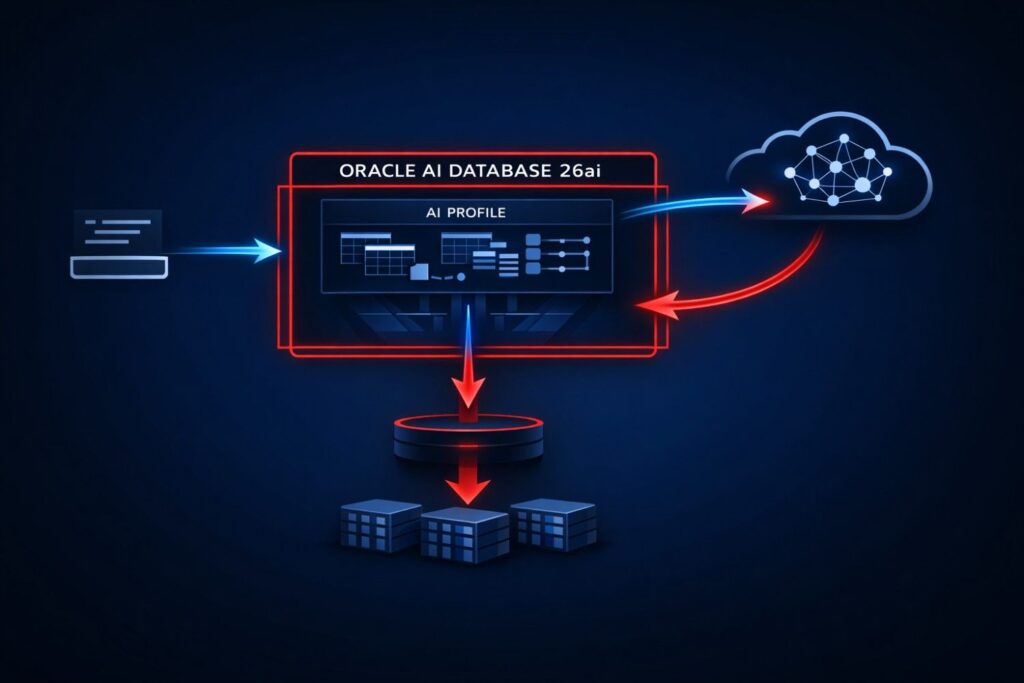
Select AI is Oracle’s built-in natural language to SQL translation layer. A user types a plain English question. Oracle sends the question plus the schema metadata of the objects we authorise to an external LLM. The LLM returns a SQL statement. Oracle validates and executes it. The user gets results.
The key word is metadata. Oracle does not send row data to the LLM. It sends column names, data types, table comments, and constraint information from the objects in the AI profile’s object_list — enough for the LLM to construct a syntactically correct SQL statement against our schema. Row data stays inside the database. Schema metadata travels to the LLM endpoint, which means the data retention and privacy policies of the LLM provider apply to that metadata. That is a compliance conversation worth having before Select AI goes to production in a regulated environment.
From a DBA perspective, the architecture has four components we own:
| Component | What It Is | Our Responsibility |
|---|---|---|
| Credential | Encrypted API key to the LLM provider | Create, rotate, revoke via DBMS_CLOUD |
| Network ACL | Outbound TCP permission to the LLM endpoint | Grant per host, per user via DBMS_NETWORK_ACL_ADMIN |
| AI Profile | Named config binding credential + model + object list | Create and manage via DBMS_CLOUD_AI |
| Session Activation | Profile active for a specific session | SET_PROFILE call — user-controlled but profile is DBA-defined |
None of these are developer-configurable without DBA privileges. That is by design.
Step 1 — Grant Required Privileges to the Schema User
Before we create anything, the schema user needs explicit grants. Select AI calls out through DBMS_CLOUD_AI and requires network access privileges that are not part of any default role.
-- Connect as SYSDBA or DBA account
-- Grant DBMS_CLOUD_AI execution privilege
GRANT EXECUTE ON DBMS_CLOUD_AI TO dbaverse;

-- Grant DBMS_CLOUD execution privilege for credential management
GRANT EXECUTE ON DBMS_CLOUD TO dbaverse;

-- Grant CREATE CREDENTIAL system privilege
GRANT CREATE CREDENTIAL TO dbaverse;
Verify the grants landed:
SELECT grantee,
       owner,
       table_name,
       privilege
FROM   dba_tab_privs
WHERE  grantee    = 'DBAVERSE'
AND    table_name IN ('DBMS_CLOUD_AI', 'DBMS_CLOUD')
ORDER  BY table_name;

-- GRANTEE    OWNER  TABLE_NAME      PRIVILEGE
-- --------- ------ --------------- ---------
-- DBAVERSE   SYS    DBMS_CLOUD      EXECUTE
-- DBAVERSE   SYS    DBMS_CLOUD_AI   EXECUTE
Step 2 — Create the Network ACL
This is the step most tutorials skip. Oracle AI Database 26ai runs in a controlled network environment. By default, the database cannot make outbound TCP connections to external endpoints. We must explicitly grant that permission per host, per database user.
For OpenAI:
BEGIN
  DBMS_NETWORK_ACL_ADMIN.APPEND_HOST_ACE(
    host => 'api.openai.com',
    ace  => xs$ace_type(
              privilege_list => xs$name_list('connect', 'resolve'),
              principal_name => 'DBAVERSE',
              principal_type => xs_acl.ptype_db
            )
  );
END;
/
For OCI Generative AI, the endpoint is the regional inference URL — replace with your tenancy region:
BEGIN
  DBMS_NETWORK_ACL_ADMIN.APPEND_HOST_ACE(
    host => 'inference.generativeai.us-chicago-1.oci.oraclecloud.com',
    ace  => xs$ace_type(
              privilege_list => xs$name_list('connect', 'resolve'),
              principal_name => 'DBAVERSE',
              principal_type => xs_acl.ptype_db
            )
  );
END;
/
Verify the ACL entry:
SELECT host,
       lower_port,
       upper_port,
       ace_order,
       principal,
       privilege
FROM   dba_host_aces
WHERE  principal = 'DBAVERSE'
ORDER  BY host;

-- HOST                          ACE_ORDER  PRINCIPAL   PRIVILEGE
-- ----------------------------- ---------- ----------- ---------
-- api.openai.com                1          DBAVERSE    connect
-- api.openai.com                2          DBAVERSE    resolve
If this ACE is missing, every Select AI call will fail with a network error at runtime — not at profile creation time. That is a painful thing to discover under load test.
Step 3 — Create the Credential
The credential stores the LLM provider API key encrypted in the Oracle wallet. We create it once. We rotate it when the key rotates. The schema user never sees the raw key value after creation.
-- Connect as DBAVERSE
BEGIN
  DBMS_CLOUD.CREATE_CREDENTIAL(
    credential_name => 'OPENAI_CRED',
    username        => 'OPENAI',
    password        => '<your-openai-api-key>'
  );
END;
/
For OCI Generative AI, authentication uses an OCI API signing key rather than a bearer token. The credential structure is different:
Replace user_ocid, tenancy_ocid, private_key, fingerprint with their original value
BEGIN
  DBMS_CLOUD.CREATE_CREDENTIAL(
    credential_name    => 'OCI_GENAI_CRED',
    user_ocid          => 'ocid1.user.oc1..aaaa...',
    tenancy_ocid       => 'ocid1.tenancy.oc1..aaaa...',
    private_key        => '<your-pem-private-key-content>',
    fingerprint        => 'xx:xx:xx:xx:xx:xx:xx:xx:xx:xx'
  );
END;
/
Verify credential exists — the password is never retrievable, only the name is visible:
SELECT credential_name,
       username,
       enabled
FROM   user_credentials
WHERE  credential_name IN ('OPENAI_CRED', 'OCI_GENAI_CRED');

-- CREDENTIAL_NAME   USERNAME  ENABLED
-- ---------------- --------- -------
-- OPENAI_CRED       OPENAI    TRUE
Step 4 — Create the AI Profile
The AI profile is the governance object we care about most. It binds together: which credential to use, which LLM provider and model, and critically — which schema objects the LLM is allowed to see metadata for.
BEGIN
  DBMS_CLOUD_AI.CREATE_PROFILE(
    profile_name => 'DBAVERSE_OPENAI',
    attributes   => '{
      "provider"        : "openai",
      "credential_name" : "OPENAI_CRED",
      "model"           : "gpt-4",
      "object_list"     : [
          {"owner": "DBAVERSE", "name": "ORA_ERRORS"}
      ]
    }'
  );
END;
/
The object_list is the most important field in this block. The LLM receives schema metadata — column names, data types, constraints, table comments — only for the objects listed here. Nothing else. If ORDERS, CUSTOMERS, or EMPLOYEES are not in the object_list, the LLM cannot construct SQL against them, and it cannot even infer they exist.
Two performance implications of object_list size that matter in production:
- LLM token consumption scales with object count. Every object in
object_listcontributes its full column metadata to the LLM context window on each Select AI call. A profile with 50 tables sends significantly more tokens per call than one with 5 tables — which directly affects latency and API cost. Keepobject_listas narrow as the use case requires. - Table and column comments improve SQL quality. The LLM uses whatever metadata Oracle sends. A table with no comments and cryptic column names like
ERR_CATproduces lower-quality SQL than one with a table comment and a column comment clarifyingERR_CATstores values likeMemory,Locking,Connectivity. We add comments toora_errorsbefore running any Select AI demo:
COMMENT ON TABLE ora_errors IS
  'Oracle database error reference table. Each row represents one ORA-XXXXX error
   with its category, severity, and a description of root cause.';

COMMENT ON COLUMN ora_errors.error_category IS
  'Functional category of the error. Values: Memory, Space, Locking, Connectivity, Schema.';

COMMENT ON COLUMN ora_errors.severity_level IS
  'Operational severity. Values: Critical, High, Medium.';
This is not optional polish — it is the single highest-leverage action a DBA can take to improve Select AI output quality before any prompt engineering happens.
For OCI Generative AI, the attributes block includes the compartment OCID and the endpoint:
Replace oci_compartment_id with actual value
BEGIN
  DBMS_CLOUD_AI.CREATE_PROFILE(
    profile_name => 'DBAVERSE_OCI',
    attributes   => '{
      "provider"         : "oci",
      "credential_name"  : "OCI_GENAI_CRED",
      "model"            : "cohere.command-r-plus",
      "oci_compartment_id" : "ocid1.compartment.oc1..aaaa...",
      "object_list"      : [
          {"owner": "DBAVERSE", "name": "ORA_ERRORS"}
      ]
    }'
  );
END;
/
Verify the profile was created:
SELECT profile_name,
       status
FROM   user_cloud_ai_profiles;

-- PROFILE_NAME       STATUS
-- ---------------- --------
-- DBAVERSE_OPENAI   ENABLED
To drop or disable a profile:
-- Disable without dropping
EXEC DBMS_CLOUD_AI.DISABLE_PROFILE('DBAVERSE_OPENAI');

-- Drop entirely
EXEC DBMS_CLOUD_AI.DROP_PROFILE('DBAVERSE_OPENAI');
Step 5 — Activate the Profile for the Session
The profile does not activate automatically. Each session that wants to use Select AI must call SET_PROFILE explicitly. This is a session-level setting — it does not persist across reconnections.
EXEC DBMS_CLOUD_AI.SET_PROFILE('DBAVERSE_OPENAI');
Verify which profile is active in the current session:
SELECT DBMS_CLOUD_AI.GET_PROFILE() AS active_profile
FROM   dual;

-- ACTIVE_PROFILE
-- ----------------
-- DBAVERSE_OPENAI
If GET_PROFILE() returns NULL, no profile is active and any SELECT AI statement will fail with ORA-40823: No AI profile set for this session.
OCI Generative AI service must be enabled in the tenancy. Without it, profile creation succeeds but runtime calls fail with ORA-20401.
The Four SELECT AI Modes — Against ora_errors
Once the profile is active, Select AI operates in four modes. Each mode changes what Oracle does with the generated SQL.
Mode 1 — RUNSQL (Default)
Generates SQL and executes it. Returns the data. This is the default — no mode keyword needed.
SELECT AI list all critical errors in the memory category;
Oracle generates SQL equivalent to:
SELECT error_code, error_title, description
FROM   ora_errors
WHERE  severity_level  = 'Critical'
AND    error_category  = 'Memory';
And returns the result set directly.
Mode 2 — SHOWSQL
Shows the SQL Oracle generated without executing it. Indispensable for validating LLM output before it runs against production data.
SELECT AI SHOWSQL list all critical errors in the memory category;

-- RESPONSE
-- -----------------------------------------------------------------------
-- SELECT error_code, error_title, description
-- FROM   ora_errors
-- WHERE  severity_level = 'Critical'
-- AND    error_category = 'Memory'
We always run SHOWSQL first on any non-trivial natural language query before letting RUNSQL loose. The LLM can and does generate syntactically valid but logically wrong SQL — a missing filter, a wrong join, an unintended full scan.
Mode 3 — NARRATE
Executes the SQL and returns the answer as a natural language sentence rather than rows and columns. Useful for executive-facing reporting layers.
SELECT AI NARRATE how many errors are there per severity level;

-- RESPONSE
-- -----------------------------------------------------------------------
-- There are 4 Critical errors, 4 High errors, and 2 Medium errors
-- in the ora_errors table across all categories.
Mode 4 — CHAT
Conversational mode — no SQL generation, no data access. The LLM responds directly from its trained knowledge. Useful for asking Oracle-related questions without hitting the schema.
SELECT AI CHAT what is the difference between ORA-04031 and ORA-04030;

-- RESPONSE
-- -----------------------------------------------------------------------
-- ORA-04031 indicates Oracle cannot allocate a contiguous chunk of shared
-- memory in the shared pool or large pool. ORA-04030 indicates a process
-- ran out of operating system memory (PGA). ORA-04031 is a shared memory
-- problem; ORA-04030 is a process memory problem.
CHAT mode does not consume schema metadata and does not issue any SQL. It is the only mode that works before object_list is configured.
What the DBA Governs — The Production Checklist
Once Select AI is live, we own several ongoing responsibilities:
-- 1. Audit which users have active AI profiles
SELECT s.username,
       SYS_CONTEXT('USERENV', 'CLOUD_AI_PROFILE') AS ai_profile,
       s.sid,
       s.serial#,
       s.status
FROM   v$session s
WHERE  s.username IS NOT NULL
AND    s.type     = 'USER'
ORDER  BY s.username;

-- 2. Review all AI profiles and their status
SELECT profile_name,
       status,
       created
FROM   dba_cloud_ai_profiles
ORDER  BY created;

-- 3. Check which objects are exposed via object_list
-- Query the profile attributes JSON for object_list entries
SELECT profile_name,
       json_value(attributes, '$.provider')   AS provider,
       json_value(attributes, '$.model')       AS model
FROM   dba_cloud_ai_profiles;
Rule 1 — object_list is explicit, never wildcard. Oracle supports {"owner": "DBAVERSE"} with no name — this exposes all objects in the schema to the LLM context. We never use this in production. Every object is named explicitly, and the list is reviewed whenever new tables are added to the schema.
Rule 2 — Keep optimizer statistics current on all objects in object_list. Select AI generates SQL — but Oracle’s optimizer executes it. Stale statistics on ora_errors mean the optimizer may choose a full table scan over an index range scan on a generated query that filters on error_category or severity_level. Statistics freshness matters for Select AI workloads exactly as it does for any other SQL workload.
-- Gather statistics on ora_errors before enabling Select AI
EXEC DBMS_STATS.GATHER_TABLE_STATS(
    ownname  => 'DBAVERSE',
    tabname  => 'ORA_ERRORS',
    cascade  => TRUE   -- includes index statistics
);
Rule 3 — Separate profiles per environment. DEV profile points to a test LLM endpoint with read-only object access. PROD profile is tightly scoped and credential-rotated on the same schedule as application credentials.
Rule 4 — SHOWSQL before RUNSQL for all ad-hoc queries. Non-trivial natural language prompts produce non-trivial SQL. We validate the generated SQL in SHOWSQL before executing against production tables with large row counts. The LLM generates syntactically valid SQL — it does not guarantee a selective execution plan.
Where We Go From Here
Post 7 covered the complete Select AI setup — credential, network ACL, AI profile, session activation, and the four operating modes — using ora_errors as the governed schema object throughout.
- Post 1: Oracle 23ai — Why Oracle Calls It The AI Database
- Post 2: Oracle Vector Search — First Hands-On Walkthrough (setup + live SQL)
- Post 3: Vector Indexes in Oracle AI Database 26ai — How HNSW and IVF Work Under the Hood
- Post 4: Hybrid Search in Oracle AI Database 26ai — Combining SQL and Semantic Queries
- Post 5: Oracle AI Database 26ai Vector Search vs PostgreSQL pgvector — A DBA’s Perspective
- Post 6: 5 Things DBAs Must Know About JSON Relational Duality in Oracle AI Database 26ai
- Post 7: Select AI: Talking to Your Database in Plain English
- Post 8: Building an AI-Ready Oracle Database: A Production DBA Checklist
Building an AI-Ready Oracle Database — Production DBA Checklist (vector memory sizing, HNSW vs IVF decision matrix, Select AI governance, duality view deployment gates — everything from Posts 1–7 distilled into one production-ready reference)If you have Select AI running in your environment and hit credential or network ACL errors that the documentation does not clearly explain — drop it in the comments. The network ACL step is the most commonly missed piece, and the failure mode is silent until the first SELECT AI call fires.
1 thought on “Select AI: Talking to Your Database in Plain English”