
Quick answer
I tested MySQL Dynamic Data Masking on MySQL Enterprise Edition 9.7.4-commercial, the downloaded trial version from Oracle Software Delivery Cloud, with a scripted AI support agent as the client. (captured test)
The agent in this post is a fixed Python script. No LLM was called. A real LLM run is not tested. All data is fake, three to ten rows per table.
What happened in these runs:
ddv_agent(roler_support_agent) received masked phone, email, tax id, card and UPI values.ddv_billingwithr_billing_adminactive received real values. (captured test, F4, F6)- Free text was not masked. A card number and an email inside a ticket note were readable by all three accounts. (captured test, F8)
- An account with ALTER but without
MANAGE_DATA_MASKING_POLICYremoved a masking policy with a plainMODIFY COLUMN, and real values followed. (captured test, F94) - Firewall and Audit were installed on the same server and tested. Audit failed on the first install and worked on the second. (captured test, F54, F58)
These results show what happened in these runs. They are not a guarantee for your setup.
All SQL, scripts and raw output are in the repo: mysql-ddm-ai-agents
How to read the labels. Every claim carries one of four labels. Captured test: I ran it and the raw output is in the repo’s evidence/ folder. Manual-documented: taken from the MySQL manual, not tested by me. Reasoning: my inference from captured output, not tested. Not tested: nothing was run. One extra label, live observation, is used once in this post (audit log files, section “What I saw after the uninstall”). I saw it live, and it is not in the repo evidence. A “process note” tags two repo-workflow items (line endings and the --tee flag) that have no finding number.
Where each question is answered
| Question | Section |
|---|---|
| Realistic agent workflow and schema with sensitive columns | Scenario and schema |
| Layered data flow, End User to Enterprise Data | Data flow |
| Masking policies, personas, masked vs unmasked output | Policies and personas |
| Can the agent stay useful when values are masked? | Staying useful |
| What if the agent sends an unexpected query? | Unexpected queries |
| Views, routines and copy-out paths | Views, routines, copy-out |
| Roles, Firewall and Audit together | Defense in depth |
| What failed | What failed |
| Developer recommendations | What I would do as a developer |
| Limits | Not tested |
Scenario and schema
The workflow is a customer-support assistant. It has to find a customer, list orders, check a payment, verify a caller by the last four digits of a phone number and read ticket notes. It does not need a full card number, a tax id or a full email address to do that. (reasoning, from the four questions below)
Schema ddv_support: four tables, 6 customers, 10 orders, 10 payments, 5 tickets, all fake. (captured test, F4)
| Table | Sensitive columns | Masking policy attached |
|---|---|---|
customers | phone, email, tax_id | sup_mask_phone, sup_mask_email, sup_mask_tax_id |
payments | card_number, upi_id | sup_mask_card, sup_mask_upi |
support_tickets | notes (free text) | none, on purpose |
orders | none | none |
Three database accounts: two personas and one control (captured test, F4, F5, F6, F7)
| Account | Role | What it is for |
|---|---|---|
ddv_agent | r_support_agent, default role | The scripted agent logs in as this account |
ddv_billing | r_billing_admin, default role | A human billing user who may see real values |
ddv_norole | none, CURRENT_ROLE() is NONE | Control: same grants, no role |
All three hold plain SELECT on the four tables, granted directly. The two roles hold only USAGE. So the roles act as gatekeeper tokens for the masking policies and carry no privileges. Least privilege through roles is not tested. (captured test, F7)
The agent is a Python script with five tools: find_customer, list_orders, payment_status, verify_last4 and ticket_notes. It answers four scripted questions and writes the text a model would receive into a context file. No model reads it. (captured test, 21-agent-run.txt)
- Where is order 102?
- Verify the caller Asha Example with last four 0101.
- Why did Chen Demo’s charge fail?
- What is the refund status of order 104?
Data flow: what sits between the agent and the data
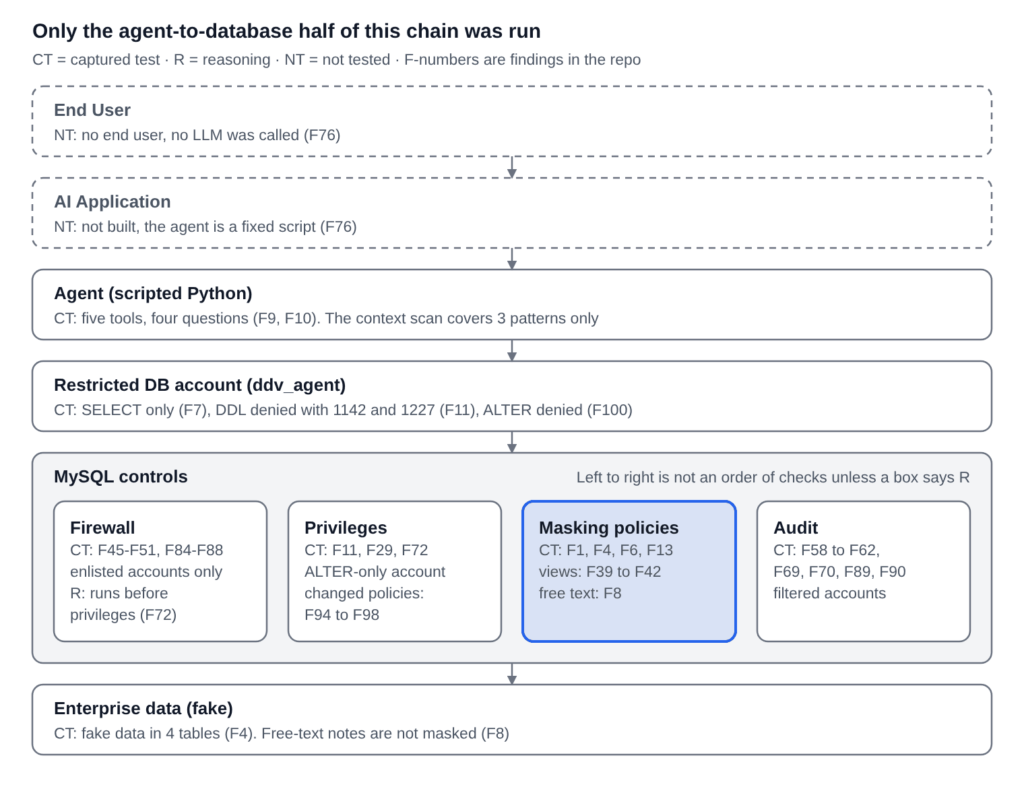
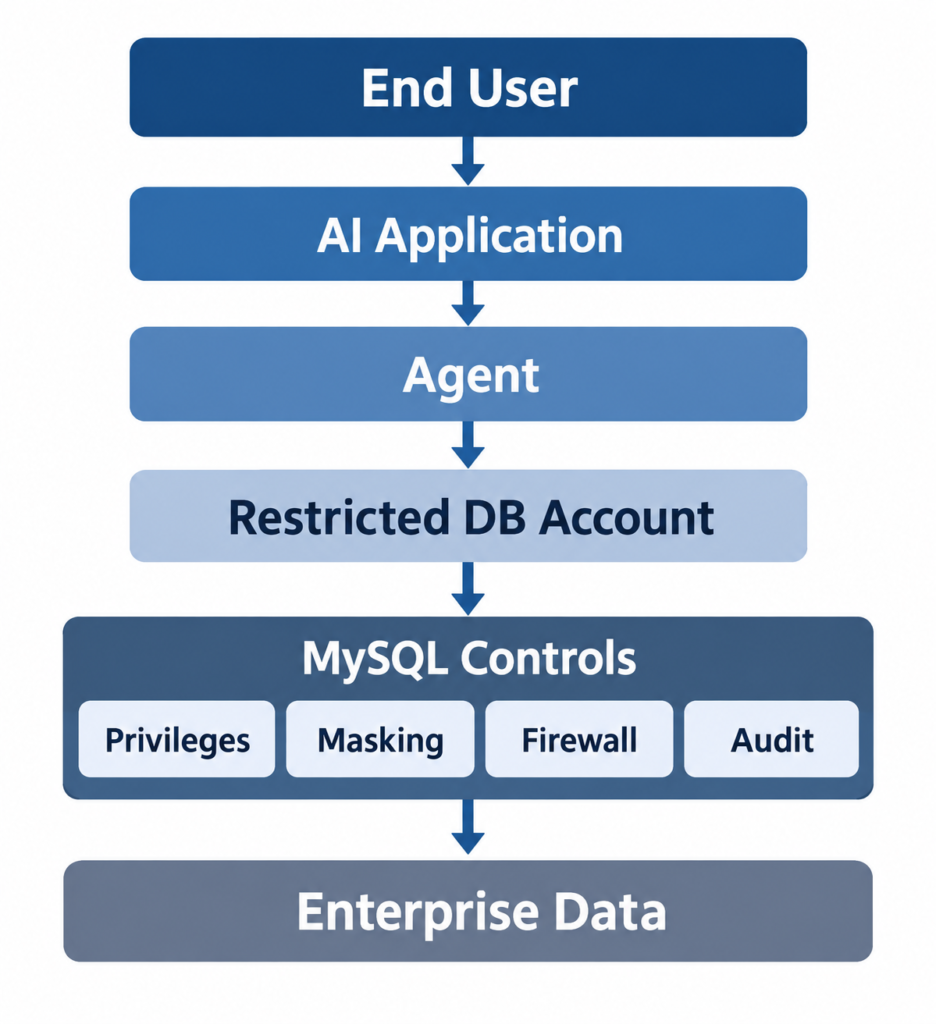
The chain is End User, AI Application, Agent, Restricted DB account, MySQL controls, Enterprise data. I ran the last four. The two top layers are boxes only. Inside MySQL controls, left to right is not an order of checks. The one order I state, Firewall before privileges, is reasoning from F72: the Firewall’s 6444 replaced the privilege errors 1142 and 1227 for the same statements, and I did not test the checks as a sequence.
MySQL Dynamic Data Masking policies and personas: same query, different values
One policy per sensitive column. The gatekeeper is CURRENT_ROLE_IN, and the mask sits in the ELSE branch. (captured test, sql/13-support-policies.sql)
CREATE MASKING POLICY sup_mask_phone(phone_column)
CASE WHEN CURRENT_ROLE_IN('r_billing_admin')
     THEN phone_column
     ELSE mask_inner(phone_column, 0, 4, '*')
END;

CREATE MASKING POLICY sup_mask_email(email_column)
CASE WHEN CURRENT_ROLE_IN('r_billing_admin')
     THEN email_column
     ELSE mask_inner(email_column, 1, 13, '*')
END;

ALTER TABLE customers MODIFY COLUMN phone VARCHAR(20) NOT NULL MASKING POLICY sup_mask_phone;
ALTER TABLE customers MODIFY COLUMN email VARCHAR(100) NOT NULL MASKING POLICY sup_mask_email;
The same pattern covers tax_id, card_number and upi_id. The roles and the default-role settings that decide who passes the gatekeeper: (captured test, sql/14-roles-grants.sql)
CREATE ROLE 'r_support_agent', 'r_billing_admin';
GRANT 'r_support_agent' TO 'ddv_agent'@'%';
GRANT 'r_billing_admin' TO 'ddv_billing'@'%';
SET DEFAULT ROLE 'r_support_agent' TO 'ddv_agent'@'%';
SET DEFAULT ROLE 'r_billing_admin' TO 'ddv_billing'@'%';
The manual says CURRENT_ROLE_IN checks active roles. (manual-documented) What a role that is granted but not active does is not documented, so I tested it (see “Views, routines, copy-out”).
As ddv_agent, with r_support_agent active: (captured test, F4, 15-verify-agent.txt)
+----+------------------+----------+-------------------------------+-----------+
| id | full_name        | phone    | email                         | tax_id    |
+----+------------------+----------+-------------------------------+-----------+
|  1 | Asha Example     | ****0101 | a***********@example.test     | ********* |
|  2 | Bilal Sample     | ****0102 | b***********@example.test     | ********* |
|  3 | Chen Demo        | ****0103 | c********@example.test        | ********* |
As ddv_billing, with r_billing_admin active, same statement: (captured test, F6, 16-verify-billing-set-role-none.txt)
+----+------------------+----------+-------------------------------+-----------+
| id | full_name        | phone    | email                         | tax_id    |
+----+------------------+----------+-------------------------------+-----------+
|  1 | Asha Example     | 555-0101 | asha.example@example.test     | TEST-0001 |
|  2 | Bilal Sample     | 555-0102 | bilal.sample@example.test     | TEST-0002 |
|  3 | Chen Demo        | 555-0103 | chen.demo@example.test        | TEST-0003 |
As ddv_norole, CURRENT_ROLE() is NONE: the same masked output as the agent, with no error. (captured test, F5)
After SET ROLE NONE in the billing session, the customers select returned masked values. Only customers was re-queried after the switch. (captured test, F6)
Two scoping notes. First, “fails closed” holds here because the mask is the ELSE branch. A policy written the other way round is not tested. Second, the masks leak shape, and I would not call them protection for every use. Phone and card masks keep the last four digits. The email mask shows the first letter, the length of the local part and the whole domain. All six fake local parts follow firstname.lastname, so length plus first letter narrows a guess. (captured test for the output, reasoning for the guessing risk)
The agent can also see which columns are masked. SHOW CREATE TABLE shows the MASKING POLICY clauses to ddv_agent. (captured test, F3, from the first user-list gatekeeper run)
Staying useful: what the agent could still do, and what changed under it
The scripted questions still got answered. Of the four questions, questions 1, 2 and 4 produced context with no unmasked email and no 13 to 19 digit run. The agent worked from names, order status, totals, dates and the masked values. (captured test, F9, 22-context-scan.txt. The scan checks three patterns only.)
Verifying a caller still works, because the phone mask keeps the last four digits: (captured test for the output, F10; the “because” is reasoning)
tool call: verify_last4(1, '0101') -> 1 row(s)
    {'matches': 1}
Filters ran on the masked value. WHERE phone='555-0101', WHERE email LIKE 'alice%', tax_id='TEST-0001' and email='asha.example@example.test' all returned empty sets for ddv_agent. That is four attempts in total. (captured test, F2, F14) Two other probes (phone LIKE '%0101', email LIKE 'a%') returned a row each, but the patterns match what the mask shows, so they say nothing about which value was evaluated. (captured test, non-diagnostic, F15) Observed: the four predicates returned empty sets for the agent. Inferred: the masked value is what the predicate saw. (reasoning) Not tested: other predicate types, joins, optimizer plans. I do not claim an execution-order guarantee.
Masking changes what the agent computes on. On a three-row probe table, with the same statements run by both accounts: (captured test, F81, 81-agent-01.txt to 81-billing-03.txt)
-- ddv_agent                                  -- ddv_billing
COUNT(DISTINCT email)  = 2                    COUNT(DISTINCT email)  = 3
COUNT(DISTINCT phone)  = 2                    COUNT(DISTINCT phone)  = 3

GROUP BY phone                                GROUP BY phone
****0101 | 1,2                                555-0101 | 1
****0303 | 3                                  555-0303 | 3
                                              777-0101 | 2

WHERE phone IN (SELECT phone ... id = 1)      same statement
ids 1, 2                                      id 1
Ids 1 and 2 have different real phones (555-0101, 777-0101) and the same masked phone (****0101). The agent grouped two different people together. Both users also got Warning 1052: Column 'phone' in group statement is ambiguous; the cause is undetermined. (captured test, F26) Sorting changed too: ORDER BY email returned ids 3,1,2 for the agent and 3,2,1 for billing. (captured test, F21) What this means for an agent that counts, groups or joins on masked columns is my reasoning, not a tested workflow.
Free text is outside the column policies. Ticket 3’s note holds a full test card number and an email address. All three accounts read it, while the same card is masked in payments. (captured test, F8) In the agent run this is the only place an unmasked email and a card-length digit run entered the context: (captured test, F9, 21-agent-run.txt; the card number is a published test number)
tool call: ticket_notes(3) -> 1 row(s)
    {'id': 3, 'subject': 'Charge failed, please call back', 'notes': 'Customer typed: my card is 378282246310005 and you can reach me at chen.demo@example.test, please retry the charge.'}
The context scan caught it (question 3, line 39). That scan is application-side code and it covers three patterns. Whether application-side redaction would hold up is not tested.
What this says about model context. The agent’s tools select columns the question does not need, so masked placeholders such as ****0101 enter the model context. (reasoning, from the tool output above) Database masking changed what reached the context file in these runs. It did not decide which columns the tools ask for.
Unexpected queries, tampering and ALTER
Reads outside the script. I ran statements the scripted tools never issue, as ddv_agent. SELECT * on customers and payments returned masked values only. (captured test, F13) SET ROLE r_billing_admin failed with ERROR 3530 (role not granted). SET ROLE ALL succeeded, and then mysql.column_masking_policies and ddv_mask.customers were denied with ERROR 1142. (captured test, F19)
Tampering. Four statements as ddv_agent, each in its own run: (captured test, F11, 24-tampering.txt)
ALTER TABLE ddv_support.customers MODIFY COLUMN phone VARCHAR(20) NOT NULL
ERROR 1142 (42000): ALTER command denied to user 'ddv_agent'@'localhost' for table 'customers'

DROP MASKING POLICY sup_mask_phone
ERROR 1227 (42000): Access denied; you need (at least one of) the MANAGE_DATA_MASKING_POLICY privilege(s) for this operation

CREATE TABLE ddv_support.copy_customers AS SELECT * FROM ddv_support.customers
ERROR 1142 (42000): INSERT, CREATE command denied to user 'ddv_agent'@'localhost' for table 'copy_customers'

CREATE VIEW ddv_support.v_leak AS SELECT * FROM ddv_support.customers
ERROR 1142 (42000): CREATE VIEW command denied to user 'ddv_agent'@'localhost' for table 'v_leak'
SHOW CREATE TABLE, the policy list and the grants were the same before and after the run. (captured test, F12) Ordinary privileges stopped these four statements. Masking did not. That is the point of keeping privileges and masking as separate layers.
ALTER is the gap I found. I made an account ddv_alterer2 with SELECT, INSERT, UPDATE, ALTER on one table, no role and no MANAGE_DATA_MASKING_POLICY. Every file prints CURRENT_USER() first, and the account was ddv_alterer2@% with CURRENT_ROLE() NONE. No Firewall and no Audit were loaded. (captured test, F93) The probe table’s phone column was created as VARCHAR(20) with no NOT NULL (evidence/90-setup-1-root.txt), so each MODIFY below repeats the original column definition and only the policy clause changes. (captured test)
| Statement by the ALTER-only account | Result | Finding |
|---|---|---|
MODIFY COLUMN phone VARCHAR(20) (no policy clause) | Succeeded. The policy was gone and the real phones came back. | F94, F96 |
MODIFY COLUMN phone VARCHAR(20) MASKING POLICY probe5_mask_phone, on a column with no policy | Succeeded. Masked values (****0101) came back. | F95 |
Same, with MASKING POLICY probe5_open (a policy whose two branches both return the column) | Succeeded. Real phones came back. | F97 |
Swap back to probe5_mask_phone | Succeeded. Masked again. | F98 |
CREATE MASKING POLICY, DROP MASKING POLICY | ERROR 1227, needs MANAGE_DATA_MASKING_POLICY | F99 |
ddv_agent running the same MODIFY COLUMN | ERROR 1142, ALTER denied | F100 |
All rows are captured test. The core of the first two rows: (excerpt, 91-s1-stmt.txt, 91-s2-stmt.txt)
+----------------+----------------+
| CURRENT_USER() | CURRENT_ROLE() |
+----------------+----------------+
| ddv_alterer2@% | NONE           |
+----------------+----------------+

ALTER TABLE probe_alter MODIFY COLUMN phone VARCHAR(20)
Query OK, 0 rows affected
   -> SHOW CREATE TABLE: `phone` varchar(20) DEFAULT NULL        (no policy)

ALTER TABLE probe_alter MODIFY COLUMN phone VARCHAR(20) MASKING POLICY probe5_mask_phone
Query OK, 0 rows affected
   -> SHOW CREATE TABLE: `phone` varchar(20) MASKING POLICY `probe5_mask_phone` DEFAULT NULL
The manual says that omitting the policy clause removes the policy. (manual-documented) The manual does not document which privilege attaching a policy needs. (manual-documented, gap) In this run an account without MANAGE_DATA_MASKING_POLICY could remove, attach and swap policies on a table it had ALTER on, and could not create or drop a policy. What I did not test: ALTER COLUMN ... DROP MASKING POLICY by an ALTER-only account, dropping a column that carries a policy, and ALTER by an account without SELECT. (not tested) Scope of this finding: it is behaviour under the grants I gave, not a claim that the server broke its documented privilege model. The manual documents MANAGE_DATA_MASKING_POLICY for CREATE and DROP MASKING POLICY only. (manual-documented) The practical lesson is the recommendation further down: ALTER on a masked table is also policy control. (reasoning, from F94 to F98)
Views, routines and copy-out: who owns the object matters
The agent often reaches data through a view or a stored procedure instead of the base table. I tested what the agent sees when the definer of that object holds an unmasking role. One definer, one view, one procedure. (captured test, F39 to F44)
CREATE DEFINER='ddv_owner2'@'%' SQL SECURITY DEFINER VIEW v_owner2_definer AS SELECT * FROM probe_people;
CREATE DEFINER='ddv_owner2'@'%' PROCEDURE p_owner2() SQL SECURITY DEFINER SELECT * FROM probe_people;
GRANT SELECT  ON ddv_probe3.v_owner2_definer TO 'ddv_agent'@'%';
GRANT EXECUTE ON PROCEDURE ddv_probe3.p_owner2 TO 'ddv_agent'@'%';
The agent had no privilege on the base table. Then I changed only the definer’s role state and ran the same SELECT * FROM v_owner2_definer and CALL p_owner2() as ddv_agent each time:
| State | Definer’s CURRENT_ROLE() | What the agent got | Finding |
|---|---|---|---|
| 1 | r_billing_admin, a default role | Real email, phone, notes | F39 |
| 2 | role granted, SET DEFAULT ROLE NONE | Masked | F40 |
| 3 | role revoked | Masked | F41 |
| 4 | role granted again, SET DEFAULT ROLE ALL | Real values again | F42 |
All rows are captured test, one definer and one view. State 1 and state 2 as the agent saw them: (52-state1-agent.txt, 52-state2-agent.txt)
-- state 1: definer's role is a default role
|  1 | mark.zzzz@example.test | 555-0101 | note one   |
|  2 | mark.aaaa@example.test | 777-0101 | note two   |

-- state 2: role granted, not a default role
|  1 | m********@example.test | ****0101 | note one   |
|  2 | m********@example.test | ****0101 | note two   |
An earlier check pointed the same way. A definer view and procedure owned by root, which had no role, returned masked rows to both the agent and billing. An INVOKER view gave billing real values and gave the agent error 1356. (captured test, F27)
The manual says that for SQL SECURITY INVOKER objects the invoking user’s privileges are considered, and does not say what happens for DEFINER objects in the masking usage page. (manual-documented) The stored-objects page says definer routines run with the definer’s default roles; that page does not mention masking. (manual-documented) My result fits that reading for this one case. Other object types and other definers are not tested.
A column grant did not cover the view. With SELECT (id, email, phone) on the base table, SELECT notes returned error 1143 and SELECT * returned 1142. The same notes column came back through a definer view. (captured test, F29, F33, F34)
Copy-out. The agent’s INSERT ... SELECT into an unmasked table stored masked values. (captured test, F28) Then a privileged account wrote real values into that same shared table, and the agent’s next SELECT * returned them. (captured test, F35) A table both accounts can write is a path for real values to reach the agent. The general rule is my reasoning from F35.
One more constraint. A column that carries a masking policy cannot also have an index: ALTER ... MASKING POLICY on an indexed column and CREATE INDEX on a masked column both gave ERROR 6572. (captured test, F36)
Defense in depth: Firewall and Audit around the masking
I added the Firewall and Audit components around the same MySQL Dynamic Data Masking setup, one at a time and then together. The Firewall watches only accounts that are enlisted in a group. Audit logs only accounts that have a filter. (captured test, F59, F86, F89; the manual also says no account is logged until a filter is assigned (manual-documented))
Firewall
I recorded the four scripted questions for ddv_agent. The allowlist held 8 rules, with literals replaced by ?: (captured test, F47, F48, 53-firewall-allowlist.txt)
| fw_agent | SELECT `id` , `full_name` , `phone` , `email` , `tax_id` FROM `ddv_support` . `customers` WHERE `full_name` = ?
| fw_agent | SELECT `id` , SUBJECT , `notes` FROM `ddv_support` . `support_tickets` WHERE `customer_id` = ? ORDER BY `id`
| fw_agent | SET NAMES ? COLLATE ?
The client’s own session statements (SET NAMES, autocommit, sql_mode) are in the list too. They had to be recorded. (captured test, F48)
In PROTECTING mode the four scripted questions ran again and returned data. Five other statements, each in its own run, returned the same error: (captured test, F49, 53-firewall-protecting.txt)
SELECT * FROM ddv_support.customers
ERROR 6444 (28000) at line 1: Access denied.

SELECT full_name FROM ddv_support.customers WHERE email LIKE 'a%'
ERROR 6444 (28000) at line 1: Access denied.

SELECT 1
ERROR 6444 (28000) at line 1: Access denied.
The manual’s tutorial quotes ERROR 1045 (28000): Statement was blocked by Firewall. I got 6444. (manual-documented vs captured test; the difference is unexplained) The firewall_access_denied counter read 10 after five visible denials, and I cannot explain why, so I do not quote a per-statement counter. (captured test, F49, F71)
The classic injection shape. ... WHERE full_name = 'x' OR '1'='1' was denied with 6444. The same characters inside one string literal ('x'' OR ''1''=''1') ran and returned an empty set, because the shape matched the recorded rule. (captured test, F85)
An account that is not enlisted is not covered. ddv_billing, with no group, read six unmasked customer rows while the agent’s group was in PROTECTING mode, and the counters did not move. (captured test, F50, F86)
An allowed shape still returns free text. The ticket_notes shape is in the allowlist, so the note with the card number still came back in question 3. (reasoning, from F8 and 53-firewall-protecting.txt)
DETECTING mode ran the same out-of-workflow selects and returned rows. firewall_access_suspicious rose from 0 to 10, and performance_schema.error_log held no firewall rows at log_error_verbosity 2. (captured test, F88)
Audit
I gave ddv_agent a filter named agent_log. audit_log.filter_id was 1 for the agent and 0 for root and billing. (captured test, F59) With a second filter on billing, events for agent and billing were logged and none for ddv_norole. (captured test, F89)
The first run logged 98 events: one server startup event and 97 from ddv_agent. (captured test, F61) Denied statements were in the log with their error codes. Statement text is logged with its literals. Query results are not. (captured test, F62, 62-audit-read-complete.txt)
82 | general/status | ddv_agent@localhost | Query/alter_table         | 1142 | ALTER TABLE ddv_support.customers MODIFY COLUMN phone VARCHAR(20) NOT NULL
87 | general/status | ddv_agent@localhost | Query/drop_masking_policy | 1227 | DROP MASKING POLICY sup_mask_phone
92 | general/status | ddv_agent@localhost | Query/create_table        | 1142 | CREATE TABLE ddv_support.copy_customers AS SELECT * FROM ddv_support.customers
97 | general/status | ddv_agent@localhost | Query/create_view         | 1142 | CREATE VIEW ddv_support.v_leak AS SELECT * FROM ddv_support.customers
Passwords in account statements were logged as <secret>. A password-like text inside a SELECT literal was logged as written. (captured test, F90, 83-audit-extract.txt; the manual does not document this default)
Query/create_user  | root@localhost | CREATE USER 'ddv_pwtest'@'%' IDENTIFIED BY <secret>
Query/set_password | root@localhost | SET PASSWORD FOR `ddv_pwtest`@`%`=<secret>
Query/select       | root@localhost | SELECT 'SENTINEL-FAKE-PW-0004'
All together
Masking, Firewall (PROTECTING) and Audit ran in one session. The Audit log held 137 events: one startup event and 136 from ddv_agent. (captured test, F66, F69) Firewall denials appear in the Audit log with status 6444, including the client’s own first statement, select @@version_comment limit 1, in every denied run. (captured test, F70) The account was not locked after nine denials. (captured test, F67)
Who refused the four tampering statements changed when the Firewall was added: (captured test, F11, F72)
| Statement | Without Firewall | With Firewall in PROTECTING |
|---|---|---|
ALTER TABLE ... MODIFY COLUMN | 1142, privileges | 6444, Firewall |
DROP MASKING POLICY | 1227, privileges | 6444, Firewall |
CREATE TABLE ... AS SELECT | 1142, privileges | 6444, Firewall |
CREATE VIEW | 1142, privileges | 6444, Firewall |
The table shows which control returned the error. It does not show the order of the checks. That the Firewall check runs before the privilege check is reasoning: the same statements were refused by privileges in the run without the Firewall, so both would have refused them. (reasoning, F72)
The role each control played in this setup
| Layer | What it did here | Evidence | Where it fell short |
|---|---|---|---|
| Restricted account and privileges | Refused DDL, CREATE TABLE AS SELECT and CREATE VIEW for the agent | F11, F100 | An ALTER-only account could still change policies (F94 to F98) |
| Dynamic masking | Returned different values for the same query by active role | F4, F5, F6 | Free text outside the policies (F8); depends on the definer’s role state for views (F39 to F42) |
| Firewall | Allowed only recorded statement shapes for an enlisted account | F49, F85 | Unenlisted accounts untouched (F86); allowed shapes still return free text (reasoning) |
| Audit | Recorded statements, accounts and status codes for filtered accounts | F61, F62, F69 | Statement text with literals is stored; log file clean-up is not tested |
| Application scan | Flagged the unmasked note in the model context | F9 | Three patterns only |
What failed
Four things went wrong. I kept all of them in the evidence.
1. The first Audit install went into the wrong schema
I ran the Audit install script against ddv_sec, the schema I had created for the Firewall. It created both tables and then failed: (captured test, F54, 54-audit-install.txt)
INSTALL COMPONENT "file://component_audit_log"
ERROR 3536 (HY000) at line 6: Initialization method provided by component 'audit_log' failed.
The server error log said why, as far as it said anything: (captured test, F55, 54-audit-error-log.txt)
Component audit_log reported: 'Failed to open 'mysql.audit_log_filter' audit_log table.'The documented uninstall script then failed on its first line, because there was nothing loaded to remove: (captured test, F56)
ERROR 3537 (HY000) at line 12: Component specified by URN 'file://component_audit_log' to unload has not been loaded before.The same script run with -D mysql, which is the manual’s example, succeeded. There were no ERROR lines, file://component_audit_log was listed, both tables existed in mysql, and 10 audit_log* functions were registered. (captured test, F58) That the schema choice caused the first failure is my reasoning from these two runs. (reasoning, F58) Filtered logging was not tested at that point (F57), so I redid the whole Audit step.
2. Line endings changed my evidence files
This one has no finding number. It is a process note from the repo’s findings file, section 6. My first two steps were committed with CRLF converted to LF, because core.autocrlf=true was set and there was no .gitattributes yet. A file with different line endings has a different SHA-256, so the hashes in the reports would not have verified. (reasoning) Commit 3054d77 stored the files exactly as captured. The repo now has a .gitattributes that marks sql/, evidence/, agent/ and docs/ as -text. A fresh clone then verified the first three reports (10, 33 and 47 hashes, 0 mismatches). (process note, author-reported)
3. The ALTER test needed a second run
My first ALTER run (F77, F78) did not print CURRENT_USER(). F78 showed a policy statement running without error through the ddv_alterer client configuration. But root had re-attached the policy in the step before, so the column already carried it. The run did not show that the ALTER-only account attached anything. (captured test, F78, reworded) I rewrote the test: every file now starts with SELECT CURRENT_USER(), CURRENT_ROLE(), the first statement removes the policy root attached, and the second then attaches one to a column that carries none, with no root restore in between. That run is F93 to F101, and F95 is the clean attach test. (captured test)
The lesson is cheap: print the identity in every evidence file. Without it, F78 and F94 look alike and prove different things. (captured test, F78 vs F94)
4. Smaller misses
- A probe that could not tell the difference.
LENGTH(email),LEFT(email,1)andORDER BY emailreturned the same result for masked and real values on my first seed data, which was alphabetical by id. I repeated them on purpose-built data. (captured test, F16, F18, then F21) - A procedure that failed first. The agent’s first
CALL p_owner()failed with ERROR 1370 until the definer got anEXECUTEgrant. I re-ran the whole file and kept both captures. (captured test, F32) - A warning captured in a re-run. The text of warning 1052 on
GROUP BYcomes from a second run, not the original capture. (captured test, F17,26-group-by-warning.txt) - A flag that wrote nothing.
--teeproduced no file when SQL was piped in batch mode, so I captured evidence by redirecting the client’s output. (process note, section 6 of the findings file)
What I saw after the uninstall
Audit log files remained after the uninstall scripts ran. (live observation, not in repo evidence)
After the Audit uninstalls in three of my steps, I listed the server’s data directory from an elevated PowerShell. I read names and sizes only and did not open the files. I found three files named audit.<timestamp>.log, of 39,940, 56,727 and 14,040 bytes. The uninstall scripts did not remove them. (live observation)
The files probably hold the statement text of the audited runs, because the log carried statement text with literals. (reasoning, from F62) Whether they are cleaned up later is not tested. Their contents were not checked. At the first uninstall I could not even list the folder, because access was denied. (not tested at that point, F65)
I report this as something I saw once on one machine. It is not a captured test, and no evidence file backs it.
What I would do as a developer using MySQL Dynamic Data Masking
Each item below is tied to a captured finding. Where the general rule goes beyond the finding, I say so. Anything I could not tie to a finding is left out.
- Keep free-text columns out of the agent’s reach. Masking did not cover the ticket note. (captured test, F8) An application-side scan caught the note, for three patterns only. (captured test, F9)
- Put the mask in the
ELSEbranch. With that design, an account with no role got masked values. (captured test, F5) The reverse design is not tested. - Do not give an agent-facing account
ALTERon a table that has policies. An ALTER-only account removed, attached and swapped policies. (captured test, F77, F94 to F98, F100) The account was refusedCREATEandDROP MASKING POLICY(F99), soMANAGE_DATA_MASKING_POLICYwas not needed to attach a policy in this run. - Do not let an agent-reachable view or procedure be owned by an account whose unmasking role is a default role. The agent got real values in that state and masked values otherwise. (captured test, F39 to F42; the general rule is reasoning)
- Do not give the agent a shared writable table that a privileged account also writes. (captured test, F28, F35; the general rule is reasoning)
- Pick masks knowing what they show. Phone and card masks keep the last four digits. The email mask shows the first letter, the length and the domain. (captured test for the output; the guessing risk is reasoning)
- Give the agent surrogate ids for counting, grouping and joining instead of masked columns. Two different people were grouped together on a masked phone. (captured test, F21 to F23, F81; the advice is reasoning) Masked columns also cannot be indexed (ERROR 6572, F36), so do not plan on them as lookup keys. (captured test for the error; the design advice is reasoning)
- Treat privileges, masking, Firewall and Audit as separate layers. Privileges refused the tampering statements without the Firewall, and the Firewall refused them with it. (captured test, F11, F72)
- Install the Audit component with
-D mysql. (captured test, F54, F58; the cause is reasoning) - Treat the Audit log as sensitive. It stored statement text with its literals, including a password-like string inside a
SELECT. (captured test, F62, F90) - Record the client’s own session statements in the Firewall allowlist.
SET NAMES,autocommitandsql_modewere in the recorded rules. (captured test, F48) - Enlist every account you want the Firewall to cover. An unenlisted account was untouched. (captured test, F86) The Firewall is not a substitute for authorization: a statement on the allowlist still returns whatever the account may read, which is how the ticket note would pass. (reasoning, from F8 and F86) Keep PROTECTING and DETECTING apart; they have different outcomes. (captured test, F49, F88)
- After a Firewall uninstall, run
RESET PERSIST component_firewall.database. The setting remained until then. (captured test, F51, F92)
Bottom line
MySQL Dynamic Data Masking is a database-layer control, and in these runs it did what the policy said for the tested accounts. It does not by itself decide what an AI agent can reach. Privileges set what the agent can read, masking sets which representation it gets, the Firewall limits statement patterns for enlisted accounts, Audit records activity, and the application decides what enters model context. No layer replaced another. (reasoning, from F8, F11, F72, F94 to F98) Two points on scope: ddv_norole is a control identity, not a third persona (the personas are the support agent and the billing user), and the roles here are gatekeeper tokens that carry no privileges, so this is role-dependent masking, not a role-based least-privilege design.
Not tested, and how to check my work
This is one server, one scripted agent and small fake tables. Each result was seen once. These results show what happened in these runs. They are not a guarantee for your setup.
Not tested
- A real LLM run. The agent is a script. Prompt injection and model behaviour were not examined.
- Encryption, MySQL REST Service, and persistence across a server restart.
- Audit log rotation, pruning, compression and encryption, and the contents of the Audit log files in the data directory.
- Masking-policy changes while the Firewall is in PROTECTING mode.
ALTER COLUMN ... DROP MASKING POLICYby an ALTER-only account, dropping a column that carries a policy, ALTER by an account without SELECT, and reads of a column underprobe5_openby accounts other thanddv_alterer2.- The
CREATEandDROP MASKING POLICYprivilege split beyond the two ERROR 1227 runs. - A policy with the mask in the
THENbranch, and policies with severalWHENbranches (the manual documents oneWHENand oneELSE). - Least privilege through roles. In this setup the roles are gatekeeper tokens and carry no privileges.
- Application-side redaction.
- Performance, scale and production sizing. Nothing was measured.
All items: not tested.
Check the evidence yourself. Every file in the repo’s evidence/ folder is listed with a SHA-256 hash in its REPORT-nn.md. From the repo root, with Windows PowerShell 5.1:
powershell -File scripts\verify-hashes.ps1It prints checked=N mismatches=M for each report, and MISMATCH plus the path for each bad file. (captured test, the script is in the repo)
Reproduce it. Use a throwaway server and your own MySQL Enterprise download. Oracle’s install scripts are not in the repo. The order, in short: run the masking and object-policy install scripts from the installation’s share folder against the mysql schema, create the three users, then run sql/12 to sql/15, the agent, and sql/24. Later steps follow the file numbering, and each REPORT-nn.md lists the files of its step. Passwords are never in the repo; the user-creation files are templates.
Sources
Manual claims in this post are labelled manual-documented. They come from the pages below, as recorded in the repo’s findings file.
- Gatekeeper functions
- CREATE MASKING POLICY
- Masking policy usage
- Data masking component functions
- Firewall component
- Audit log component installation
- Stored objects security
- Oracle Software Delivery Cloud, where I downloaded the trial version
Further reading from Oracle on the same feature: Dynamic Data Masking in MySQL and Dynamic Data Masking with MySQL Enterprise Edition 9.7.
More from dbadataverse.com: ORA-00020 maximum processes exceeded, ORA-08103 object no longer exists and Oracle VECTOR data type storage, dimensions and metrics.