
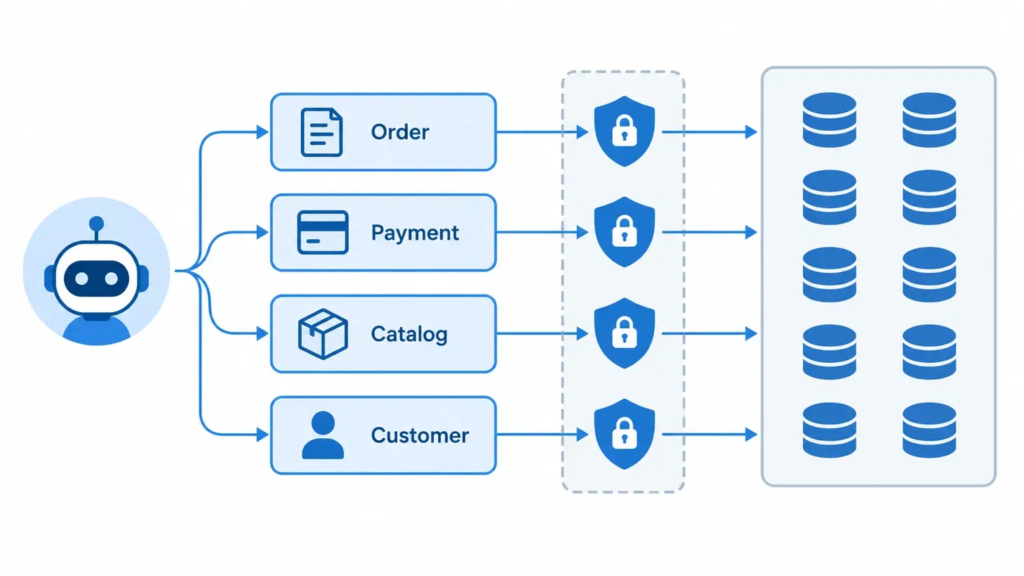
The error that told me the view was working
ERROR 6498 (HY000): Missing DELETE tag on table jdv_ai_billing.order_items, path '$.items[1]'.That is what MySQL JSON Duality Views return when a write leaves an item out of an order document. The view reads a missing array element as a delete, and the view was never granted DELETE. I wanted that error. It means the database, not the application, decided the write was out of bounds.
This post is about the other half of that idea. I let an AI agent create and update orders through MySQL JSON Duality Views only, with no grants on the base tables. Then I tried to break it. Below are the views, what the agent sends, the layers that stopped bad writes, the real error codes, and six things the database still does not enforce.
Three-line summary
- The agent reads and writes JSON documents through four views. It has zero grants on the ten base tables.
- Bad writes were stopped by three database layers: grants, view tags, and CHECK constraints plus triggers. Reads are scoped by a tenant filter in the tool code, which is application code, not database enforcement.
- Six gaps remain. They are listed under “Six things this design does not enforce”. They include a payment total that can exceed the order total and item GST that need not add up to the order GST. The demo enforces specific invariants, not every financial one.
Tested on: MySQL Community Server 9.7.2, local single instance (results/45_version.txt). Version statements in this post are “as of October 2026”. Evidence types: a captured SQL test is a file in results/ produced by scripts/run_sql.py; a live observation is one captured Gemini run; manual-documented means I read it on the MySQL page and did not test it; reasoning means design analysis I did not test. Where it matters, the text says which one a claim is. Documentation links were consulted at publication time; behaviour reported here was observed only on 9.7.2.
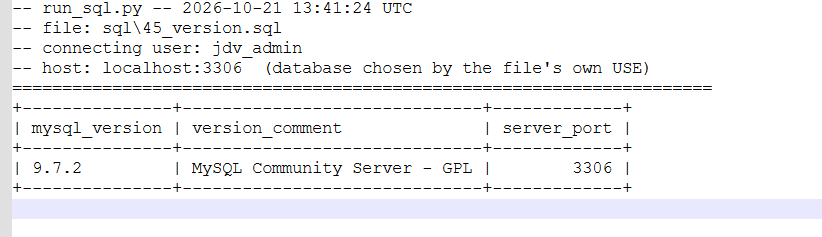
The demo is a small-shop billing demo: ten normalized InnoDB tables, four views, one agent with six tools. Everything here was run on that one instance. Where I reason without a test, I say so.
Submission resources
| Resource list | Where to find it |
|---|---|
| Repository (MIT licence) | github.com/kumarsanjeeva/mysql-jdv-ai-billing |
| Multi-table relational schema (10 tables) | sql/01_schema.sql·docs/schema.md |
| Duality views (4 views) | sql/02_duality_views.sqlWalkthrough in “Setup: ten tables, four views, one agent user” below |
| Application code | Python agent with six tools: agent/The SQL of each tool is in “What the agent sends and gets back” below |
| API requests and sample documents | See “What the agent sends and gets back” below |
| A recorded agent session (create order, add payment) | results/agent_interactive_demo.txtExcerpt in “What the agent sends and gets back” below |
| Architecture diagram | See “Architecture: the model outside, the rules inside” belowSource: docs/architecture.md |
| When to use, and when not to | See “When to use MySQL JSON Duality Views, and when not” below·docs/when-to-use.md |
| Comparison with hand-built JSON, JSON columns and ORMs | See “View versus hand-built JSON in SQL” and “Versus a JSON column and an ORM” belowThe JSON column and ORM part is reasoning, not a test |
| Test evidence | results/Captured outputs of the SQL tests and agent runs |
| Not covered | MySQL REST Service, a live run through the Anthropic provider path, HTTP and JavaScript clients, Linux and macOS commandsSee “What I did not test” below |
| Tested on | MySQL Community Server 9.7.2, local single instance, as of October 2026 |
Architecture: the model outside, the rules inside
The architecture is small on purpose. The model sits outside, thin Python sits in the middle, and the database holds the rules.
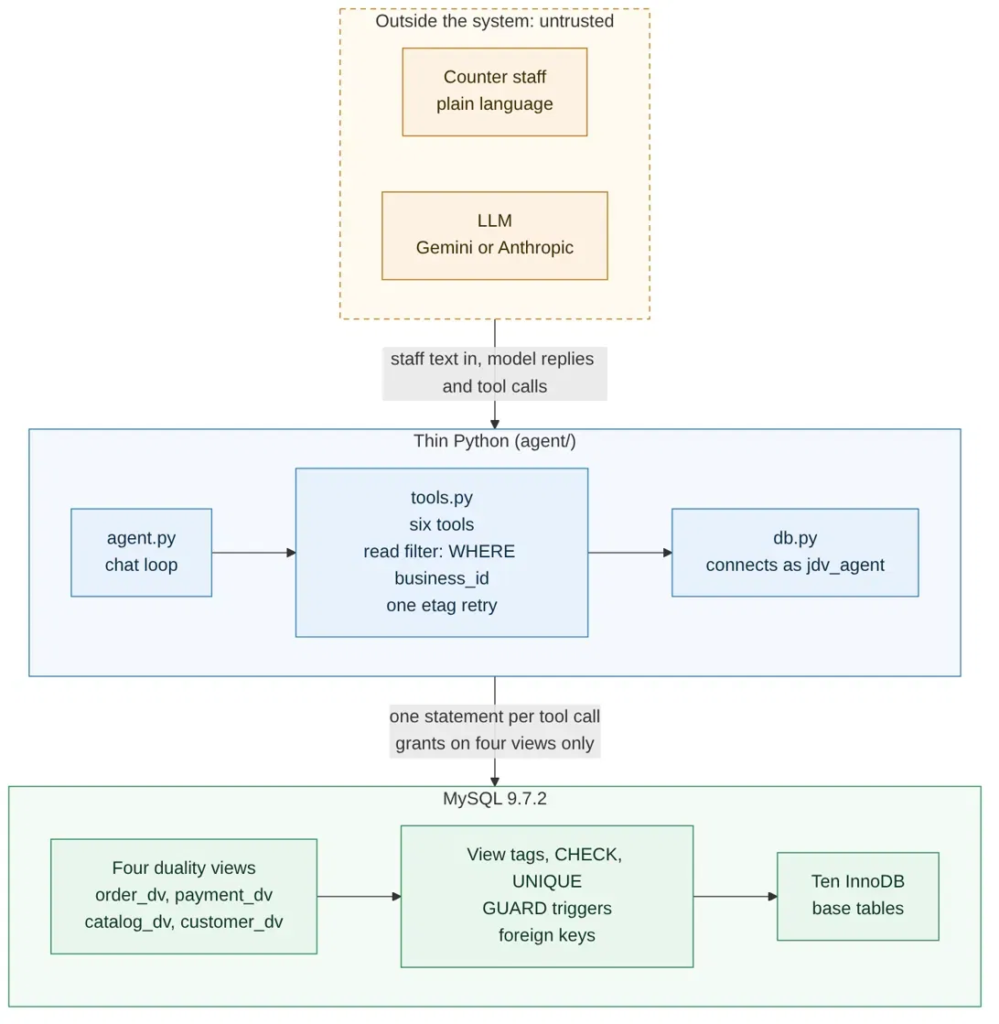
Figure 1. One request path: outside the system, thin Python, MySQL. This is a simplified overview I drew from the repo’s docs/architecture.md, which has seven Mermaid diagrams (system context, trust boundaries, the relational schema, the four views, the agent runtime, the write path and concurrency).
How one request moves
- Staff type in plain language.
agent.pysends the system prompt, the six tool definitions and the conversation to the model. The agent supports two providers. I began with the Anthropic API, and during development I learned it is paid, so I moved my live runs to Gemini’s free tier. All my captured live runs used Gemini. The Anthropic path stays in the code, but I did not run it live. - The model answers with text or asks for a tool.
tools.pyruns one parameterized statement against one of the four views asjdv_agent. (update_order_statuscan run up to three statements when the etag is stale.) - MySQL splits the JSON document into row writes across the base tables. The view tags, CHECK constraints, UNIQUE keys, triggers and foreign keys all apply to those writes.
- The result comes back as the JSON document, or as an error number and message.
tools.pypasses that text to the model unchanged, so the model sees the real error. In both v2 live runs the agent repaired an order from the GUARD 6 message (“Live runs with a real model”).
What lives where
| Concern | Where it lives | Not in |
|---|---|---|
| Document shape | sql/02_duality_views.sql | Python |
| Tenant write consistency | GUARDs 4, 7, 8 and 8b | Python |
| Tenant read filter | agent/tools.py only | MySQL |
| Item price on insert | GUARD 6 and the catalog columns | The agent adjusting a number after a rejection |
| Duplicate-request guard | request_id UNIQUE on orders and payments (a database barrier against a second insert with the same ID; a retry gets a duplicate-key error, error 1062, not the first result back; no live run showed this end to end) | UUID primary keys (not used) |
| Model vendor | Marked sections in agent/agent.py | The tools and the SQL |
Three things to notice
- Python does not enforce the business invariants (price, totals, tenant on writes); the database does. Python still does real work: it builds the JSON, runs one parameterized SQL statement per tool, dispatches the model’s tool calls, forwards database errors, and does the read-side
business_idfilter and one etag retry. - I treat the model’s output like any other untrusted input. Four different things limit it, and they are not the same kind of control: grants limit which objects and operations the account can use; view tags limit which document changes are accepted; CHECK constraints and triggers enforce the write rules; and the tool code filters reads by tenant. Only the first three are database enforcement. The prompt only shapes what it tries.
- The four views are a boundary around which objects and operations the agent can use. They are not a tenant-level read boundary: the grant on
order_dvcovers every business’s rows, and thebusiness_idfilter that scopes reads is intools.py(Three layers that stop a bad write, layer 4, and When to use MySQL JSON Duality Views, and when not). The write-side tenant checks are different: they are in triggers. I found no row-level security on the views, and the manual pages I read do not describe one.
I intended point-of-sale and reporting work to use the base tables under an admin account while the agent never does. That split is a design intent, and I did not test it.
Setup: ten tables, four views, one agent user
The agent connects as jdv_agent. It holds exactly these grants:
GRANT SELECT, INSERT, UPDATE ON jdv_ai_billing.order_dv    TO 'jdv_agent'@'%';
GRANT SELECT, INSERT         ON jdv_ai_billing.payment_dv  TO 'jdv_agent'@'%';
GRANT SELECT                 ON jdv_ai_billing.catalog_dv  TO 'jdv_agent'@'%';
GRANT SELECT                 ON jdv_ai_billing.customer_dv TO 'jdv_agent'@'%';
| View | Agent can | Notes |
|---|---|---|
order_dv | SELECT, INSERT, UPDATE | No DELETE tag |
payment_dv | SELECT, INSERT | Payments are append-only |
catalog_dv | SELECT | Read-only |
customer_dv | SELECT | Read-only |
The proof that the base tables are closed to the agent is one query (E13):
SELECT id, total FROM orders LIMIT 1;
ERROR 1142 (42000) at line 2: SELECT command denied to user 'jdv_agent'@'localhost' for table 'orders'
The order_dv definition is the interesting one. It spans orders, outlets, customers, items, products and payments. Here is its shape, trimmed (full file: sql/02_duality_views.sql, lines 48 to 129):
CREATE JSON DUALITY VIEW order_dv AS
SELECT JSON_DUALITY_OBJECT( WITH(INSERT, UPDATE)
    '_id': id,
    'business_id': business_id,
    'request_id': request_id,
    'order_status': order_status,
    'subtotal': subtotal,
    'discount_value': discount_value,
    'gst_value': gst_value,
    'total': total,
    'outlet':   ( SELECT JSON_DUALITY_OBJECT('id': id, 'name': name)
                  FROM outlets WHERE outlets.id = orders.outlet_id ),
    'customer': ( SELECT JSON_DUALITY_OBJECT('id': id, 'name': name, 'phone': phone)
                  FROM customers WHERE customers.id = orders.customer_id ),
    'items': ( SELECT JSON_ARRAYAGG(
                   JSON_DUALITY_OBJECT( WITH(INSERT, UPDATE)
                       'id': id, 'qty': qty, 'price': price, /* ... */
                       'product': ( SELECT JSON_DUALITY_OBJECT('id': id, 'name': name)
                                    FROM products WHERE products.id = order_items.product_id ) ) )
               FROM order_items WHERE order_items.order_id = orders.id ),
    'payments': ( SELECT JSON_ARRAYAGG(
                      JSON_DUALITY_OBJECT( WITH(INSERT, UPDATE)
                          'id': id, 'amount': amount, 'payment_type': payment_type, /* ... */ ) )
                  FROM payments WHERE payments.order_id = orders.id )
)
FROM orders;
Two details in that definition come from tests, not taste:
paymentscarriesUPDATEonly so that an unchanged payment can round-trip as JSON text (E23, see “Where the views got in the way“). A real change to a payment is rejected by a trigger (GUARD 5).- The variant is a flat
product_variant_id, not a nested object. A nested read-only object that reads back asnullcannot be written back (E20, see “Where the views got in the way”).
What the agent sends and gets back
An order read through the view is one JSON document. This is a truncated, illustrative document. The second item was removed for length, so the item amounts shown do not add up to the order totals. Customer and demo catalog names are replaced; the real file keeps fictional seed values:
{
  "_id": 2,
  "business_id": 1,
  "request_id": "seed-order-002",
  "order_status": "delivered",
  "subtotal": 1290.00, "discount_value": 40.00, "gst_value": 62.50, "total": 1312.50,
  "outlet":   { "id": 1, "name": "<outlet>" },
  "customer": { "id": 2, "name": "<customer>", "phone": "<phone>" },
  "items": [
    { "id": 3, "qty": 1.00, "price": 750.00, "gst_rate": 5.00, "gst_value": 36.35,
      "discount_value": 23.00, "product": { "id": 2, "name": "<item>" },
      "product_variant_id": 5 }
  ],
  "payments": [
    { "id": 1, "amount": 500.00, "method": "upi", "payment_type": "advance",
      "request_id": "seed-payment-001", "business_id": 1 }
  ],
  "_metadata": { "etag": "2647eb0b6823a00a33d3ec298b4a18a5" }
}
The _metadata.etag is the part that matters for an agent. It is the view’s optimistic-concurrency token. An update that carries a stale etag fails (E01, see “Three layers that stop a bad write”).
The six tools. Each tool runs one parameterized statement, except update_order_status, which can run up to three on a stale etag (below). BUSINESS_ID comes from configuration, never from the model.
-- search_catalog
SELECT JSON_ARRAYAGG(data) FROM catalog_dv
 WHERE JSON_VALUE(data, '$.business_id') = %s
   AND LOCATE(LOWER(%s), LOWER(JSON_VALUE(data, '$.name'))) > 0

-- get_customer
SELECT data FROM customer_dv
 WHERE JSON_VALUE(data, '$.business_id') = %s AND JSON_VALUE(data, '$.phone') = %s

-- get_order (adds a computed balance_due to the returned document)
SELECT JSON_SET(d.data, '$.balance_due',
       JSON_VALUE(d.data, '$.total' RETURNING DECIMAL(10,2)) - COALESCE(SUM(p.amount), 0))
  FROM order_dv d
  LEFT JOIN JSON_TABLE(d.data, '$.payments[*]'
       COLUMNS (amount DECIMAL(10,2) PATH '$.amount')) p ON TRUE
 WHERE JSON_VALUE(d.data, '$.business_id') = %s
   AND (JSON_VALUE(d.data, '$._id') = %s OR JSON_VALUE(d.data, '$.request_id') = %s)
 GROUP BY d.data

-- create_order
INSERT INTO order_dv VALUES (JSON_SET(%s, '$.business_id', %s))

-- add_payment
INSERT INTO payment_dv VALUES
  (JSON_SET(%s, '$.business_id', %s, '$.order', JSON_OBJECT('id', %s)))

-- update_order_status
UPDATE order_dv
   SET data = JSON_SET(data, '$.order_status', %s, '$._metadata.etag', %s)
 WHERE JSON_VALUE(data, '$._id') = %s AND JSON_VALUE(data, '$.business_id') = %s
update_order_status may run up to three statements: on error 6494 (stale etag) it re-reads the etag and retries.
A recorded session. This is the middle of one interactive session with the agent: create an order, then add a payment. The customer and item names are replaced, long ids are shortened, and the JSON is trimmed (…). The full file is results/agent_interactive_demo.txt.
USER: Create an order for <customer>: 1 kg <item>, delivery today at 5 pm
...
USER: yes

TOOL CALL create_order: {"order": {"gst_value": 37.5, "outlet": {"id": 1}, "total": 787.5,
  "discount_type": "amount", "items": [{"gst_value": 37.5, "price": 750, "qty": 1,
  "product_variant_id": 5, "product": {"id": 2}, …}], "delivery_at": "2026-10-26 17:00:00",
  "request_id": "ord-49281a92…", "discount_value": 0, "customer": {"id": 2}, "subtotal": 750}}
TOOL RESULT: Created: 2 rows written. Read it back with get_order(request_id='ord-49281a92…').

USER: Add a cash payment of 200 to that order

TOOL CALL add_payment: {"order_id": 6, "payment": {"payment_type": "advance", "amount": 200,
  "request_id": "pay-92847a92…", "method": "cash"}}
TOOL RESULT: Payment recorded: 1 row written.
Reading the order back afterwards returned "total": 787.50, one payment of 200.00 ("method": "cash") and "balance_due": 587.50. The balance_due field is added by the get_order query (total minus payments), not stored in a table.
What this session shows and does not show: the path works end to end through the views. No guard fired in it; the refusals under “Three layers that stop a bad write” come from the SQL tests and the earlier live runs. It is one session with one model (gemini-3.1-flash-lite, prompt v2), recorded on 2026-10-26 with AGENT_TODAY=2026-10-26. It is a demonstration, not a reliability measure.
Three layers that stop a bad write, and one that scopes reads
I did not rely on one mechanism. Layers 1 to 3 are database enforcement and were tested separately. Layer 4 is application code and is not a write guard.
Layer 1: grants
The agent has no base-table access (E13, above). It also cannot write catalog_dv. An agent-side write there is refused at the privilege check with error 1142 (E04).
Layer 2: what the view itself permits
A duality view only allows what its tags allow. Three tests, three different error codes:
-- E02: drop an item from an order document (order has 2 items)
ERROR 6498 (HY000): Missing DELETE tag on table jdv_ai_billing.order_items, path '$.items[1]'.

-- E03: drop a payment from an order document (order has 2 payments)
ERROR 6498 (HY000): Missing DELETE tag on table jdv_ai_billing.payments, path '$.payments[0]'.

-- E04b: admin tries to change a price through the read-only catalog view
ERROR 6497 (HY000): Missing UPDATE tag on jdv_ai_billing.products.price, path '$.price'.
And the etag check (E01). Read a document, update it once (the etag changes), then replay the first copy:
SET @doc = (SELECT data FROM order_dv WHERE JSON_VALUE(data,'$.request_id') = 'seed-order-001');
UPDATE order_dv SET data = JSON_SET(@doc,'$.order_status','ready')
 WHERE JSON_VALUE(data,'$._id') = JSON_VALUE(@doc,'$._id');      -- ok, etag changes
UPDATE order_dv SET data = JSON_SET(@doc,'$.order_status','delivered')
 WHERE JSON_VALUE(data,'$._id') = JSON_VALUE(@doc,'$._id');      -- stale etag
ERROR 6494 (HY000): Cannot update JSON duality view. The ETAG of the document in the database
did not match the ETAG '"1e0130b119b74d0607dbc6beb9183063"' passed in.
An agent that retries blindly with stale state gets a refusal, not a silent overwrite.
Layer 3: CHECK constraints and triggers on the base tables
Triggers on base tables run for writes that arrive through a view. The MySQL 9.7 manual page on updatable duality views says triggers defined on the base tables are executed, that a failed sub-statement rolls back all of them, and that they take no new metadata or row locks. That let me put business rules in the schema:
| Guard | Rule |
|---|---|
| 1 | qty > 0 (CHECK) |
| 2 | Payments: refund < 0, other types > 0 (CHECK) |
| 3 | total = subtotal - discount_value + gst_value (a difference up to 0.01 is accepted) |
| 4 | Customer and outlet must belong to the order’s business |
| 5 | Payments are immutable |
| 6 | Item price must equal catalog price on insert; price, product, variant and order_id are immutable |
| 7 | Payment business must equal order business |
| 8 | Item business must match |
| 8b | orders.business_id is immutable |
| n/a | UNIQUE(request_id) |
Real refusals:
-- E34a: item with qty 0 (as admin)
ERROR 3819 (HY000): Check constraint 'chk_order_items_qty' is violated.

-- E35a: order total off by 1.00
ERROR 1644 (45000): GUARD 3: orders.total does not match subtotal - discount_value + gst_value

-- E28b: item price 100.00 when the catalog price is 900.00
ERROR 1644 (45000): GUARD 6: order_items.price does not match the current catalog price

-- E29b: payment under business 2 against an order of business 1
ERROR 1644 (45000): GUARD 7: payments.business_id does not match the business_id of the order it pays
GUARD 3 has a tolerance you should know about. A total off by 0.01 is accepted (E35d), off by 0.02 is rejected (E35e: UPDATE orders SET total = 1312.52 ... against a correct 1312.50). I chose the tolerance to absorb rounding; it is a design decision, not a MySQL rule.
Trigger order matters. If you re-apply the guard files, run sql/06 then sql/09, together and in that order. After a re-run of sql/06 alone, the cross-tenant item test (E30f) reported GUARD 8. In the correct order it reports GUARD 6. So the message depends on trigger order, even when the write is refused either way.
Layer 4: the tool layer (read scoping, not a write guard)
Every tool filters by business_id in its WHERE clause. That is the tenant read filter, and it is Python and SQL text only. I found no row-level security on the views. I tested none, and the MySQL 9.7 duality view pages I read (the overview, the DML requirements and the stored-object access control pages) do not describe one. A grant on order_dv is all-or-nothing: an agent with that grant that ran its own query could read every business’s orders. Write-side tenant checks are in the triggers (GUARDs 4, 7, 8, 8b). The read side is not.
Live runs with a real model
Read the live results as individual observations from captured runs, not as a controlled comparison and not as a measure of reliability. The scripted scenarios (S1 to S10) and guardrail tests (G1 to G7) are deterministic. The live scenarios (L1 to L5) used gemini-3.1-flash-lite on the free tier, paced to about 13 seconds per call, with one retry each on 503 and 429. Seed data only.
| Run | MySQL 1265 (“unit”) | 6489 (path not mapped) | GUARD 6 |
|---|---|---|---|
| v1 run 4 | 7 | 0 | 0 |
| v1 baseline | 3 | 0 | 0 |
| v2 run 1 (stopped in L5 by a 503) | 0 | 2 | 1 |
| v2 run 2 (complete) | 0 | 0 | 1 |
v1 and v2 differ in the agent’s prompt text, not the database. v1 runs hit 1265 errors on the unit field. v2 runs had none. Instead, v2 sent invented paths such as $.items[0].gst_inclusive, and MySQL answered 6489 (path not mapped to any column). Then GUARD 6 fired:
TOOL ERROR: MySQL error 1644: GUARD 6: order_items must reference a product or product
variant, so the price can be checked against the catalog
The agent re-sent create_order with "product": {"id": 3} added to the item and got Created: 4 rows written. It repaired the order from the plain-language error text.
What I am not claiming. Two runs per version, different starting data, one model. I am not saying v2 “fixed” anything. No live run showed idempotency (no create_order succeeded in L4). No live run through the Anthropic provider path is captured. Attempts on other Gemini models (gemini-3.6-flash, gemini-3.8-flash) were stopped by 429 and 503 responses and are not in the table.
View versus hand-built JSON in SQL
For one order (order 77) I built the same document two ways: with JSON_OBJECT and JSON_ARRAYAGG by hand, and by selecting from order_dv. results/47_manual_vs_dv.txt compares them:
- All 17 top-level keys are equal as JSON and as text, with matching types. Totals and amounts are
DOUBLEon both sides. - Items and payments compare equal element by element.
- The naive whole-document comparison returned
json_values_equal = 0andtext_equal = 0, even though every key matched. The view’s document has 18 top-level keys against 17, because of_metadata, which carries the etag. - After casting both sides to JSON, the comparison returned 1. Pretty-printed text also compared equal.
- The raw JSON text of the two documents differs in length (1524 vs 1507 characters). The start of the strings shows one reason:
"qty": 1.00in the hand-built text against"qty": 1.0in the view’s.
So 1.00 versus 1.0 is a text difference, not a value difference. Anything that compares raw document strings will see it. Cast to JSON first, and expect _metadata on the view side.
What I tested is the read only; the write-path points below are design reasoning, not something I built and measured. The practical gap is not the read. A hand-built read is a query you maintain. The difference is the write path: with hand-built JSON, the decomposition of a document back into rows, the etag check and the delete semantics are yours to write. With the view, they are the engine’s, and the limits under “Where the views got in the way” apply.
For scale: the hand-built read query for one order is about 37 lines (sql/47, lines 10 to 46). The order_dv definition is 82 lines (sql/02, lines 48 to 129). The view definition is longer, but you write it once, and it also carries the write path. These are line counts of my own SQL, not a performance or effort measurement.
Versus a JSON column and an ORM
This section is reasoning, not a test. I did not build the JSON-column or ORM variants.
JSON column. A JSON column stores the document whole. Reads are simple. The cost is that the database has no foreign keys, CHECK constraints or triggers across the nested items and payments unless you build generated columns or application validation. In this demo, GUARDs 1 to 8b exist because items and payments are real rows.
ORM. An ORM gives application code a typed model over the same tables. It does not give the agent a bounded document interface. The agent’s grants would still be on base tables, or the ORM would run as a service with its own authority. The view puts the boundary in the database user’s grants.
The honest trade-off. The views also constrain you. That is the section “Where the views got in the way”.
Where the views got in the way
These are the limits I hit while testing. The MySQL 9.7 limitations page lists ten restrictions on DML operations against JSON Duality Views. Among them are: changing more than one object in a single statement, EXPLAIN, REPLACE, LOAD DATA and LOAD XML, INSERT ... SELECT, multi-table UPDATE and DELETE, INSERT ... ON DUPLICATE KEY UPDATE, the LOW_PRIORITY and IGNORE modifiers, DML on an SQL view built over a duality view, and updates whose WHERE does not identify a single row. That list is what MySQL documents. What follows is what I observed on 9.7.2. I tested four of the restrictions, and on those four my results match the page:
| Test | Run as | Statement | Result |
|---|---|---|---|
| E06 | agent | Multi-row UPDATE (WHERE matched 5 rows) | 6482 |
| E07 | agent | INSERT ... SELECT into order_dv | 6482 |
| E08 | agent | INSERT ... ON DUPLICATE KEY UPDATE | 6482 |
| E09 | admin | EXPLAIN SELECT | works |
| E09b | agent | EXPLAIN SELECT | 1345 (“lacking privileges for underlying table”) |
| E09c | admin | EXPLAIN UPDATE | 6482 |

E06 corresponds to the page’s “updating multiple objects is not supported” item, not to multi-table UPDATE. EXPLAIN SELECT working does not contradict the page; the limit is about data-modification statements.
If you planned bulk loads or set-based updates through a view, plan for row-by-row writes instead. EXPLAIN INSERT and EXPLAIN DELETE were not tried.
Three findings that are not on the manual pages I read:
- Mixed generated and explicit ids in a nested array (E16, E17, E18). No ids given: error 6560. Explicit ids: accepted. An inline subquery for an id: 6560.
- A nested read-only object that reads back
nullcannot be written back (E20). This is whyproduct_variant_idis a flat scalar. - In my test, a
DATETIME(6)value in an insert-only nested array failed a round trip through JSON text (E23). This is an observed anomaly in this test, not a general property of the feature or the data type. An unchanged value sent back failed withMissing UPDATE tag(error 6497) in 4 of 5 cases. Observed on 9.7.2. I have not reported this to MySQL, and the cause is my inference. That is whypaymentscarriesUPDATEin the view.
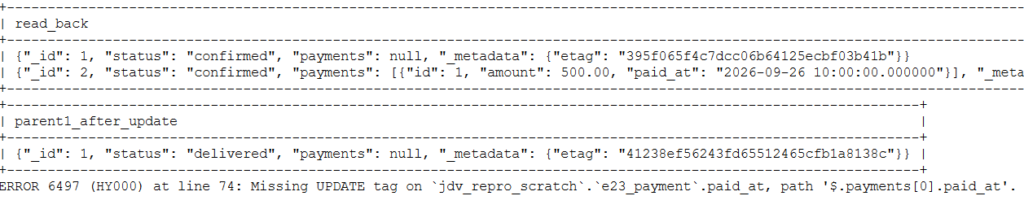
One surprise in my own guards (E32): I probed a duplicate-id item insert and expected 1062. The result was
ERROR 1644: GUARD 8: order_items.product_id does not belong to the business of the order. The guard fired before the primary-key collision. It was the only unexpected result in the final regression (results/11: 12 of 13).
Six things this design does not enforce
- A payment can push the total paid above the order total. One live order showed 2524.00 paid against a 1512.00 total, and no guard rejected it.
- Item
gst_valueneed not add up to the order’sgst_value. One live order had order GST 72.00 and item GST 0.00. An application this schema was modelled on requires the match; the database does not enforce it. udhaar_settlementpayments may not map to one order’s total. (udhaar_settlementis a payment type in the schema for settling a customer’s running credit balance.- Cancelled orders, and lowering
orders.totalbelow the amount already paid, are not covered. - An admin can still change
products.business_id. - Changing an item’s
order_idthroughorder_dvis untested. The lock was proven with a directUPDATE(E33), not through the view.
None of these six appears on the manual pages I read. They are gaps in my schema, not MySQL defects.
When to use MySQL JSON Duality Views, and when not
Reasoning from this one demo, as of October 2026 on 9.7.2. Not a general recommendation.
Consider them when
- the consumer wants a whole document per business object (an agent, a REST client, a mobile app), and the data is already normalized;
- you want the database user’s grants, not application code, to define what the consumer can touch;
- single-document read, insert and update cover the workload.
Think twice when
- the workload is bulk or set-based writes (see “Where the views got in the way”);
- you need row-level read security: I found none on the views, and the manual pages I read do not describe one, so tenant isolation on reads is yours to build;
- you cannot tolerate the DML limitations or the
DATETIMEround-trip behaviour in your own testing.
Run it yourself
You need: MySQL Community Server 9.7 (I tested on 9.7.2) with the mysql command-line client on your PATH, and Python (I used 3.13.5). You also need an admin MySQL account that can create and drop databases and users and grant privileges. Its name and password go into .env as MYSQL_USER and MYSQL_PASSWORD. The commands below are the PowerShell ones I ran. The README also lists Linux and macOS equivalents, which I did not run.
git clone https://github.com/kumarsanjeeva/mysql-jdv-ai-billing.git
cd mysql-jdv-ai-billing
python -m venv .venv
.venv\Scripts\Activate.ps1      # the prompt should now start with (.venv)
pip install -r requirements.txt
copy .env.example .env          # then fill it in
python scripts\reset_db.py      # rebuilds the demo database (see the warning below)
python -m agent.scenarios       # scripted demo, no model API key needed
Warning about reset_db.py. It drops the database named in MYSQL_DB and rebuilds it from the SQL files, so use a database you can lose. It also rewrites six capture files under results/ (reset_drop_database, 00_setup, 01_schema, 02_duality_views, 06_guards_6_7 and 09_guard_8). If you cloned the repo with git, restore them afterwards with git restore results/.
The interactive agent. python -m agent.agent needs three settings in .env that have no default, plus the key for the provider you pick:
AGENT_PROVIDER=gemini           # or anthropic
AGENT_MODEL=<model name>
AGENT_PROMPT_VERSION=v2         # or v1
GEMINI_API_KEY=<your key>       # ANTHROPIC_API_KEY for anthropic
If one is missing, the agent stops with a message that names the setting. All my captured live runs used Gemini (gemini-3.1-flash-lite). Optional: AGENT_TODAY sets the date the model is told is today (default 2026-09-26, a date already in the past, so always set it to today’s date; otherwise the model computes delivery times from the wrong day). At the You: prompt, type a request in plain words. To leave, type quit or exit, press Enter on an empty line, or press Ctrl+C. Each run overwrites results/agent_transcript.txt. The agent sends the system prompt, the whole conversation and every tool result to the model provider, so use seed data only. The seed customer 9900000002 is a fictional one you can look up.
The SQL tests. python scripts\run_sql.py sql\04_edge_cases.sql --as agent runs the edge-case file, prints a PASS or SURPRISE table, and saves the full output under results/. Running it overwrites the committed capture of the same name.
Repo: mysql-jdv-ai-billing.
What I did not test
A note on my role. My background is database engineering rather than Python development. My focus in this project was the database design, review of the SQL, validation of every output file in results/, and the final judgment on what the evidence does and does not prove.
- MySQL REST Service access to the views
- A live run through the Anthropic provider path (I switched to Gemini because it was free to use)
- HTTP or JavaScript clients
- The Linux and macOS commands in the README (I ran the Windows ones)
- Foreign-key actions through a view (the DML page describes them; I did not test them)
- Performance of any kind. No performance claims are made here.
UPDATEwith noWHERE,EXPLAIN INSERT/DELETE, nested outlet or customer writes inorder_dv,DELETEonorder_dv, andUPDATE/DELETEonpayment_dv- A negative test for the “other types > 0” half of GUARD 2