
ORA-08103: object no longer exists
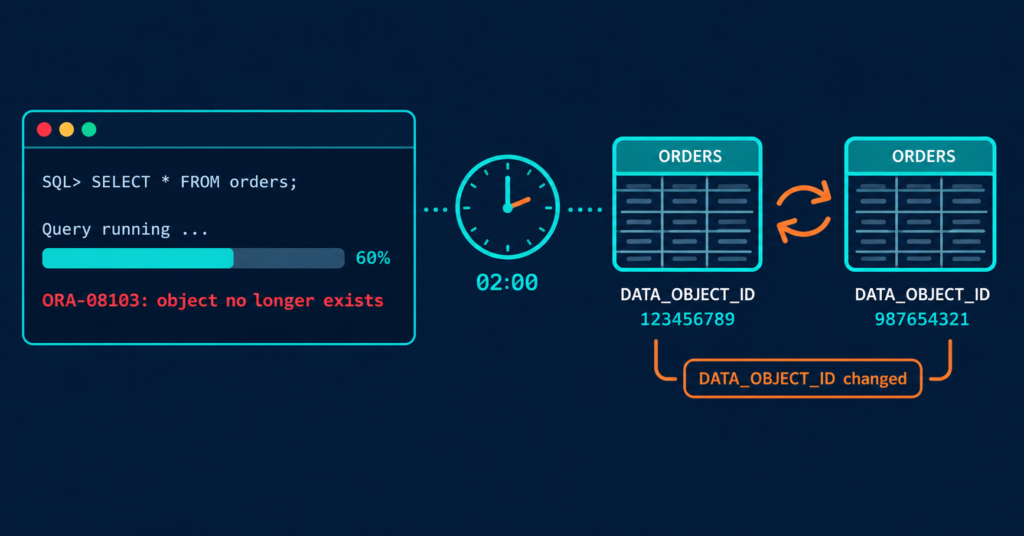
Sound familiar? The table is still there. DESC works. SELECT COUNT(*) works. But the 40-minute report died halfway through with ORA-08103 object no longer exists, and the application team wants to know who dropped their table.
Usually nobody dropped it. The table was replaced underneath the query.
All Queries and their output is generated on My Oracle Database Account instead of Production for Obvious reason.
Quick Triage: Run This First
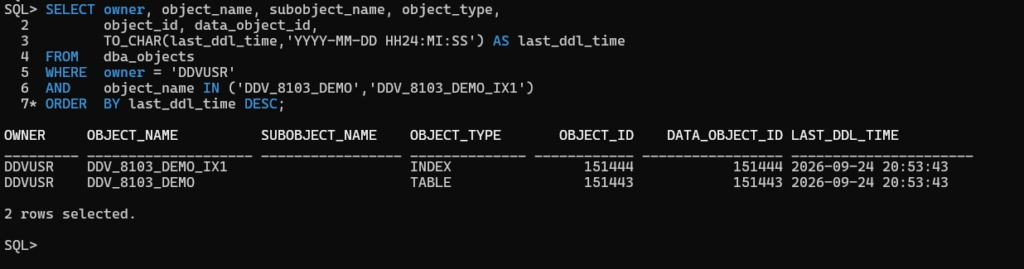
Check whether the object’s segment changed while the query was running:
SET LINESIZE 200
COLUMN owner          FORMAT A15
COLUMN object_name    FORMAT A20
COLUMN subobject_name FORMAT A20
COLUMN object_type    FORMAT A10

SELECT owner, object_name, subobject_name, object_type,
       object_id, data_object_id,
       TO_CHAR(last_ddl_time,'YYYY-MM-DD HH24:MI:SS') AS last_ddl_time
FROM   dba_objects
WHERE  owner = 'DDVUSR'
AND    object_name IN ('DDV_8103_DEMO','DDV_8103_DEMO_IX1')
ORDER  BY last_ddl_time DESC;
If LAST_DDL_TIME falls inside the failed query’s run window, you have your lead. Treat the concurrent DDL as the prime suspect.
The Demo Table Used in This Post
Every query below runs against this table and index in the DDVUSR schema. Create them once to follow along:
CREATE TABLE ddv_8103_demo AS
SELECT level              AS id,
       RPAD('x', 200, 'x') AS pad
FROM   dual
CONNECT BY level <= 200000;

CREATE INDEX ddv_8103_demo_ix1 ON ddv_8103_demo (id);
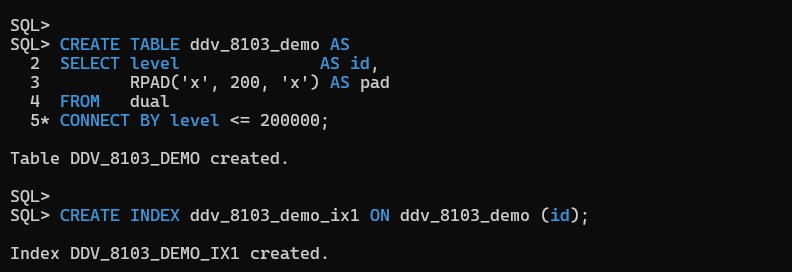
200,000 rows gives a full scan long enough to reproduce the collision. The index lets the diagnosis section show the segment change on an index as well as the table.
What Oracle Officially Says About ORA-08103
The Oracle error reference for ORA-08103 lists exactly two causes:
- The object was deleted by another user after the operation began.
- A prior incomplete recovery restored the database to a point in time during the object’s deletion.
The documented action is to delete the object if the error is the result of an incomplete recovery.
“Deleted” in that text covers more than DROP TABLE. In practice, it includes any operation that throws away the segment the query was reading.
Root Cause: Why a Table That “Exists” Raises ORA-08103 Object No Longer Exists
- A query binds to a segment, not just a name. Every segment has a
DATA_OBJECT_ID.TRUNCATE,ALTER TABLE ... MOVE, index rebuilds, and partitionDROP/TRUNCATE/EXCHANGE/SPLITtypically give the object a newDATA_OBJECT_ID, whileOBJECT_IDstays the same. - Plain SELECTs take no TM lock. DDL does not wait for running queries, so a
TRUNCATEcan go through while a report is mid-fetch. - Undo does not protect segment replacement. Read consistency rebuilds data changes from undo. It cannot rebuild a segment that was truncated or swapped out. That is why this is not an ORA-01555 problem, and why raising
UNDO_RETENTIONdoes not help. - The error depends on timing. DDL does not always kill the query. As Connor McDonald explains on AskTOM, a query can keep going after a truncate. It fails when the space it still has to read is reused by a new object mid-fetch. So the same job can fail one night and pass the next.
- Partition maintenance is a frequent trigger. In the same AskTOM thread, Chris Saxon notes that partition maintenance is probably the most common time this error appears.
- Incomplete recovery (rarer). If a point-in-time recovery landed in the middle of an object’s deletion, Oracle’s documented action is to drop that object.
The Production Incident
We had a finance extract that normally finished by 01:30. One night month-end volume pushed it past 02:00. At 02:00 the ETL scheduler ran a TRUNCATE and reload on the same summary table the extract was reading.
The extract failed with ORA-08103. The next morning a rerun completed cleanly, which made the application team suspect “Oracle instability.”
The table was fine. Two jobs that had never overlapped before overlapped once.
Reproduce It: Two Sessions, One Collision
Here is the same collision reproduced in the lab.
Baseline before the test. Note OBJECT_ID and DATA_OBJECT_ID for both the table and the index:
Session 1: start a slow fetch (roughly 40 seconds)
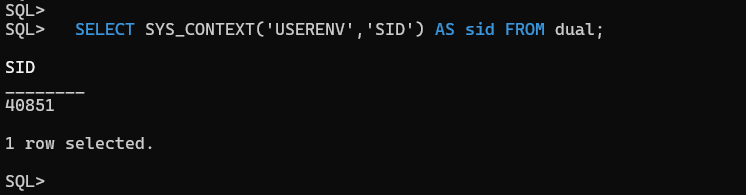
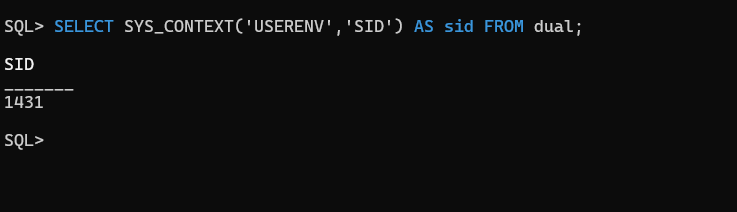
Verifying First Session ID
SET SERVEROUTPUT ON
DECLARE
  CURSOR c IS SELECT id FROM ddv_8103_demo;
  v_id NUMBER;
  n    PLS_INTEGER := 0;
BEGIN
  OPEN c;
  LOOP
    FETCH c INTO v_id;
    EXIT WHEN c%NOTFOUND;
    n := n + 1;
    IF MOD(n, 5000) = 0 THEN
      DBMS_SESSION.SLEEP(1);
    END IF;
  END LOOP;
  CLOSE c;
  DBMS_OUTPUT.PUT_LINE('Rows fetched: ' || n);
END;
/
Session 2: within about 10 seconds, truncate and reload
Verifying second session ID
TRUNCATE TABLE ddv_8103_demo;

INSERT INTO ddv_8103_demo
SELECT level, RPAD('y', 200, 'y')
FROM   dual
CONNECT BY level <= 200000;

COMMIT;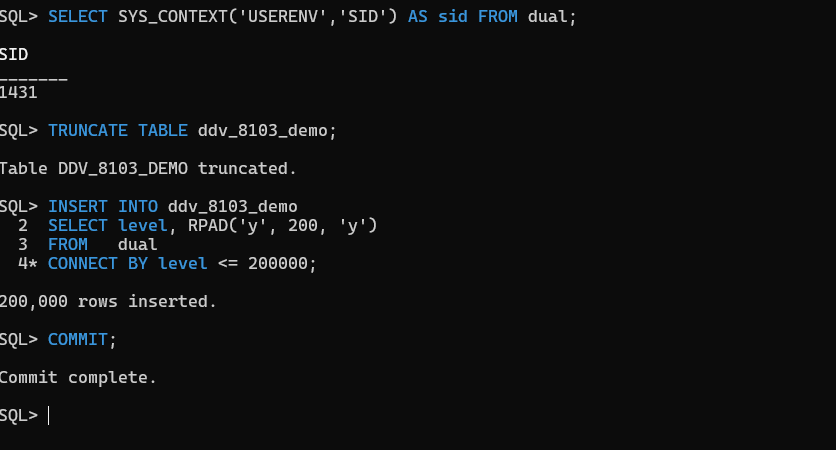
Session 1 result:
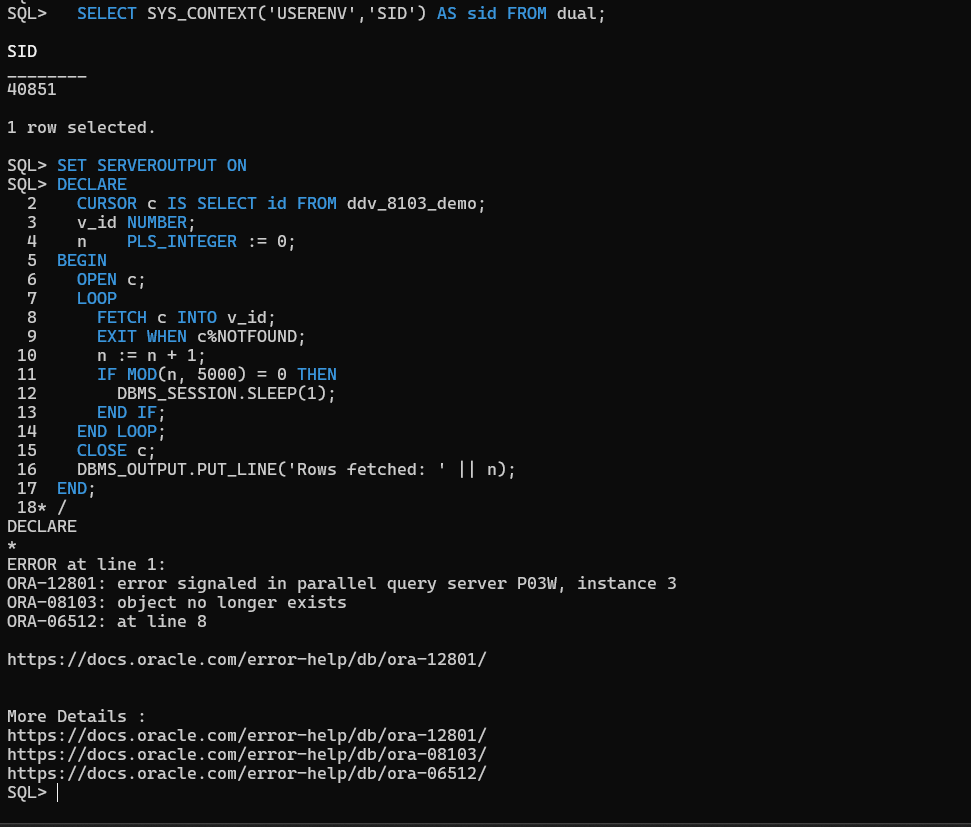
The truncate alone does not guarantee the error. The reload formats blocks under the new DATA_OBJECT_ID, and that is what the in-flight scan runs into.
Step-by-Step Diagnosis
Step 1: Pin the failure timestamp
Get the exact error time from the application log. ORA-08103 surfaces to the client session, so the application log is the first place to look. Don’t assume the alert log will have it.
Step 2: Compare OBJECT_ID vs DATA_OBJECT_ID (table and index)
Run the Quick Triage query again, and check the indexes on the table too. A plan that reads an index can fail the same way when that index is rebuilt.
SELECT o.object_name, o.object_type, o.object_id, o.data_object_id,
       CASE WHEN o.object_id = o.data_object_id
            THEN 'SAME' ELSE 'DIFFERENT' END AS id_check,
       TO_CHAR(o.last_ddl_time,'YYYY-MM-DD HH24:MI:SS') AS last_ddl_time
FROM   dba_objects o
WHERE  o.owner = 'DDVUSR'
AND   (o.object_name = 'DDV_8103_DEMO'
       OR o.object_name IN (SELECT index_name
                            FROM   dba_indexes
                            WHERE  table_owner = 'DDVUSR'
                            AND    table_name  = 'DDV_8103_DEMO'))
ORDER  BY o.object_type DESC;
After the truncate, compare with the baseline:
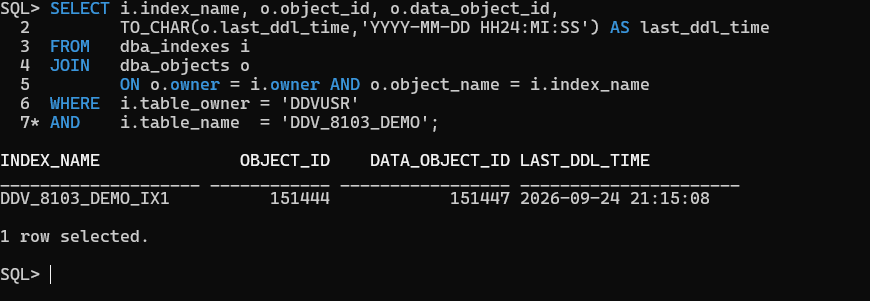
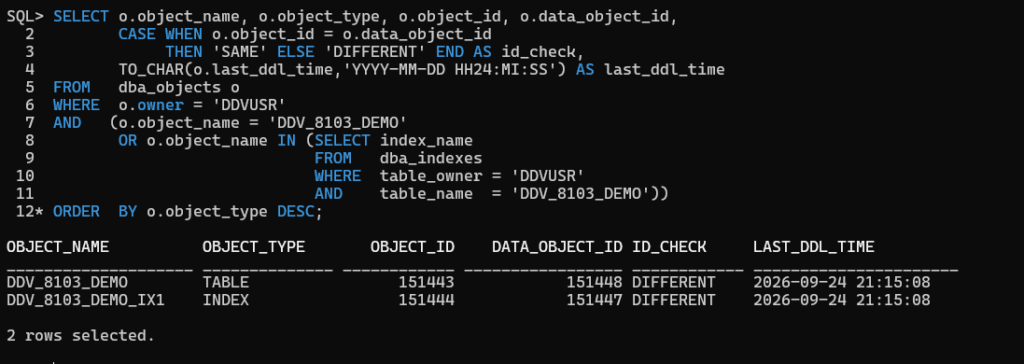
OBJECT_IDis unchanged, andDATA_OBJECT_IDhas moved on both the table and its index. The object “exists”; its segment does not.
Step 3: Find who ran the DDL
A TRUNCATE finishes in well under a second, which is too fast to rely on sampled activity. In this lab, the DDL audit trigger from the Prevention section had already recorded every TRUNCATE, ALTER and DROP in the schema, so finding the culprit was one query:
SELECT TO_CHAR(ddl_time,'YYYY-MM-DD HH24:MI:SS.FF3') AS ddl_time,
       db_user, event, obj_owner, obj_type, obj_name
FROM   ddl_audit_log
ORDER  BY ddl_time;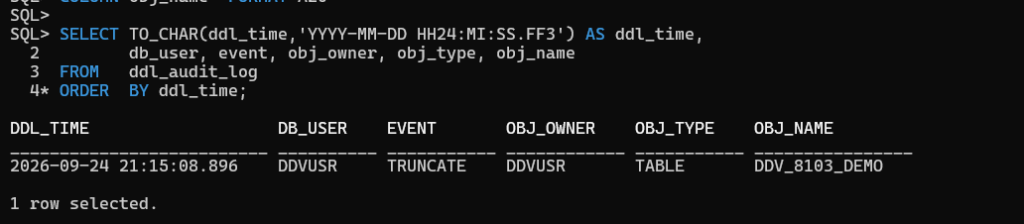
The TRUNCATE at 21:15:08.896 matches the LAST_DDL_TIME from Step 2 to the second. That is who and when, in one row.
No audit trigger in place? Check these instead:
UNIFIED_AUDIT_TRAIL, if your audit policies cover DDL.
DBA_SCHEDULER_JOB_RUN_DETAILS and your external scheduler’s logs for jobs that ran in the window.
ASH for longer-running DDL such as a partition move. Query patterns are in the DBA_HIST_ACTIVE_SESS_HISTORY guide.
Step 4: No DDL found? Take the other branch
Sometimes you find no concurrent DDL, and the error reproduces consistently on the same object. Oracle’s error text does not mention corruption. However, community reports do tie persistent ORA-08103 to structural problems, such as an Oracle Forums case that was resolved by dropping a bad index. In that situation, validate the structure before guessing:
ANALYZE TABLE ddvusr.ddv_8103_demo VALIDATE STRUCTURE CASCADE ONLINE;

On Base Database or on-premises systems, also run a logical block check and query the corruption view:
RMAN> VALIDATE CHECK LOGICAL TABLESPACE users;
SELECT * FROM v$database_block_corruption;
Then capture diagnostics for Oracle Support instead of experimenting in production (Base Database / on-premises; this event is not available on Autonomous):
ALTER SESSION SET EVENTS '8103 trace name errorstack level 3';
-- re-run the failing statement, then:
ALTER SESSION SET EVENTS '8103 trace name errorstack off';
Search My Oracle Support for ORA-08103 alongside your exact release update. Several product bugs have surfaced with this error over the years, so the version matters.
Fix: Match the Action to the Cause
| Cause found | Action |
|---|---|
| Concurrent DDL (truncate, move, partition op, rebuild) | Re-run the failed query, then separate the schedules so the jobs no longer overlap |
| Incomplete recovery during an object drop | Oracle’s documented action: drop the object, then recreate it from source |
| No DDL, reproducible, validation errors found | Follow the validation findings with Oracle Support. Do not patch around it with hints |
Verification: How to Confirm the Fix Worked
- Re-run the failed job outside the DDL window. It should complete with no application change.
- After rescheduling, check
LAST_DDL_TIMEthe next morning with the Quick Triage query. It should fall outside the report’s run window. - For the corruption branch, a clean
ANALYZE ... VALIDATE STRUCTURE CASCADE, a clean RMANVALIDATE, and no rows inV$DATABASE_BLOCK_CORRUPTIONconfirm the structural fix.
Prevention and Proactive Monitoring
1. Pre-DDL guard: check for readers before truncating
Guard A looks for active sessions whose current SQL plan touches the table:
SELECT s.sid, s.serial#, s.username, s.sql_id,
       s.last_call_et AS secs_running, s.module
FROM   v$session s
JOIN   v$sql_plan p
       ON p.sql_id = s.sql_id AND p.child_number = s.sql_child_number
WHERE  s.status = 'ACTIVE'
AND    p.object_owner = 'DDVUSR'
AND    p.object_name  = 'DDV_8103_DEMO';
Guard B looks for sessions holding an open cursor on the table:
SELECT s.sid, s.serial#, s.username, s.status,
       s.last_call_et AS secs_running, oc.sql_id, oc.sql_text
FROM   v$open_cursor oc
JOIN   v$session s ON s.sid = oc.sid AND s.saddr = oc.saddr
WHERE  UPPER(oc.sql_text) LIKE '%DDV_8103_DEMO%'
AND    s.sid <> TO_NUMBER(SYS_CONTEXT('USERENV','SID'));
2. Log every DDL for forensics
CREATE TABLE ddl_audit_log (
  ddl_time   TIMESTAMP DEFAULT SYSTIMESTAMP,
  db_user    VARCHAR2(128),
  event      VARCHAR2(30),
  obj_owner  VARCHAR2(128),
  obj_type   VARCHAR2(30),
  obj_name   VARCHAR2(128)
);

CREATE OR REPLACE TRIGGER trg_ddl_audit
AFTER DDL ON SCHEMA
BEGIN
  IF ora_sysevent IN ('TRUNCATE','ALTER','DROP') THEN
    INSERT INTO ddl_audit_log (db_user, event, obj_owner, obj_type, obj_name)
    VALUES (ora_login_user, ora_sysevent, ora_dict_obj_owner,
            ora_dict_obj_type, ora_dict_obj_name);
  END IF;
END;
/
What the trigger recorded during the lab:
This gives you the millisecond timestamp that ASH can miss. Test it in non-production first: a failing DDL trigger can block the DDL it is watching.
3. Choose DML over DDL where concurrent readers matter
DELETE is undo-protected and read-consistent. TRUNCATE is not. DELETE costs undo and redo, so this is a trade-off, not a free switch. Partition exchange also swaps segments, so it does not avoid the problem either.
4. Retry once in the application
A single retry on ORA-08103 handles the timing collision. If the retry also fails, stop and investigate rather than looping, because persistent failures point to the other branch.
Key Takeaways
The table exists; the segment changed. ORA-08103 object no longer exists usually means the query’s segment was replaced mid-flight.
Readers don’t block DDL. Separate the job schedules; don’t try to lock around the problem.
Undo tuning doesn’t fix this. This error is not ORA-01555. See the ORA-01555 fix guide for that one.
No DDL and it reproduces? Validate the structure and involve Oracle Support.
Lab Used for this Error Reproduce: Oracle Cloud Autonomous AI Database 26ai (23.26.3.3.0), SQLcl 24.3, September 2026. Errorstack and RMAN steps apply to Base Database Service and on-premises. Error text verified against Oracle Error Help as of September 2026.