
A developer on our team messaged last week: “The app is timing out on the customer dashboard — but the query is just findAll(), there’s nothing to tune.” We pulled AWR for the window. One SQL ID was executing 4,200 times in ninety seconds. The Java code was one line. The database saw 4,200 statements.
That gap — one line of application code producing thousands of database round trips — is exactly what this post is about. If you’re a DBA who inherited an application built on Hibernate, JPA, Entity Framework, or SQLAlchemy, you’ve felt this before: the ORM disappears from your view, and all you’re left with is SQL. Understanding the ORM architecture behind that SQL is what turns “why is this slow” into “here’s exactly which layer is generating the problem.”
What Is ORM?
Object-Relational Mapping (ORM) is a software layer that lets application developers work with objects — Java classes, C# classes, Python classes — instead of writing SQL directly. Instead of:
SELECT customer_id, name
FROM customers
WHERE customer_id = 101;
a developer writes:
Customer customer = customerRepository.findById(101);
The ORM translates that object call into SQL behind the scenes, sends it to the database, and converts the returned rows back into objects. Common ORMs by language:
| Language | Common ORM |
|---|---|
| Java | Hibernate, JPA |
| C# | Entity Framework |
| Python | SQLAlchemy, Django ORM |
| Node.js | Prisma, Sequelize |
What Is Hand-Written SQL?
Hand-written SQL is exactly what it sounds like — a developer or DBA writes the statement directly and sends it to the database, with full control over every join, filter, and index path:
SELECT c.customer_name,
       SUM(o.amount) AS total_sales
FROM customers c
JOIN orders o
  ON c.customer_id = o.customer_id
WHERE o.order_date >= DATE '2026-01-01'
GROUP BY c.customer_name
ORDER BY total_sales DESC;
Both approaches return the same data. The difference is who writes the SQL, and how much control that gives you over execution.
The ORM Architecture — Layer by Layer
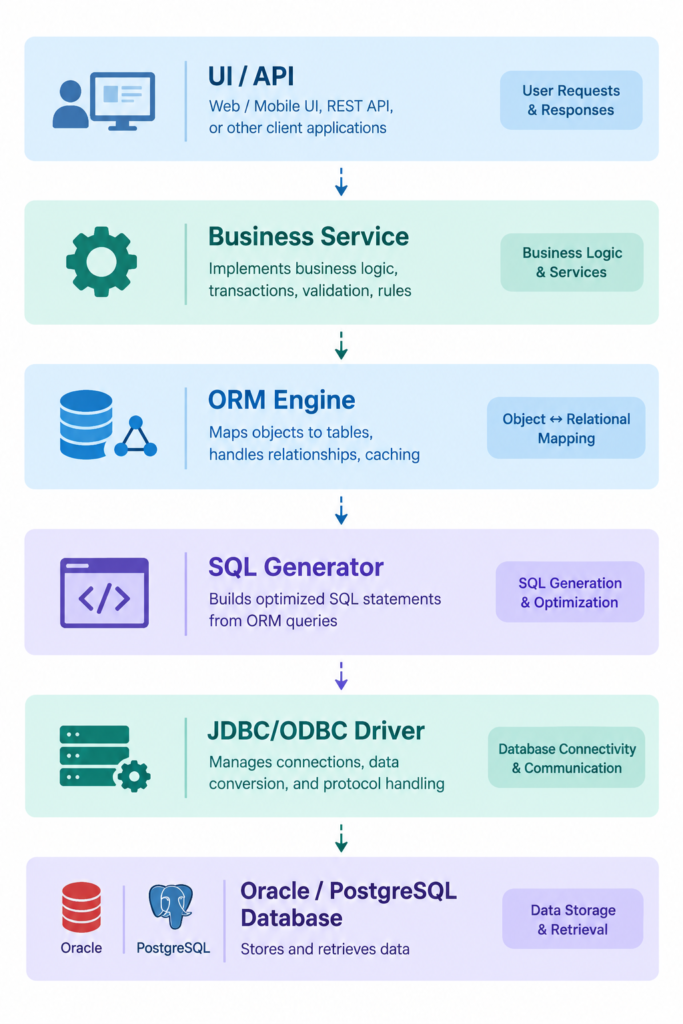
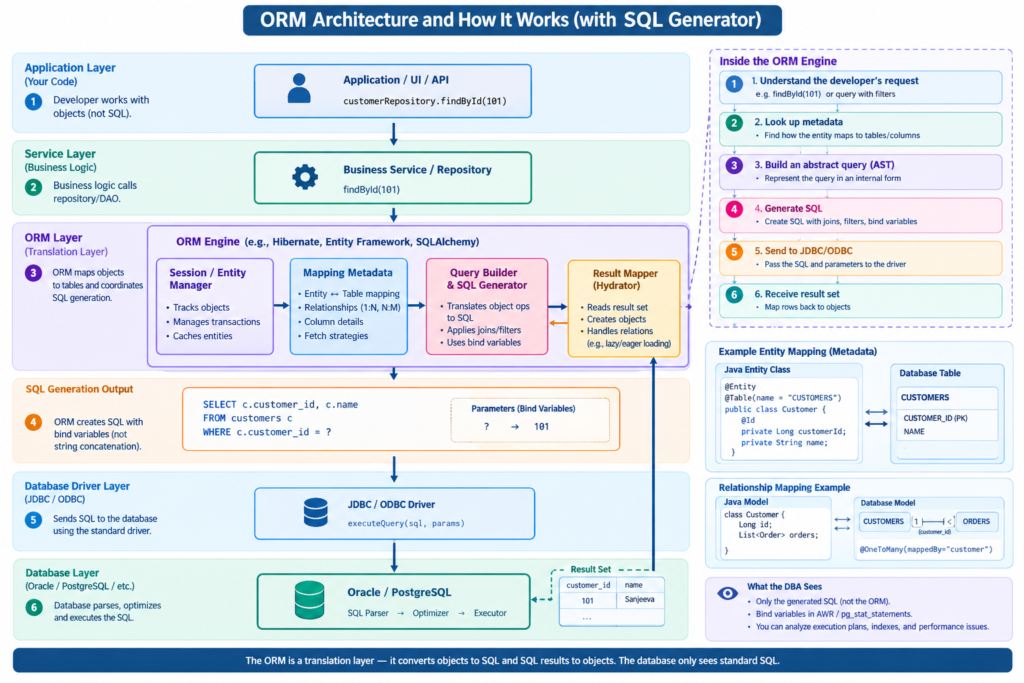
This is the part most application developers never think about and most DBAs never see directly. An ORM sits between the business logic and the database as a translation layer, built from distinct responsibilities:
| Layer | Responsibility |
|---|---|
| UI / API | Receives the user or application request |
| Business Service | Executes business logic, calls the repository |
| ORM Engine | Understands objects, relationships, and mapping metadata |
| SQL Generator | Produces parameterized SQL from the object query |
| JDBC / ODBC Driver | Sends SQL and bind values to the database |
| Database (Oracle / PostgreSQL) | Parses, optimizes, and executes ordinary SQL |
Notice the last row. The database has no concept that an ORM exists. Oracle and PostgreSQL only ever receive SQL text through the driver — the same path as if you’d typed it in SQL*Plus or psql.
Step 1 — The Schema Already Exists
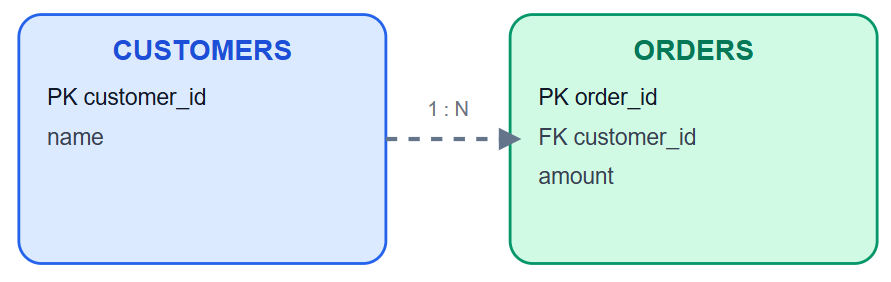
Before any ORM code is written, the relational schema is already there — ordinary tables, primary keys, foreign keys:
CREATE TABLE customers (
    customer_id NUMBER PRIMARY KEY,
    name        VARCHAR2(100)
);

CREATE TABLE orders (
    order_id    NUMBER PRIMARY KEY,
    customer_id NUMBER REFERENCES customers(customer_id),
    amount      NUMBER
);
Nothing about ORM changes this. The database design comes first; the ORM maps onto it afterward.
Step 2 — The Developer Defines the Mapping
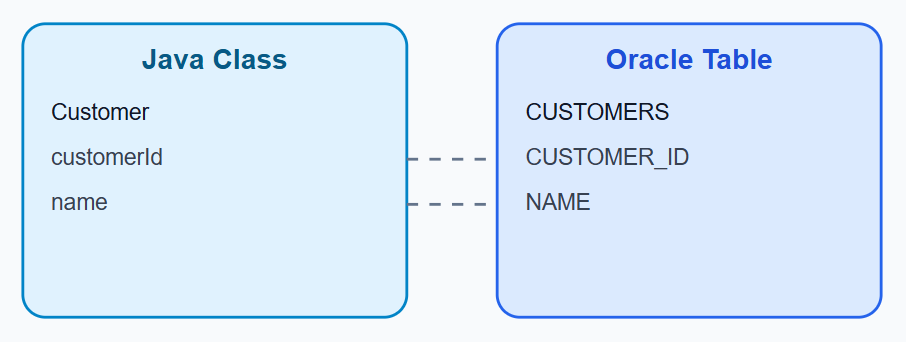
The developer writes an entity class with annotations that describe how it maps to the table:
@Entity
@Table(name = "CUSTOMERS")
public class Customer {

    @Id
    private Long customerId;

    private String name;

    @OneToMany(mappedBy = "customer")
    private List<Order> orders;
}
@Entity marks the class as mapped; @Table names the target table; @Id marks the primary key; @OneToMany describes the relationship to ORDERS through the customer_id foreign key. At application startup, the ORM reads every entity class and builds an in-memory mapping model — Hibernate calls this the SessionFactory metadata; Entity Framework calls it the metadata workspace. This is just a dictionary: Customer.class → CUSTOMERS table, Customer.orders → ORDERS.customer_id. No SQL exists yet at this point.
Step 3 — The Application Requests Data
At runtime, the developer writes:
Customer c = repository.findById(101);
Internally, the ORM engine runs through a fixed sequence:
- Understand the request — resolve
findById(101)against the mapping metadata - Look up metadata — find how
Customermaps toCUSTOMERS - Build an internal query representation — an abstract form of the request
- Generate SQL — produce parameterized SQL with bind variables
- Send to JDBC/ODBC — pass SQL and parameters to the driver
- Receive the result set — map rows back to objects
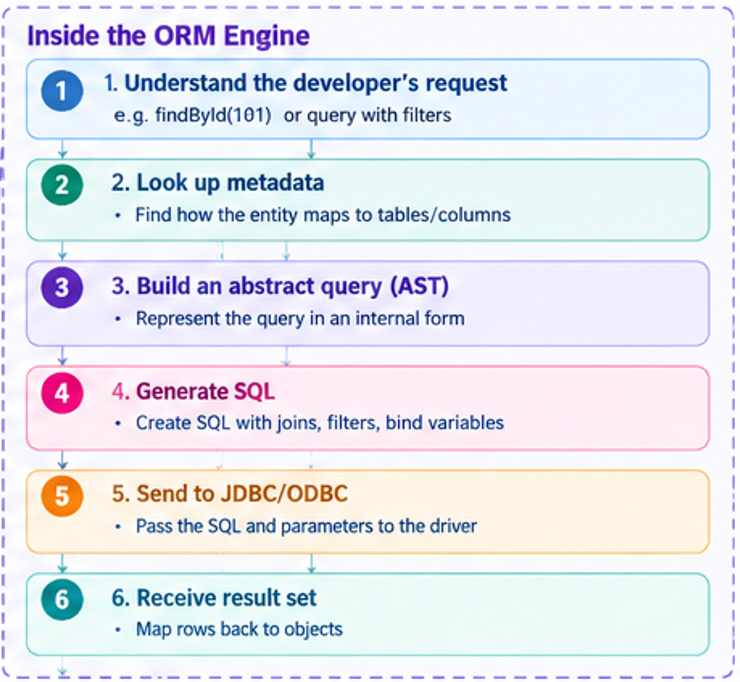
The SQL that comes out the other end:
SELECT customer_id, name
FROM customers
WHERE customer_id = ?;
Bind:
101
That ? is a bind variable — exactly what you’d expect from a well-written OCI or JDBC application, and exactly why you still see bind variables in AWR even when the SQL originated from Hibernate rather than a developer’s hand.
Step 4 — Rows Become Objects
Oracle returns a row; the ORM builds an object from it. This step is called hydration — a relational row becomes an in-memory object with its fields populated. From this point, the application works entirely with Customer objects and never sees SQL again.
Where the N+1 Problem Comes From
This is the single most common ORM performance incident, and it’s worth understanding at the architecture level rather than just recognizing the symptom.
Suppose the application loads 100 customers:
List<Customer> customers = repository.findAll();
One query, 100 objects. Fine so far. Later, the UI loops through each customer and accesses their orders:
for (Customer c : customers) {
    c.getOrders();
}
With lazy loading — the ORM default in most frameworks — each getOrders() call silently triggers its own query:
SELECT * FROM customers;

SELECT * FROM orders WHERE customer_id = 1;
SELECT * FROM orders WHERE customer_id = 2;
SELECT * FROM orders WHERE customer_id = 3;
...
One line of application code. 101 SQL statements against the database. In development, with five test rows, nobody notices. In production, with 500,000 customers, this is the incident that pages you at 2 a.m.
This is not an ORM defect — it’s a default. Eager fetch strategies, JOIN FETCH in JPQL, or explicit batch loading all exist specifically to prevent this pattern, but they have to be chosen deliberately.
What the DBA Actually Sees
Here’s the part that matters most for how you diagnose this. You never see Hibernate, Entity Framework, or SQLAlchemy in your monitoring. You only see the SQL they generated:
Oracle (AWR / ASH):
SELECT sql_id, executions, elapsed_time/executions AS avg_elapsed
FROM v$sql
WHERE sql_text LIKE 'SELECT * FROM ORDERS WHERE CUSTOMER_ID%'
ORDER BY executions DESC;
PostgreSQL (pg_stat_statements):
SELECT query, calls, mean_exec_time
FROM pg_stat_statements
WHERE query ILIKE '%FROM orders WHERE customer_id%'
ORDER BY calls DESC;
An N+1 problem shows up as the same SQL ID (or normalized query) executing an unusually high number of times relative to the page load or batch job that triggered it — not as one slow query, but as one fast query running far too often. That’s the signature to look for: low average elapsed time, high execution count, and a suspiciously round-trip-heavy access pattern.
ORM vs Hand-Written SQL — A Practical Rule
We don’t choose ORM or hand-tuned SQL ideologically — we choose based on complexity, performance sensitivity, and the size of the result set:
| Use ORM | Use hand-tuned SQL |
|---|---|
| CRUD screens, single-row lookups by key | Reporting queries, dashboards |
| User profile updates | Financial calculations |
| Simple REST APIs | Batch processing |
| Admin portals | High-volume joins, aggregations |
| Low-risk business logic | Performance-critical paths |
In most enterprise applications, 80–90% of the code is ordinary CRUD, where an ORM is the right tool for developer productivity. The remaining 10–20% of queries typically consume a disproportionate share of database time — and those are the ones worth rewriting as tuned SQL, stored procedures, or carefully indexed views, regardless of what generated the original version.
The Architectural Takeaway
An ORM is not a database replacement — it’s a translation layer. It maintains metadata mapping classes to tables, converts object operations into parameterized SQL, sends that SQL through JDBC or ODBC, and reconstructs the returned rows into objects. Oracle and PostgreSQL optimize only the SQL text they receive; from the engine’s perspective, there is no difference between SQL generated by Hibernate and SQL typed by a DBA.
Once you see the ORM architecture this way, tuning an ORM-backed application stops feeling like a black box. You’re not debugging “the ORM” — you’re doing exactly what you’d do for any other SQL: reading AWR or pg_stat_statements, finding the SQL ID with the wrong execution count or the missing index, and fixing that. The ORM is just the layer that put it there.