
Last Updated: October 2026 · Tested On: Oracle AI Database 26ai Enterprise Edition Release 23.26.4.1.0 on OCI Base Database Service · Lab: PDB CDBDEV, schema DDVUSR
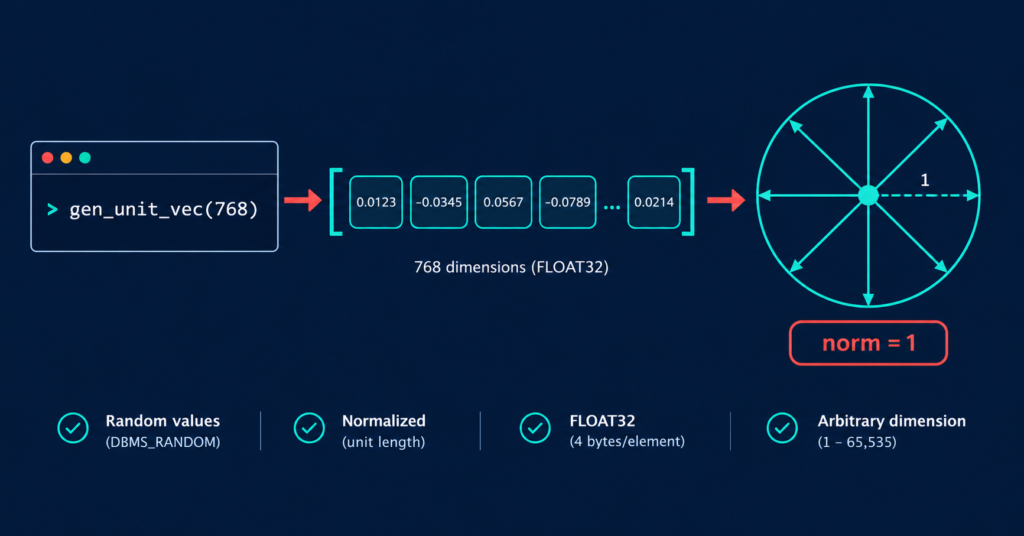
Every developer and DBA hits this moment sooner or later: you need to generate test vectors in Oracle for a POC, a vector index test or a storage sizing check, but there is no embedding model loaded and no time to set one up. You don’t need real embeddings for this. You need vectors of the right shape, fast.
Copy the function below. It returns a random, unit-length FLOAT32 vector of any dimension from 1 to 65535, ready to insert into a VECTOR column.
The Function — Copy-Paste First
/* ==========================================================================
   GEN_UNIT_VEC : Generate a random test vector for Oracle AI Vector Search
   --------------------------------------------------------------------------
   VERSION INFO
     Version      : 1.1
     Created      : October 2026
     Author       : Sanjeeva Kumar | dbadataverse.com
     Tested on    : Oracle AI Database 26ai Enterprise Edition 23.26.4.1.0
     Requires     : A database release that supports the VECTOR data type
                    (Oracle 23ai or later). Not tested on 23ai by the author.
     Output       : FLOAT32 only (no INT8 or BINARY)
     Valid range  : p_dims from 1 to 65535 (any other value raises ORA-20001)

   CHANGE LOG
     1.0  Oct 2026  Initial release.
     1.1  Oct 2026  Added p_dims range check (1 to 65535).

   WHAT IT DOES
     Returns one random VECTOR with the number of dimensions you ask for.
     The vector is "unit length" (norm is approximately 1), like many real
     embedding models produce. Values are stored as FLOAT32.

   WHEN TO USE IT
     POCs, vector index tests, storage sizing, error reproduction.
     Do NOT use it to test search quality. The numbers are random, so
     similarity results mean nothing.

   USAGE
     SELECT gen_unit_vec(384) FROM dual;     -- one 384-dimension vector

   REPRODUCIBLE RUNS
     EXEC DBMS_RANDOM.SEED(42)               -- run before the SELECT
     to get the same vector every time.

   CLEAN UP
     DROP FUNCTION gen_unit_vec;

   LICENSE / USE
     Free to copy and use for lab and test purposes. Not for production tables.
   ========================================================================== */
CREATE OR REPLACE FUNCTION gen_unit_vec (p_dims IN PLS_INTEGER)  -- p_dims = how many numbers the vector holds (e.g. 384, 768)
RETURN VECTOR                                                    -- gives back a native Oracle VECTOR value
IS
    -- A simple in-memory list of numbers (think: one column in a spreadsheet).
    -- We keep the random numbers here so we can use them twice.
    TYPE t_num IS TABLE OF NUMBER INDEX BY PLS_INTEGER;
    a    t_num;          -- the list holding our random numbers

    s    NUMBER := 0;    -- running total of (each number x itself); used to measure vector length

    -- The vector in text form, e.g. [0.123456,-0.045678,...]
    -- CLOB is used because the text form of a high-dimension vector can
    -- exceed the SQL VARCHAR2 size limit.
    txt  CLOB   := '[';  -- start with the opening square bracket
BEGIN
    /* ---- GUARD: reject dimension counts Oracle cannot store ---- */
    IF p_dims IS NULL OR p_dims < 1 OR p_dims > 65535 THEN
        RAISE_APPLICATION_ERROR(-20001,
            'Ranges must be between 1 and 65535');
    END IF;

    /* ---- PASS 1: create random numbers and measure the vector ---- */
    FOR i IN 1 .. p_dims LOOP
        a(i) := DBMS_RANDOM.VALUE(-1, 1);   -- random number between -1 and 1
        s    := s + a(i) * a(i);            -- add its square to the running total
    END LOOP;

    -- The square root of that total is the vector's "length" (its norm).
    s := SQRT(s);

    /* ---- PASS 2: scale every number so the vector length becomes 1 ---- */
    FOR i IN 1 .. p_dims LOOP
        txt := txt
               || CASE WHEN i > 1 THEN ',' END     -- put a comma between numbers, but not before the first
               || TO_CHAR(a(i) / s,                -- divide by the length = "normalise" to unit length
                          'FM990.000000');         -- 6 decimals, no padding spaces (e.g. -0.045678)
    END LOOP;

    /* ---- FINISH: convert the text into a real VECTOR value ---- */
    RETURN TO_VECTOR(txt || ']',   -- add the closing bracket
                     p_dims,       -- number of dimensions
                     FLOAT32);     -- storage format (32-bit floating point)
END;
/
Why a Generator Instead of Real Embeddings
You are testing a table design, an index build or a sizing number. The embedding model is not the thing under test, so don’t let it become the project.
- Skip the setup, start the real work. Loading an ONNX model or wiring up an external embedding API can eat hours before you run a single line of your own test. Here it is one function and one
SELECT. Your time goes into what you are actually validating: DDL, index behaviour, storage, or the error you are chasing. - Any dimension you have, you can test. 384, 768, 1024, 3072, or whatever the application team is evaluating next. Pass the number and test that shape today, even before the model is finalised.
- Nothing leaves the database. No API keys, no external calls, no real document text sent to a third party. This helps in locked-down environments where an embedding service is simply not reachable.
- Repeatable when you need it. Fix the seed (Step 3) and every reader or colleague gets the same vector. That makes it usable in runbooks and regression tests.
- Unit length, like many real models. Many popular embedding models return normalised vectors, and this generator does the same. Norm checks and distance-metric tests start from a realistic shape, even though the values carry no meaning.
Native Option: VECTOR_RANDOM and VECTOR_RANDOM_PER_ROW
Oracle 26ai already ships native functions for random vector data: VECTOR_RANDOM and VECTOR_RANDOM_PER_ROW. If all you need is random numbers in a VECTOR column, use them. No custom code needed.
SELECT VECTOR_RANDOM_PER_ROW(8, FLOAT32) AS v8 FROM dual;
Check what comes out. Does the native vector have a norm of 1, and does DBMS_RANDOM.SEED make it repeatable?
SELECT ROUND(VECTOR_NORM(v), 4) AS norm
FROM  (SELECT /*+ NO_MERGE */ VECTOR_RANDOM_PER_ROW(768, FLOAT32) AS v FROM dual);
So why write our own? Because this function gives you three things in one place: unit-length output (the native vectors in our test came out with a norm of about 2.9 × 10²⁰, not 1), a vector sequence you can repeat with DBMS_RANDOM.SEED (the native function gave a different vector after re-seeding), and readable PL/SQL you can change. Use the native function when you only need random data. Use this one when the test depends on those properties.
How It Works — Line by Line (and What You Can Change)
The function does four things. Each step below also shows the knob you can turn if your test needs something different.
- First loop: generate the raw numbers. It fills an array with
p_dimsrandom values between -1 and 1 (DBMS_RANDOM.VALUE) and keeps a running sum of their squares.
Customize it: changeVALUE(-1, 1)toVALUE(0, 1)if you want only positive values. The vector still comes out unit length after Step 3. s := SQRT(s): measure the vector. The square root of that running sum is the vector’s length (its norm). We need this number to scale everything in the next step.- Second loop: normalise and build the text. Every value is divided by the length, so the final vector has a norm of approximately 1. The loop also builds the text form
[0.123456,-0.045678,...].FM990.000000keeps six decimals and drops padding spaces.
Customize it:- Use
FM990.0000for four decimals if you want shorter text and smaller scripts. - The
.in the format mask always produces a period, whatever yourNLS_NUMERIC_CHARACTERSsetting, so the text form stays valid on any locale. - Remove the
/ sdivision if you want raw, non-normalised vectors, for example to see how dot product and cosine behave differently on data whose norm is not 1.
- Use
TO_VECTOR(..., p_dims, FLOAT32): make it a real vector. This converts the text into a nativeVECTORvalue with the declared dimension count and storage format.
Customize it:TO_VECTORalso acceptsFLOAT64. If you switch, keep it in line with your column definition and raise the decimals in the format mask, otherwise the extra precision is wasted. I have only tested FLOAT32 on CDBDEV.
Why a CLOB? The text form of a high-dimension vector can exceed the SQL VARCHAR2 limit (depending on dimensions and MAX_STRING_SIZE), so the text is built in a CLOB.
Dimension and seed. Pass any number to gen_unit_vec(n) and run EXEC DBMS_RANDOM.SEED(42) first when you need the same vector every time.
Guard Rail: Dimensions Must Be 1 to 65535
On our lab, FLOAT32 vectors accept 1 to 65535 dimensions. Version 1.0 of this function had no check, so a bad value only failed at the very end, after all the work was done:
SELECT gen_unit_vec(65536) FROM dual;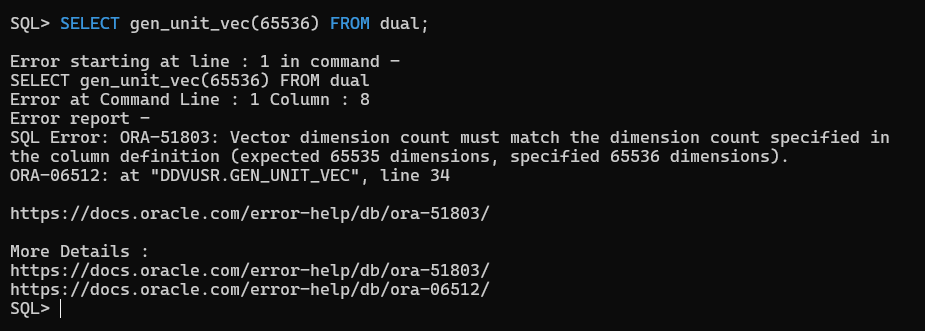
The message mentions a column definition even though there is no column in this query. Read it as “Oracle’s limit is 65535”.
Version 1.1 checks the value first and fails immediately:
SELECT gen_unit_vec(65536) FROM dual;The upper edge still works:
SELECT VECTOR_DIMENSION_COUNT(gen_unit_vec(65535)) AS dims FROM dual;Step 1 — Quick Sanity Check
One vector, three checks. NO_MERGE makes Oracle generate the vector once instead of once per column:
SELECT VECTOR_DIMENSION_COUNT(v)     AS dims,
       VECTOR_DIMENSION_FORMAT(v)    AS fmt,
       ROUND(VECTOR_NORM(v), 4)      AS norm
FROM  (SELECT /*+ NO_MERGE */ gen_unit_vec(768) AS v FROM dual);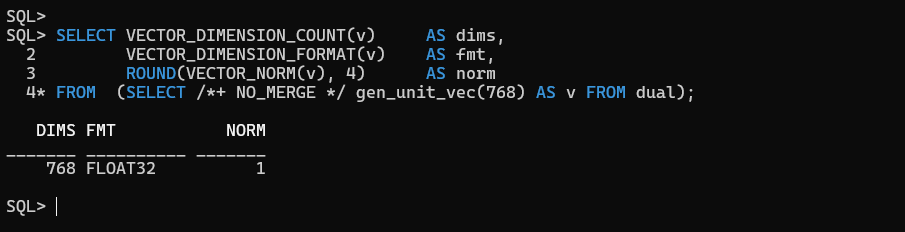
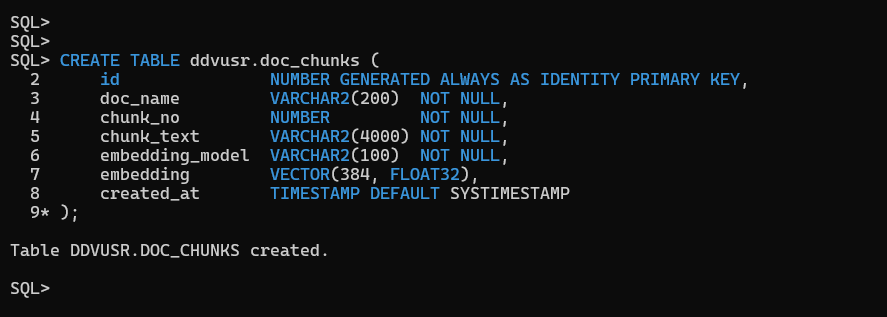
Step 2 — Load a Test Table
CREATE TABLE ddvusr.doc_chunks (
    id               NUMBER GENERATED ALWAYS AS IDENTITY PRIMARY KEY,
    doc_name         VARCHAR2(200)  NOT NULL,
    chunk_no         NUMBER         NOT NULL,
    chunk_text       VARCHAR2(4000) NOT NULL,
    embedding_model  VARCHAR2(100)  NOT NULL,
    embedding        VECTOR(384, FLOAT32),
    created_at       TIMESTAMP DEFAULT SYSTIMESTAMP
);
INSERT INTO ddvusr.doc_chunks (doc_name, chunk_no, chunk_text, embedding_model, embedding)
SELECT 'ora_runbook_' || CEIL(LEVEL / 20),
       MOD(LEVEL - 1, 20) + 1,
       'Lab chunk ' || LEVEL || ': synthetic runbook text for vector testing',
       'lab-model-384',
       gen_unit_vec(384)
FROM   dual
CONNECT BY LEVEL <= 1000;

COMMIT;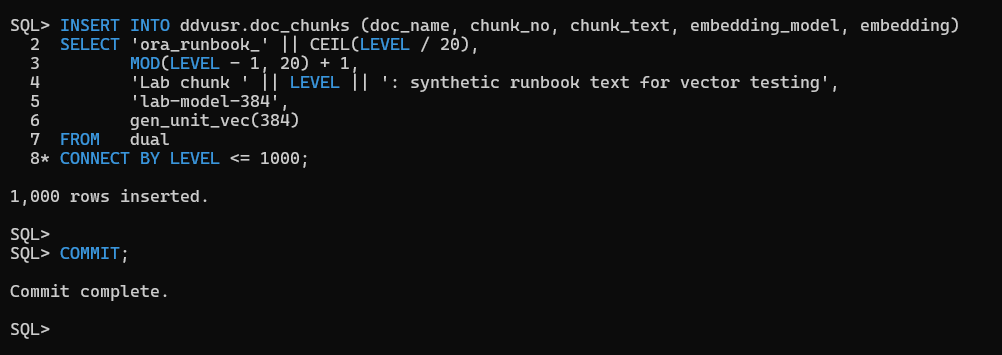
SELECT VECTOR_DIMENSION_COUNT(embedding)  AS dims,
       VECTOR_DIMENSION_FORMAT(embedding) AS fmt,
       COUNT(*)                            AS row_count
FROM   ddvusr.doc_chunks
GROUP  BY VECTOR_DIMENSION_COUNT(embedding),
          VECTOR_DIMENSION_FORMAT(embedding);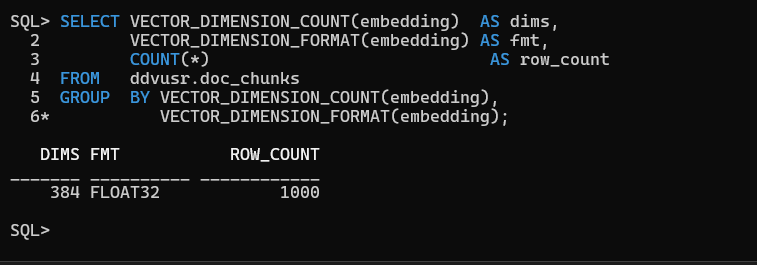
Step 3: Reproducible Runs with a Seed
Random output changes on every run. That is fine for a quick sizing test, but it hurts the moment someone else has to see the same result. Fix the seed first, and the same sequence of calls gives the same set of vectors.
This helps when you are:
- Running a pilot project: your team lead re-runs your test next week and gets identical data, so any difference in results comes from the change, not from the random numbers.
- Building a POC: the demo behaves the same in the rehearsal and in front of the client. No surprises.
- Writing a blog or a runbook: readers run your steps and see the same output you printed.
- Doing regression testing: you compare before and after a patch, parameter change or index rebuild on identical input.
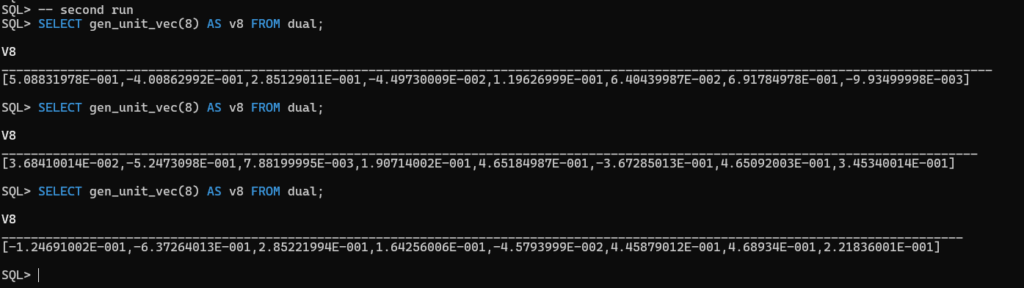
Before fixing the seed: every run gives a new set
Run the same three calls, twice, with no seed:
SELECT gen_unit_vec(8) AS v8 FROM dual;
SELECT gen_unit_vec(8) AS v8 FROM dual;
SELECT gen_unit_vec(8) AS v8 FROM dual;
First Execution:
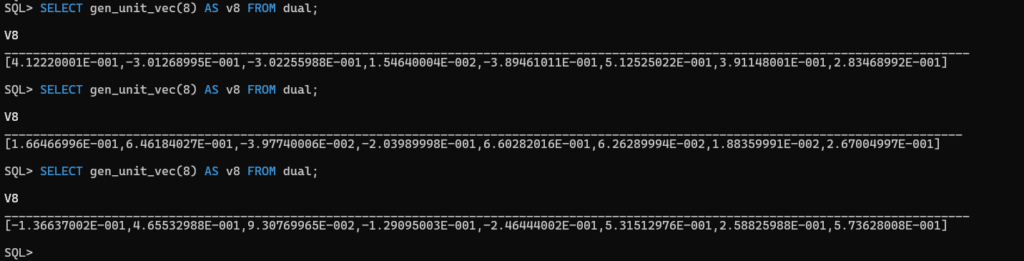
Second Execution
After fixing the seed: same seed, same set
Seed first (any number works; 42 is just our choice), then run the three calls. Repeat the whole block:
-- Run 1
EXEC DBMS_RANDOM.SEED(42);
SELECT gen_unit_vec(8) AS v8 FROM dual;
SELECT gen_unit_vec(8) AS v8 FROM dual;
SELECT gen_unit_vec(8) AS v8 FROM dual;

-- Run 2: seed again, same three calls
EXEC DBMS_RANDOM.SEED(42);
SELECT gen_unit_vec(8) AS v8 FROM dual;
SELECT gen_unit_vec(8) AS v8 FROM dual;
SELECT gen_unit_vec(8) AS v8 FROM dual;
Output (identical in both runs):
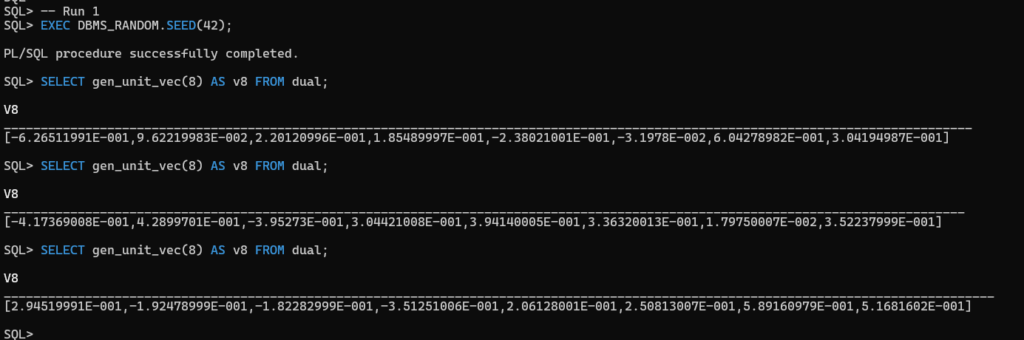
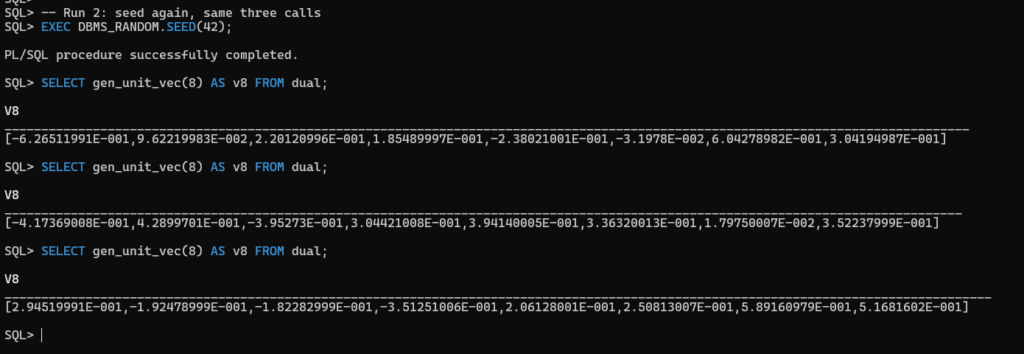
Inside a run, the three vectors differ. Across the two runs, vector 1 matches vector 1, vector 2 matches vector 2 and vector 3 matches vector 3. The seed fixes the whole sequence, so the same seed plus the same order of calls gives the same set.
Note: Your client displays vectors in scientific notation (
6.26511991E-001). That is display formatting only. The function builds the plain[0.123456,...]text form internally.Note: Reproducibility holds for the same seed, the same sequence of
DBMS_RANDOMcalls and the same session. If anything else in the session callsDBMS_RANDOMin between, the sequence shifts. I verified this on 23.26.4.1.0 only, so don’t assume the same vectors on other releases.
Random output changes on every run.
What This Generator Is NOT
- Not semantic. Random vectors carry no meaning. Similarity rankings between them are noise — use them for structure, sizing and plan tests, never to judge search quality.
- FLOAT32 only.
BINARYvectors need packedUINT8values and dimensions in multiples of 8;INT8needs whole numbers from -128 to 127. Neither is produced here. - Not built for bulk. CLOB concatenation runs once per dimension, per row. Fine for thousands of rows in a lab; for millions, measure on your own system before committing to it.
- Not for production tables. Keep it in a lab schema and drop it when the test is done:
DROP FUNCTION gen_unit_vec;
Where We Use It
- Oracle VECTOR Data Type: Storage, Dimensions, Metrics — reproducing ORA-51803 and backfilling a 768-dim column
- Oracle Vector Search: Your First Hands-On Walkthrough