
Last Updated: December 2025 | Oracle 19c/21c | By Ahaaryo
Oracle Version Scope: This guide covers Oracle 19c (fully supported) and Oracle 21c (Innovation Release, already desupported but widely deployed).
Introduction
“The password is definitely correct!” – Every DBA has said this at least once while troubleshooting ORA-01017 invalid username password.
I remember a production incident at 2 AM. The monitoring application couldn’t connect to the database. The password hadn’t changed, the connection string was correct, but login kept failing. After investigating, I discovered the account had automatically expired due to a password policy the application team didn’t know existed.
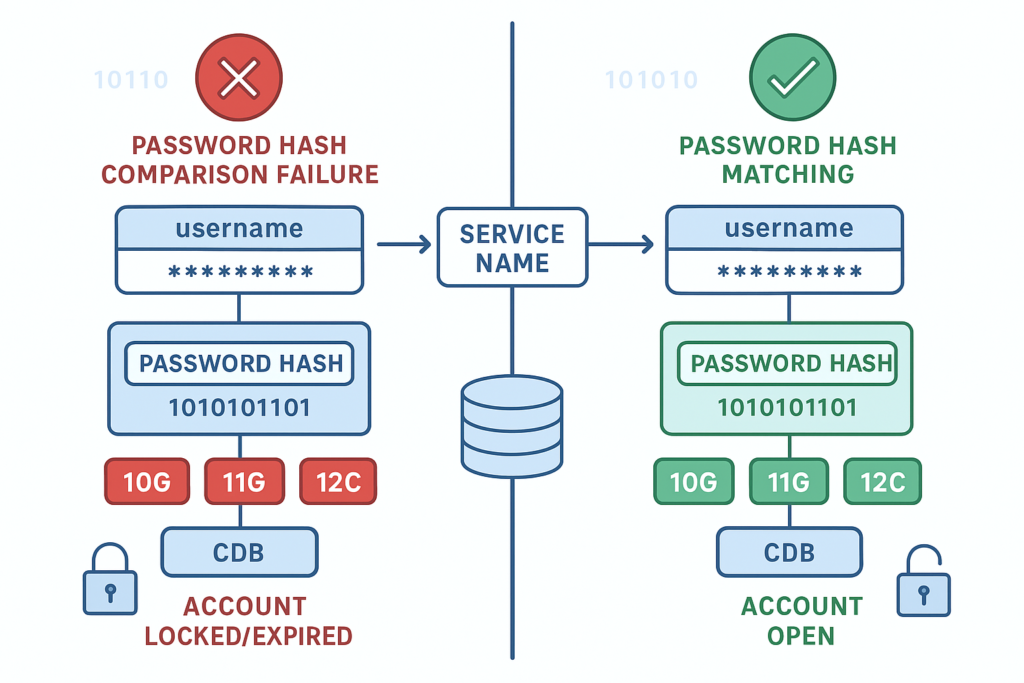
ORA-01017 seems straightforward – wrong username or password, right? But there are actually 7 different root causes, and several involve Oracle’s authentication mechanisms that many DBAs don’t fully understand. In this comprehensive guide, I’ll explain not just HOW to fix ORA-01017, but WHY each solution works at the technical level.
What is ORA-01017?
Error Message:
ORA-01017: invalid username/password; logon deniedWhat it means: Oracle’s authentication process failed. This could be due to incorrect credentials, account status issues, authentication configuration problems, or connection misrouting.
When it occurs:
- SQL*Plus login fails
- Application database connections fail
- Database links stop working
- Scheduled jobs fail to authenticate
- SQL Developer/Toad cannot connect
- Service accounts suddenly lose access
Critical Oracle Authentication Concepts
Before diving into troubleshooting, understanding these Oracle authentication fundamentals will save you hours of frustration.
1. Password Case Sensitivity & Hashing Versions
Oracle’s password case sensitivity depends on which password hashing algorithm is active:
sql
-- Check user's password versions
SELECT username, password_versions
FROM dba_users
WHERE username = 'SCOTT';

-- Possible values:
-- 10G  : Legacy DES hash (case-INSENSITIVE if this exists)
-- 11G  : SHA-1 hash (case-sensitive)
-- 12C  : SHA-2 hash (case-sensitive, strongest)
Critical Rule:
- If 10G version exists → Password is case-INSENSITIVE
- If only 11G or 12C exists → Password is case-SENSITIVE
- Best practice: Remove 10G hash for security
Example:
sql
-- User with only 12C hash
SELECT password_versions FROM dba_users WHERE username = 'APPUSER';
-- Result: 12C

-- These will have different behaviors:
CONNECT appuser/MyPassword    -- Works
CONNECT appuser/mypassword    -- ORA-01017 (case matters!)
CONNECT appuser/MYPASSWORD    -- ORA-01017
2. Password Special Characters (The Double Quote Rule)
CRITICAL: Passwords containing special characters MUST be enclosed in double quotes during password setting. The quotes are NOT part of the password.
sql
-- CORRECT - Special characters require quotes during ALTER
ALTER USER app_user IDENTIFIED BY "P@ssw0rd!2024";

-- WRONG - Without quotes, Oracle interprets @ as SQL*Plus variable
ALTER USER app_user IDENTIFIED BY P@ssw0rd!2024;
-- Results in: SP2-0042: unknown command

-- When connecting, quotes are needed:
CONNECT app_user/"P@ssw0rd!2024"
Common special characters requiring quotes:
@#$%^&*()!+={}[]|:;'"<>,.?/
3. Username Case Sensitivity (Quoted Identifiers)
Default behavior: Unquoted usernames are stored in UPPERCASE.
sql
-- These are IDENTICAL - both create user "SCOTT"
CREATE USER scott IDENTIFIED BY tiger;
CREATE USER SCOTT IDENTIFIED BY tiger;

-- Both stored as: SCOTT (uppercase)

-- This creates a DIFFERENT user: "Scott" (case-preserved)
CREATE USER "Scott" IDENTIFIED BY tiger;
Connection implications:
sql
-- For normal user (created without quotes)
CONNECT scott/tiger           -- Works
CONNECT SCOTT/tiger           -- Works
CONNECT "scott"/tiger         -- ORA-01017 (no such user)

-- For quoted user (created with quotes)
CREATE USER "Scott" IDENTIFIED BY tiger;
CONNECT "Scott"/tiger         -- Works
CONNECT scott/tiger           -- ORA-01017
CONNECT SCOTT/tiger           -- ORA-01017
Best Practice: Avoid quoted usernames unless absolutely necessary. They create confusion and break automation scripts.
4. The sec_case_sensitive_logon Parameter
sql
-- Check current setting
SHOW PARAMETER sec_case_sensitive_logon;

-- Disable case sensitivity (NOT RECOMMENDED)
ALTER SYSTEM SET sec_case_sensitive_logon = FALSE;
Important Notes:
- Setting to FALSE is a security downgrade
- Do NOT use this as a fix – properly set passwords instead
Version Status:
| Version | Status |
|---|---|
| 12c | ✅ Supported |
| 18c | ✅ Supported |
| 19c | ⚠️ Deprecated (documented) |
| 21c | ❌ Desupported |
| 23ai | ❌ Removed |
The 7 Root Causes of ORA-01017
Cause 1: Wrong Password (Most Common – 60% of cases)
Problem: The password provided doesn’t match Oracle’s stored hash.
Diagnosis:
sql
-- You cannot retrieve passwords - only reset them
-- Connect as SYSDBA
sqlplus / as sysdba

-- Check if user exists
SELECT username, account_status
FROM dba_users
WHERE username = 'APPUSER';
Solution:
sql
-- Reset password
ALTER USER appuser IDENTIFIED BY "NewSecure123!";

-- Test connection
CONNECT appuser/"NewSecure123!"
Why it works: Oracle hashes the new password using the configured algorithm (11G/12C) and stores it. During login, Oracle hashes the provided password and compares hashes.
Cause 2: Password Case Mismatch
Problem: Password has correct characters but wrong case, and user only has 11G/12C hash (no 10G hash for case-insensitive fallback).
Diagnosis:
sql
-- Check password versions
SELECT username, password_versions
FROM dba_users
WHERE username = 'APPUSER';

-- If result shows: 11G 12C (no 10G)
-- Then password IS case-sensitive
Solution:
sql
-- Try different cases manually
CONNECT appuser/MyPassword
CONNECT appuser/mypassword
CONNECT appuser/MYPASSWORD

-- Or reset with known case
ALTER USER appuser IDENTIFIED BY "MyPassword";
Technical Detail: The 10G hash algorithm (DES) uppercases passwords before hashing. 11G (SHA-1) and 12C (SHA-2) hash the password exactly as provided, making them case-sensitive.
Cause 3: Account is Locked
Problem: Account locked due to failed login attempts or manual lock.
Diagnosis:
sql
SELECT username, account_status, lock_date
FROM dba_users
WHERE username = 'APPUSER';

-- Status shows: LOCKED or LOCKED(TIMED)
Solution:
sql
-- Unlock the account
ALTER USER appuser ACCOUNT UNLOCK;

-- Test
CONNECT appuser/correct_password
To prevent auto-locking for service accounts:
sql
-- Create service profile with unlimited failed attempts
CREATE PROFILE svc_profile LIMIT
  FAILED_LOGIN_ATTEMPTS UNLIMITED
  PASSWORD_LIFE_TIME UNLIMITED;

-- Assign to service account
ALTER USER appuser PROFILE svc_profile;
Cause 4: Password Expired
Problem: Password lifetime exceeded based on profile settings.
Diagnosis:
sql
SELECT username, account_status, expiry_date
FROM dba_users
WHERE username = 'APPUSER';

-- Status shows: EXPIRED or EXPIRED(GRACE)
Solution:
sql
-- Reset password (also removes expiry)
ALTER USER appuser IDENTIFIED BY "NewPassword123!";

-- For service accounts, use unlimited lifetime
ALTER USER appuser IDENTIFIED BY "NewPassword123!"
  PROFILE svc_profile;
Cause 5: Quoted Username Mismatch
Problem: User was created with quotes, but connecting without quotes (or vice versa).
Diagnosis:
sql
-- Check exact username as stored
SELECT username, created
FROM dba_users
WHERE UPPER(username) = 'SCOTT';

-- If username shows as "Scott" (mixed case)
-- → User was created with quotes
Solution:
sql
-- For quoted user, use quotes when connecting
CONNECT "Scott"/tiger

-- To avoid confusion, recreate without quotes
DROP USER "Scott";
CREATE USER scott IDENTIFIED BY tiger;
-- Now stored as: SCOTT (uppercase)
Real-world scenario:
sql
-- Developer accidentally creates:
CREATE USER "AppUser" IDENTIFIED BY pass123;

-- Later, connection fails:
CONNECT appuser/pass123     -- ORA-01017

-- Must use:
CONNECT "AppUser"/pass123   -- Works
Cause 6: Wrong Service Name or Connection String
Problem: Connecting to wrong database service entirely.
Diagnosis:
sql
-- On the database server, check service names
SELECT value FROM v$parameter WHERE name = 'service_names';

-- List all available services
SELECT name, con_id FROM v$services ORDER BY con_id;

-- From client, test connection
tnsping YOUR_SERVICE_NAME
Solution:
bash
# Correct connection format
sqlplus username/password@hostname:port/service_name

# Example
sqlplus appuser/"Pass123"@dbserver:1521/PROD

# Or update tnsnames.ora correctly
PROD =
  (DESCRIPTION =
    (ADDRESS = (PROTOCOL = TCP)(HOST = dbserver)(PORT = 1521))
    (CONNECT_DATA = (SERVICE_NAME = PROD))
  )
Common mistake:
bash
# Using database name instead of service name
sqlplus user/pass@host:1521/ORCL    # Wrong if service is PROD

# Check database name vs service name - they CAN be different!
Cause 7: Wrong PDB in Multitenant (12c+)
Problem: In multitenant architecture, user exists in a specific PDB but you’re connecting to CDB$ROOT or a different PDB.
Diagnosis:
sql
-- Connect to CDB as SYSDBA
sqlplus / as sysdba

-- Check which container(s) user exists in
SELECT con_id, username, account_status
FROM cdb_users
WHERE username = 'APPUSER'
ORDER BY con_id;

-- Result example:
-- CON_ID  USERNAME   ACCOUNT_STATUS
-- ------  ---------  --------------
--      1  APPUSER    OPEN           <- CDB$ROOT
--      3  APPUSER    OPEN           <- PDB1
Solution:
bash
# Connect directly to the correct PDB
sqlplus appuser/password@hostname:1521/PDB1

# Or connect to CDB first, then switch container
sqlplus / as sysdba
ALTER SESSION SET CONTAINER = PDB1;
CONNECT appuser/password;
Verify PDB services:
sql
-- List PDB service names
SELECT name AS service_name, con_id
FROM v$services
WHERE con_id > 1;
Real-world example:
sql
-- User exists only in PDB1, but connection string points to CDB
-- Wrong:
sqlplus appuser/pass@host:1521/CDB1    -- ORA-01017

-- Correct:
sqlplus appuser/pass@host:1521/PDB1    -- Success
Complete Troubleshooting Workflow
Follow this systematic approach to diagnose ORA-01017:
Step 1: Verify Username Existence and Container
sql
sqlplus / as sysdba

-- Non-CDB environment
SELECT username, account_status, lock_date, expiry_date,
       password_versions, profile
FROM dba_users
WHERE username = 'YOUR_USERNAME';

-- CDB/PDB environment
SELECT con_id, username, account_status, password_versions
FROM cdb_users
WHERE username = 'YOUR_USERNAME'
ORDER BY con_id;
Interpretation:
- No rows: Username doesn’t exist → CREATE USER
- Multiple CON_IDs: Exists in multiple containers → Connect to correct PDB
- Account_status: Determines next troubleshooting step
Step 2: Check Account Status
| Status | Meaning | Action Required |
|---|---|---|
OPEN | Active, password is wrong | Reset password |
LOCKED | Too many failed attempts | ACCOUNT UNLOCK |
EXPIRED | Password lifetime exceeded | Reset password |
EXPIRED & LOCKED | Both problems | Reset password AND unlock |
EXPIRED(GRACE) | In grace period | Reset password soon |
Fix commands:
sql
-- For LOCKED
ALTER USER username ACCOUNT UNLOCK;

-- For EXPIRED or EXPIRED & LOCKED
ALTER USER username IDENTIFIED BY "NewPass123!";

-- Combined fix
ALTER USER username IDENTIFIED BY "NewPass123!" ACCOUNT UNLOCK;
Step 3: Verify Password Case Sensitivity
sql
-- Check hashing versions
SELECT password_versions FROM dba_users WHERE username = 'APPUSER';

-- If 11G or 12C only (no 10G), password is case-sensitive
-- Try exact case from documentation or reset
ALTER USER appuser IDENTIFIED BY "KnownPassword";
Step 4: Check for Quoted Username
sql
-- This query finds case-sensitive usernames
SELECT username
FROM dba_users
WHERE username != UPPER(username);

-- If your username appears, it was created with quotes
-- Connect using: CONNECT "ExactCase"/password
Step 5: Verify Service Name and PDB
sql
-- Check available service names
SELECT value FROM v$parameter WHERE name = 'service_names';

-- For CDB, list PDB services
SELECT pdb_name, service_name FROM cdb_services;

-- Test from client
tnsping YOUR_SERVICE_NAME
Step 6: Test Connection
bash
# Try connecting with explicit service
sqlplus username/"password"@host:port/service_name

# For PDB
sqlplus username/"password"@host:port/pdb_service_name
Preventing ORA-01017 Issues
1. Service Account Password Management
sql
-- Create service account profile
CREATE PROFILE svc_unlimited LIMIT
  PASSWORD_LIFE_TIME UNLIMITED
  PASSWORD_REUSE_TIME UNLIMITED
  PASSWORD_LOCK_TIME UNLIMITED
  FAILED_LOGIN_ATTEMPTS UNLIMITED;

-- Create service account
CREATE USER batch_svc IDENTIFIED BY "Secure!Pass2024"
  DEFAULT TABLESPACE users
  TEMPORARY TABLESPACE temp
  PROFILE svc_unlimited;

-- Grant required privileges
GRANT CONNECT, RESOURCE TO batch_svc;
2. Password Complexity Standards
Implement password verification function:
sql
-- Example verification function
CREATE OR REPLACE FUNCTION verify_password
(username varchar2,
 password varchar2,
 old_password varchar2)
RETURN boolean IS
BEGIN
   -- Check length (minimum 12 characters)
   IF LENGTH(password) < 12 THEN
      RAISE_APPLICATION_ERROR(-20001, 'Password too short');
   END IF;

   -- Check complexity (must have upper, lower, digit, special)
   IF NOT REGEXP_LIKE(password, '([A-Z])') OR
      NOT REGEXP_LIKE(password, '([a-z])') OR
      NOT REGEXP_LIKE(password, '([0-9])') OR
      NOT REGEXP_LIKE(password, '([!@#$%^&*])') THEN
      RAISE_APPLICATION_ERROR(-20002, 'Password lacks complexity');
   END IF;

   RETURN(TRUE);
END;
/

-- Assign to profile
ALTER PROFILE default LIMIT
  PASSWORD_VERIFY_FUNCTION verify_password;
3. Monitor Account Status
sql
-- Daily monitoring script
SELECT username, account_status,
       expiry_date,
       ROUND(expiry_date - SYSDATE) days_until_expiry
FROM dba_users
WHERE (account_status != 'OPEN'
       OR expiry_date < SYSDATE + 7)
  AND username NOT IN ('SYS','SYSTEM','DBSNMP','XS$NULL')
ORDER BY expiry_date;
4. Document Connection Strings
Maintain connection documentation:
Environment | Host        | Port | Service Name | PDB
----------- | ----------- | ---- | ------------ | ------
Production  | dbprod1     | 1521 | PRODDB       | PDB1
UAT         | dbuat1      | 1521 | UATDB        | PDB2
Dev         | dbdev1      | 1521 | DEVDB        | PDB3
5. Connection Testing Script
bash
#!/bin/bash
# test_connections.sh

USERS="appuser1 appuser2 batch_svc reporting"
SERVICE="dbprod:1521/PRODDB"

for user in $USERS; do
  echo -n "Testing $user@$SERVICE... "
  echo "exit" | sqlplus -S $user/password@$SERVICE >/dev/null 2>&1
  if [ $? -eq 0 ]; then
    echo "OK"
  else
    echo "FAILED - ORA-01017"
  fi
done
Advanced Troubleshooting Scenarios
Scenario 1: Database Link Fails After Password Change
sql
-- Check existing database links
SELECT db_link, username, host
FROM dba_db_links;

-- Test link
SELECT * FROM dual@REMOTE_DB;
-- ORA-01017 via database link

-- Fix: Update database link with new password
DROP DATABASE LINK remote_db;

CREATE DATABASE LINK remote_db
  CONNECT TO remote_user IDENTIFIED BY "NewPassword123"
  USING 'remote_tns';
Scenario 2: SQLPLUS Works but Application Fails
Diagnosis:
sql
-- Check application user from application server
sqlplus appuser/password@connection_string

-- If this works but app fails, check:
-- 1. Application's connection string
-- 2. Special characters in password (app may not escape properly)
-- 3. Application using wrong service/PDB
Solution:
- Review application configuration file
- Check application logs for actual connection string used
- Consider simpler password without special characters for app accounts
Scenario 3: Intermittent ORA-01017
Possible causes:
- Multiple passwords in use (some cached connections still use old)
- RAC node configuration differences
- Password about to expire (EXPIRED(GRACE) status)
Diagnosis:
sql
-- Check grace period
SELECT username, account_status, expiry_date,
       ROUND(expiry_date - SYSDATE) days_until_expiry
FROM dba_users
WHERE username = 'APPUSER';

-- Check RAC password file consistency
SELECT * FROM v$pwfile_users WHERE username = 'APPUSER';
Key Takeaways
The ORA-01017 Quick Reference:
- Passwords with special characters → Always use double quotes
- Password case matters → Unless user has 10G hash (not recommended)
- Username case matters → Only if created with quotes (avoid this)
- Check account status first → LOCKED, EXPIRED most common after wrong password
- Verify service name → Often overlooked in multitenant environments
- Check correct PDB → User might exist in different PDB than expected
- Never use sec_case_sensitive_logon=FALSE → Deprecated, insecure
Best Practices:
- ✅ Service accounts: UNLIMITED password lifetime
- ✅ Document all passwords in secure vault
- ✅ Avoid quoted usernames
- ✅ Use strong passwords with complexity requirements
- ✅ Monitor account status proactively
- ✅ Test connections after any password changes
- ✅ Keep only 11G/12C hashes (remove 10G for security)
Conclusion
ORA-01017 is deceptively simple on the surface but reveals Oracle’s sophisticated authentication architecture when you dig deeper. Understanding password hash versions, case sensitivity rules, and multitenant container awareness transforms you from someone who just resets passwords to someone who can architect secure, maintainable authentication strategies.
The next time you encounter ORA-01017, you’ll know exactly where to look and why each solution works at the technical level. That’s the difference between fixing a symptom and understanding the system.
Have you encountered ORA-01017 in an unusual scenario not covered here? Share your experience in the comments!
Additional Resources
- Oracle Net Services Administrator’s Guide
- Oracle Support: Doc ID 1304899.1 – ORA-12154 Troubleshooting
- tnsnames.ora Syntax Reference
Related Posts:
5 thoughts on “ORA-01017: Invalid Username/Password – Complete Guide”