
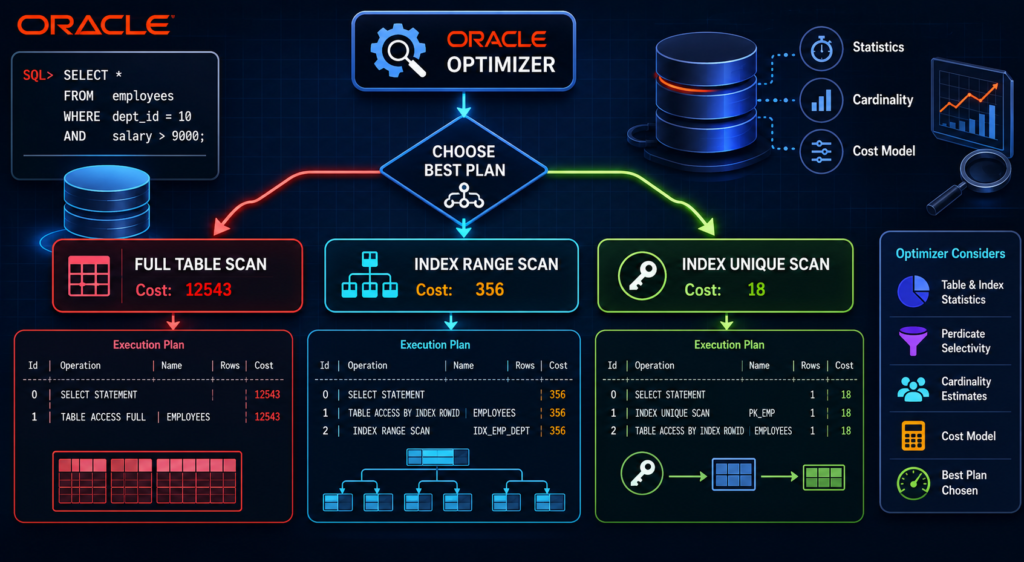
Oracle optimizer access paths determine whether your query runs in 18 seconds or 18 milliseconds. Every SQL statement hitting your Oracle database goes through the optimizer, which silently picks between a full table scan, index range scan, or index unique scan — and that single decision defines your query’s cost.
What Is an Access Path?
Before the optimizer picks a plan, it evaluates row sources — the set of rows returned at each step of the execution plan. A row source can be a table, a join result, or a view.
- Unary operation — single row source. Example: full table scan
- Binary operation — two or more row sources. Example: join query
The optimizer’s goal is always the same: find the lowest-cost execution plan using available statistics, cardinality estimates, and index metadata. Get this right and your queries fly. Get it wrong and you’re chasing TABLE ACCESS FULL on a 50-million-row table at 2 AM.
How Oracle Chooses an Access Path
The optimizer is cost-based (CBO). It does not guess — it calculates. Three inputs drive every access path decision:
| Input | What It Tells the Optimizer |
|---|---|
| Object statistics | Row count, block count, column NDV |
| Cardinality estimates | How many rows will this predicate return? |
| Cost model | I/O cost + CPU cost for each candidate plan |
Stale statistics = wrong access path choice. This is the root cause of 80% of optimizer misbehavior in production.
sql
-- Check when statistics were last gathered on a table
SELECT table_name, last_analyzed, num_rows, blocks
FROM dba_tables
WHERE owner = 'YOUR_SCHEMA'
ORDER BY last_analyzed ASC;
If last_analyzed is NULL or months old — your optimizer is flying blind.
Oracle Access Paths — The Complete List
Oracle has 15 access paths. Each serves a specific data retrieval pattern. Here is the full map:
Index-Based Access Paths
| Access Path | When Optimizer Picks It | Cost Profile |
|---|---|---|
| Index Unique Scan | Equality predicate on unique/PK index | Lowest — single block read |
| Index Range Scan | Range predicate (>, <, BETWEEN, LIKE) | Low-medium |
| Index Full Scan | All rows needed, ordered by index key | Medium |
| Index Fast Full Scan | All index blocks needed, order not required | Medium — multiblock reads |
| Index Skip Scan | Leading column of composite index not in predicate | Medium-high |
| Index Join Scan | Multiple indexes satisfy full select list | Medium |
Table-Based Access Paths
| Access Path | When Optimizer Picks It | Cost Profile |
|---|---|---|
| Full Table Scan | Low selectivity, no usable index, small table | High on large tables |
| Table Access by RowID | After index lookup returns rowid | Very low |
| Sample Table Scan | SAMPLE clause in query | Varies |
Bitmap Access Paths
| Access Path | When Optimizer Picks It | Cost Profile |
|---|---|---|
| Bitmap Index Single Value | Equality on bitmap-indexed low-cardinality column | Low for DW workloads |
| Bitmap Index Range Scan | Range predicate on bitmap index | Low-medium |
| Bitmap Merge | Multiple bitmap indexes combined | Medium |
Cluster and Hash Access Paths
| Access Path | When Optimizer Picks It | Cost Profile |
|---|---|---|
| Cluster Scan | Table stored in indexed cluster | Low |
| Hash Scan | Table stored in hash cluster, equality predicate | Very low |
Confirming the Access Path — Read Your Execution Plan
Do not guess what the optimizer picked. Read the execution plan:
sql
-- Method 1: EXPLAIN PLAN
EXPLAIN PLAN FOR
SELECT * FROM employees WHERE dept_id = 10 AND salary > 9000;

SELECT * FROM TABLE(DBMS_XPLAN.DISPLAY);

-- Method 2: Real execution plan from cursor cache
SELECT * FROM TABLE(
  DBMS_XPLAN.DISPLAY_CURSOR(sql_id => '&sql_id', format => 'ALLSTATS LAST')
);
The Operation column tells you exactly which access path was used:
Id | Operation                   | Name        | Rows | Cost
---|-----------------------------|-------------|------|-----
 0 | SELECT STATEMENT            |             |    1 |   18
 1 |  TABLE ACCESS BY INDEX ROWID| EMPLOYEES   |    1 |   18
 2 |   INDEX UNIQUE SCAN         | PK_EMP      |    1 |    1
INDEX UNIQUE SCAN → optimizer found a unique index match. Cost = 18. This is what you want.
Compare that to:
Id | Operation         | Name      | Rows  | Cost
---|-------------------|-----------|-------|------
 0 | SELECT STATEMENT  |           | 50000 | 12543
 1 |  TABLE ACCESS FULL| EMPLOYEES |  50000| 12543
TABLE ACCESS FULL with cost 12543 — optimizer has no usable index or statistics are stale.
Deep Dives — Explore Each Access Path
Each access path has its own behavior, hints, and production gotchas. Explore the full series:
- 📌 Oracle Index Full Scan — How It Works and When the Optimizer Uses It
- 📌 Optimizer Access Paths — Index Unique Scan
- 📌 Optimizer Access Paths — Index FFS with DISTINCT
- 📌 Oracle Direct Path Read — Complete Performance Guide
Version Note
Validated on Oracle 19c and Oracle 21c. CBO behavior is consistent across both versions. Oracle 26ai introduces additional optimizer intelligence via AI-assisted statistics but core access path logic remains unchanged.
2 thoughts on “Why Is Oracle Doing a Full Table Scan Instead of the Index?”