
This is in continuation of My last blog about Meta Commands in PostgreSQL. In last blog I have explained what a Meta command and how to list databases. In next few blogs we will explore few of Meta commands. Lets start exploring schemas.
Visit this series of last blog for other command.
The command we will explore here is:
1. \dt
2. CREATE TABLE
3. \d
Extended Output with \dt+
The basic \dt command lists tables but \dt+ gives you extended information including table size on disk and optional description.
postgresblogs=# \dt+
Sample output:
                          List of relations
   Schema    |  Name  | Type  |  Owner   |  Size   | Description
-------------+--------+-------+----------+---------+-------------
 postgresblogs | posts  | table | postgres | 8192 bytes |
 postgresblogs | writer | table | postgres | 0 bytes    |
This is especially useful in production environments where you want to quickly identify large tables without running a full pg_size_pretty() query.
Filter Tables by Schema Using \dt
When you have multiple schemas in a database, \dt without arguments lists only the tables in the current search_path. To list tables from a specific schema:
-- List all tables in a specific schema
\dt schema_name.*

-- List tables matching a pattern
\dt post*

-- List tables across all schemas
\dt *.*
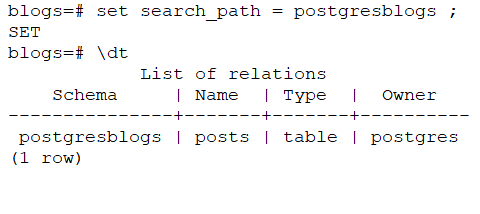
Output lists all relations of schemaDescribing a Table with \d and \d+
You already know \d tablename shows column names, datatypes, and constraints. The extended version \d+ reveals even more:
postgresblogs=# \d+ writer
                                        Table "postgresblogs.writer"
   Column   |          Type         | Collation | Nullable | Default | Storage  | Stats target | Description
------------+-----------------------+-----------+----------+---------+----------+--------------+-------------
 id         | bigint                |           | not null |         | plain    |              |
 name       | character varying     |           |          |         | extended |              |
 language   | character varying(2)  |           |          |         | extended |              |
 category   | character varying     |           |          |         | extended |              |
Indexes:
    "writer_pkey" PRIMARY KEY, btree (id)
Key additions in \d+ output:
- Storage — plain, extended, external, main (how PostgreSQL stores the column internally)
- Stats target — number of statistics buckets for query planner (default 100)
- Indexes — all indexes defined on the table including primary keys
List Schemas with \dn
Before listing tables, you need to know which schemas exist in your database:
postgresblogs=# \dn
      List of schemas
     Name      |  Owner
---------------+----------
 postgresblogs | postgres
 public        | postgres
Use \dn+ to also see access privileges per schema — useful when debugging permission issues.
Common Errors and Fixes
Error 1 — Table not found with \dt
Did not find any relation named "writer".
Cause: You are connected to the right database but the wrong schema is in search_path.
Fix:
-- Check current search_path
SHOW search_path;

-- Set the correct schema
SET search_path TO postgresblogs;

-- Now retry
\dt
Error 2 — \d shows no indexes after CREATE TABLE
After creating a table without explicit constraints, \d shows no indexes section. This is expected — PostgreSQL only creates an index automatically when you define a PRIMARY KEY or UNIQUE constraint:
-- No index created (as in our example)
CREATE TABLE writer (
  id        BIGINT,
  name      VARCHAR,
  language  VARCHAR(2),
  category  VARCHAR
);

-- Index auto-created on id when PRIMARY KEY is defined
CREATE TABLE writer (
  id        BIGINT PRIMARY KEY,
  name      VARCHAR,
  language  VARCHAR(2),
  category  VARCHAR
);
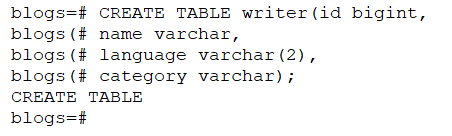
Create statement of table writerAlways define PRIMARY KEY at creation time. Adding it later via ALTER TABLE creates the index but is slower on large tables.
Error 3 — \dt returns empty on fresh database
Did not find any relations.
Cause: You connected to the default postgres database which has no user tables.
Fix:
-- List available databases first
\l

-- Connect to your target database
\c your_database_name

-- Now list tables
\dt
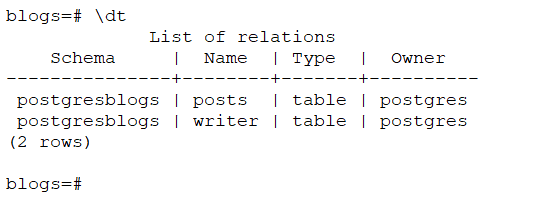
Practical DBA Workflow — Schema Exploration Sequence
When you connect to an unfamiliar PostgreSQL database for the first time, follow this sequence:
-- Step 1: Which database am I in?
SELECT current_database();

-- Step 2: What schemas exist?
\dn

-- Step 3: Set search path to target schema
SET search_path TO your_schema;

-- Step 4: List all tables with sizes
\dt+

-- Step 5: Describe a specific table
\d+ tablename

-- Step 6: Check indexes on a table
\di tablename
This 6-step sequence takes under 30 seconds and gives you a complete picture of any schema you land on.
Quick Reference — \dt and \d Variants
| Command | What It Shows |
|---|---|
\dt | Tables in current search_path |
\dt+ | Tables with size and description |
\dt schema.* | Tables in specific schema |
\dt pattern* | Tables matching name pattern |
\d tablename | Columns, types, constraints |
\d+ tablename | Full detail including storage and indexes |
\di | Indexes in current schema |
\di+ tablename | Indexes on specific table |
\dn | List all schemas |
\dn+ | Schemas with access privileges |
Validated on PostgreSQL 14, 15, and 16. Commands work identically across all three versions.
In next blog we will explore further commands which we can run in psql
Last few blogs on Commands are:
2 thoughts on “PostgreSQL Meta-Command using psql: Command Information -IV”