
T
his is in continuation of My last blog about Meta Commands in PostgreSQL. In last blog I have explained what a Meta command and how to list databases. In next few blogs we will explore few of Meta commands. Lets start exploring schemas.
Visit this series of last blog for other command.
The command we will explore here is:
1. \dn
2. CREATE SCHEMA
3. SET SEARCH_PATH
Once we are able to connect to our database using \c, we can use another psql command to proceed further. To list all schemas of the database connected, we can use \dn.
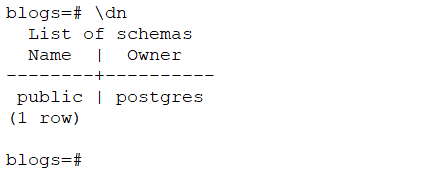
Listing of all schema of the connected database i.e. blogsCurrently there is only one schema i.e. public. This is default schema created by PostgreSQL for us. We can create new schema using CREATE SCHEMA command.
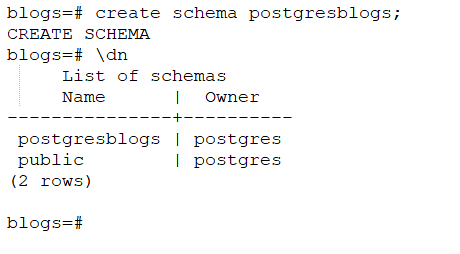
New schema postgresblogs are created using create schemaNew schema is created using CREATE SCHEMA. To navigate to the desired schema in psql, we can use SET command which sets the SEARCH_PATH for our session.
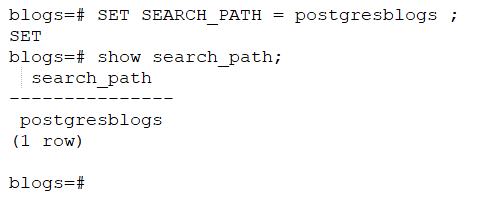
Navigating to schema postgresblogsThis we can use psql to connect to a particular database and schema within that database.
\dn+ — Schemas with Permissions
The basic \dn command lists schema names and owners. Use \dn+ to also see access privileges — critical when debugging permission denied errors:
sql
blogs=# \dn+ List of schemas
Name | Owner | Access privileges | Description
---------------+----------+----------------------+-------------
postgresblogs | postgres | postgres=UC/postgres |
public | postgres | =UC/postgres |Access privilege letters decoded:
- U = USAGE (can see and use the schema)
- C = CREATE (can create objects inside the schema)
- = before the slash = privilege granted to PUBLIC (all users)
If a user gets ERROR: permission denied for schema, check this output first.
CREATE SCHEMA with Owner
In production environments, schemas are usually created with a dedicated owner rather than the superuser:
sql
-- Create schema owned by a specific user
CREATE SCHEMA appschema AUTHORIZATION appuser;

-- Verify
\dn
This is the recommended approach for application databases — the application user owns its schema and postgres superuser is not used at runtime.
SET search_path — Session vs Permanent
The SET search_path command you used sets the schema only for the current session. When you disconnect and reconnect, it resets to default.
Session-level (temporary)
sql
SET search_path TO postgresblogs;Permanent for a specific user
sql
ALTER USER appuser SET search_path TO postgresblogs, public;Permanent for a specific database
sql
ALTER DATABASE blogs SET search_path TO postgresblogs, public;Check current search_path
sql
SHOW search_path;For production applications always set search_path at the user or database level — relying on session-level setting causes hard-to-debug issues when connection pools recycle.
Multiple Schemas in search_path
PostgreSQL resolves object names by checking schemas left to right in search_path:
sql
SET search_path TO postgresblogs, public;With this setting:
- PostgreSQL first looks for the table in
postgresblogs - If not found, falls back to
public - If still not found, throws
ERROR: relation does not exist
This is why you can call SELECT * FROM writer without specifying postgresblogs.writer explicitly — as long as search_path is set correctly.
Drop a Schema Safely
sql
-- Drop empty schema
DROP SCHEMA postgresblogs;

-- Drop schema and all objects inside it (use with extreme caution)
DROP SCHEMA postgresblogs CASCADE;
CASCADE drops all tables, views, functions, and sequences inside the schema. Always verify what is inside before running CASCADE in production:
sql
-- Check what objects exist before dropping
SELECT schemaname, tablename
FROM pg_tables
WHERE schemaname = 'postgresblogs';
Common Errors and Fixes
Error 1 — schema does not exist
ERROR: schema "postgresblogs" does not existCause: Typo in schema name or schema was never created.
Fix:
sql
-- List all schemas to verify
\dn

-- Create if missing
CREATE SCHEMA postgresblogs;
Error 2 — permission denied for schema
ERROR: permission denied for schema postgresblogsCause: Connected user does not have USAGE privilege on the schema.
Fix:
sql
GRANT USAGE ON SCHEMA postgresblogs TO youruser;
GRANT CREATE ON SCHEMA postgresblogs TO youruser;
Error 3 — relation does not exist (after schema creation)
ERROR: relation "writer" does not existCause: Schema exists but search_path not set — PostgreSQL is looking in public by default.
Fix:
sql
SET search_path TO postgresblogs;
-- or qualify fully
SELECT * FROM postgresblogs.writer;
Practical DBA Workflow — Schema Setup Sequence
Use this sequence when setting up a new schema for an application:
sql
-- Step 1: Create schema with dedicated owner
CREATE SCHEMA appschema AUTHORIZATION appuser;

-- Step 2: Verify schema and permissions
\dn+

-- Step 3: Set search_path permanently for the user
ALTER USER appuser SET search_path TO appschema, public;

-- Step 4: Reconnect as appuser and verify
SHOW search_path;

-- Step 5: Create your tables
CREATE TABLE appschema.orders (...);

-- Step 6: Verify
\dt appschema.*
Quick Reference — Schema Commands
| Command | What It Does |
|---|---|
\dn | List all schemas |
\dn+ | List schemas with permissions |
CREATE SCHEMA name | Create a new schema |
CREATE SCHEMA name AUTHORIZATION user | Create schema with specific owner |
SET search_path TO name | Navigate to schema (session only) |
ALTER USER u SET search_path TO name | Permanent search_path for user |
ALTER DATABASE d SET search_path TO name | Permanent search_path for database |
SHOW search_path | Show current search_path |
DROP SCHEMA name | Drop empty schema |
DROP SCHEMA name CASCADE | Drop schema and all its objects |
Validated on PostgreSQL 14, 15, and 16. All commands work identically across versions.
We will explore few more commands in next blog.
Last few blogs on Commands are:
4 thoughts on “PostgreSQL Meta-Command using psql: Command Information -III”