
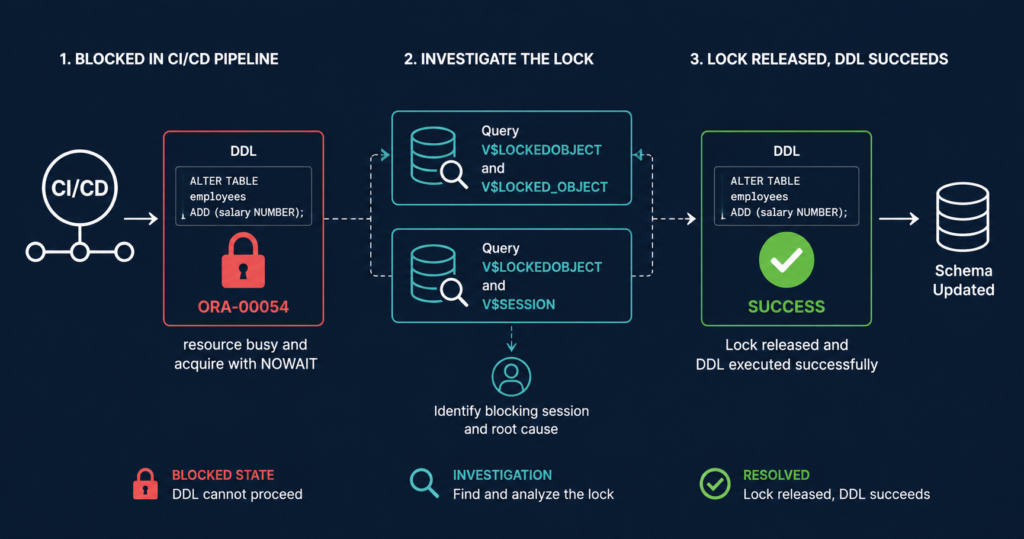
A CI/CD pipeline pushing a schema change to production failed at 2 AM with ORA-00054. The release engineer opened a P1 ticket. The on-call DBA identified the blocker and resolved it in under 3 minutes. The issue was not a bug, not a configuration problem, and not an application defect. It was a classic lock conflict — and one that every production DBA will encounter sooner or later.
This post breaks down what ORA-00054 actually means, how to find the blocking session in real time, how to resolve it safely, and how to prevent it from derailing your deployment pipelines.
What Does ORA-00054 Mean?
The full error reads:
ORA-00054: resource busy and acquire with NOWAIT specified or timeout expired
This error occurs when a session tries to acquire a lock on an object — typically through a DDL operation like ALTER TABLE, TRUNCATE, or DROP INDEX — but another session already holds an incompatible lock on that same object. Because DDL operations use NOWAIT by default, Oracle does not wait for the lock to be released. It fails immediately.
The important thing to understand is that this is not a database failure. The database is doing exactly what it should — protecting data integrity by refusing to let two conflicting operations run on the same object simultaneously.
The Real Production Scenario
Here is how this typically plays out in a modern production environment.
An application is running DML transactions — inserts, updates, deletes — against an ORDER_DETAILS table. Meanwhile, a CI/CD pipeline triggers a deployment that includes an ALTER TABLE ADD COLUMN on the same table. The ALTER TABLE requires an exclusive metadata/object lock on the table. Active DML transactions hold TM enqueue locks in Row Exclusive (SX) mode. Oracle cannot grant the exclusive DDL lock while incompatible TM locks exist on the object. The ALTER TABLE fails immediately with ORA-00054.
This scenario has become increasingly common as teams adopt automated deployments. In the days of manual releases, the DBA would coordinate a maintenance window. With CI/CD pipelines running at any hour, there is no coordination — the DDL simply collides with active DML.
Step 1: Find the Blocking Session
When ORA-00054 hits, we need to answer one question: who is holding the lock?
First, get the full lock picture across the instance — run this without any object filter:
-- Step 1a: Full lock landscape — all locked objects on the instance
SELECT
    lo.session_id      AS blocking_sid,
    s.serial#          AS blocking_serial,
    s.username          AS blocking_user,
    o.object_name       AS locked_object,
    DECODE(lo.locked_mode,
        2, 'Row Share (SS)',
        3, 'Row Exclusive (SX)',
        4, 'Share (S)',
        5, 'Share Row Exclusive (SSX)',
        6, 'Exclusive (X)'
    )                   AS lock_mode,
    s.status            AS session_status
FROM
    v$locked_object lo
JOIN
    dba_objects o ON lo.object_id = o.object_id
JOIN
    v$session s ON lo.session_id = s.sid
ORDER BY
    o.object_name, lo.session_id;
Once we identify the problem object from the output above, drill down to that specific table:
-- Step 1b: Drill down to the specific locked object
SELECT
    lo.session_id      AS blocking_sid,
    s.serial#          AS blocking_serial,
    s.username          AS blocking_user,
    s.program           AS blocking_program,
    s.machine           AS blocking_machine,
    s.status            AS session_status,
    o.owner             AS object_owner,
    o.object_name       AS locked_object,
    o.object_type       AS object_type,
    lo.oracle_username  AS lock_holder,
    DECODE(lo.locked_mode,
        0, 'None',
        1, 'Null',
        2, 'Row Share (SS)',
        3, 'Row Exclusive (SX)',
        4, 'Share (S)',
        5, 'Share Row Exclusive (SSX)',
        6, 'Exclusive (X)'
    )                   AS lock_mode
FROM
    v$locked_object lo
JOIN
    dba_objects o ON lo.object_id = o.object_id
JOIN
    v$session s ON lo.session_id = s.sid
WHERE
    o.object_name = 'ORDER_DETAILS'
ORDER BY
    lo.session_id;
For a quick view of blocking chains, Oracle provides two useful views:
-- Who is blocking?
SELECT * FROM dba_blockers;

-- Who is waiting?
SELECT * FROM dba_waiters;
Note: In Oracle RAC environments, use GV$ views (GV$LOCKED_OBJECT, GV$SESSION) instead of V$ views to capture lock information across all instances.
Sample output:
BLOCKING_SID  BLOCKING_SERIAL  BLOCKING_USER  BLOCKING_PROGRAM       SESSION_STATUS  LOCKED_OBJECT   LOCK_MODE
-----------   ---------------  -------------  --------------------   --------------  --------------  ------------------
247           34521            APP_USER       JDBC Thin Client       ACTIVE          ORDER_DETAILS   Row Exclusive (SX)
312           12876            APP_USER       JDBC Thin Client       INACTIVE        ORDER_DETAILS   Row Exclusive (SX)
Now we know exactly who is holding the lock. Session 247 is actively running a transaction. Session 312 is INACTIVE — meaning it started a transaction but never committed or rolled back. This type of abandoned session with an uncommitted transaction is the most common culprit.
Step 2: Deeper Investigation — What Is the Blocker Doing?
Before killing anything, let us check what SQL the blocking session is running:
SELECT
    s.sid,
    s.serial#,
    s.username,
    s.status,
    s.last_call_et     AS seconds_since_last_call,
    sq.sql_text         AS current_sql
FROM
    v$session s
LEFT JOIN
    v$sql sq ON s.sql_id = sq.sql_id
WHERE
    s.sid IN (247, 312);
Sample output:
SID   SERIAL#  USERNAME   STATUS    SECONDS_SINCE_LAST_CALL  CURRENT_SQL
---   -------  --------   -------   -----------------------  ------------------------------------
247   34521    APP_USER   ACTIVE    3                        UPDATE ORDER_DETAILS SET status = ...
312   12876    APP_USER   INACTIVE  7200                     NULL
Session 312 has been inactive for 7200 seconds (2 hours) with no current SQL. This is an abandoned session — an uncommitted transaction from an application that lost its connection but never cleaned up. This is our target.
Session 247 is actively running a legitimate UPDATE. We do not kill this one — it will release its lock naturally when the transaction completes.
Step 3: Kill the Abandoned Session
Once we have confirmed the blocking session is abandoned, we kill it:
ALTER SYSTEM KILL SESSION '312,12876' IMMEDIATE;
The IMMEDIATE clause marks the session for termination and initiates rollback of any uncommitted transaction. Locks are released once rollback completes. For large transactions, rollback may take time — monitor V$TRANSACTION to track progress.
If the session does not die cleanly (which happens with certain connection types), escalate to an OS-level kill. Always attempt a normal kill signal first before resorting to kill -9:
-- Find the OS process ID
SELECT spid
FROM v$process
WHERE addr = (SELECT paddr FROM v$session WHERE sid = 312);

-- First attempt: normal kill (allows cleanup)
kill <spid>

-- Only if normal kill fails: forced kill (bypasses cleanup, may leave PMON recovery work)
kill -9 <spid>
Use kill -9 only as a last resort — it bypasses process cleanup and can leave PMON with additional recovery work.
Step 4: Retry the DDL
After killing the blocker, retry the ALTER TABLE:
ALTER TABLE order_details ADD (delivery_notes VARCHAR2(500));
This time it succeeds because the exclusive lock can be acquired.
Prevention: DDL_LOCK_TIMEOUT Parameter
The default behavior of DDL is NOWAIT — if the lock is not available instantly, the DDL fails. Starting with Oracle 11g, we can change this behavior using DDL_LOCK_TIMEOUT.
-- Set at session level before running DDL
ALTER SESSION SET DDL_LOCK_TIMEOUT = 30;
This tells Oracle to wait up to 30 seconds for the lock before raising ORA-00054. In many cases, the DML transaction commits within those 30 seconds and the DDL proceeds without any manual intervention.
For CI/CD pipelines, this is the single most effective prevention. Add this as the first step in your migration script:
-- deployment_script.sql
ALTER SESSION SET DDL_LOCK_TIMEOUT = 60;

-- Now run your DDL changes
ALTER TABLE order_details ADD (delivery_notes VARCHAR2(500));
ALTER TABLE order_details MODIFY (customer_name VARCHAR2(200));
With a 60-second timeout, the vast majority of ORA-00054 failures in automated pipelines disappear.
Important nuance: DDL_LOCK_TIMEOUT only helps when the blocking transaction eventually commits or rolls back within the timeout window. It does not solve persistent blocking from abandoned sessions, hung transactions, or dead application connection pools. For those cases, the diagnostic and kill approach described above is still necessary.
Mature deployment pipelines also implement automatic retry logic with exponential backoff before escalating ORA-00054 as a deployment failure — for example, retry the DDL 3 times with 30-second intervals before raising an alert.
Prevention: CI/CD Pipeline Pre-Check Script
For teams that want to be proactive, add a lock-check as a pre-deploy validation step in the pipeline. Run this before executing any DDL:
-- Pre-deploy lock check: are there active locks on our target tables?
SELECT
    o.object_name,
    COUNT(*)            AS active_locks,
    MAX(s.last_call_et) AS longest_lock_seconds
FROM
    v$locked_object lo
JOIN
    dba_objects o ON lo.object_id = o.object_id
JOIN
    v$session s ON lo.session_id = s.sid
WHERE
    o.object_name IN ('ORDER_DETAILS', 'CUSTOMER_MASTER')  -- your target tables
GROUP BY
    o.object_name;
If this query returns rows, the pipeline pauses and alerts the DBA instead of blindly running DDL and hitting ORA-00054. This turns a 2 AM P1 ticket into a controlled decision.
Diagnostic Script for the DBA Toolkit
Here is a consolidated diagnostic script that combines all the investigation steps into a single runnable block. This is the script we keep in our production toolkit for immediate use when ORA-00054 is reported:
-- ============================================================
-- ORA-00054 Diagnostic Script
-- Purpose: Identify blocking sessions on a locked object
-- Usage:   Replace &OBJECT_NAME with the locked table name
-- Author:  Sanjeeva Kumar | dbadataverse.com
-- ============================================================

SET LINESIZE 200
SET PAGESIZE 100
COLUMN blocking_sid       FORMAT 9999
COLUMN blocking_serial    FORMAT 99999
COLUMN blocking_user      FORMAT A15
COLUMN blocking_program   FORMAT A25
COLUMN session_status     FORMAT A10
COLUMN locked_object      FORMAT A25
COLUMN lock_mode          FORMAT A22
COLUMN seconds_idle       FORMAT 999999
COLUMN current_sql        FORMAT A50

SELECT
    lo.session_id                   AS blocking_sid,
    s.serial#                       AS blocking_serial,
    s.username                      AS blocking_user,
    s.program                       AS blocking_program,
    s.status                        AS session_status,
    s.last_call_et                  AS seconds_idle,
    o.object_name                   AS locked_object,
    DECODE(lo.locked_mode,
        0, 'None',
        1, 'Null',
        2, 'Row Share (SS)',
        3, 'Row Exclusive (SX)',
        4, 'Share (S)',
        5, 'Share Row Exclusive (SSX)',
        6, 'Exclusive (X)'
    )                               AS lock_mode,
    SUBSTR(sq.sql_text, 1, 50)     AS current_sql
FROM
    v$locked_object lo
JOIN
    dba_objects o ON lo.object_id = o.object_id
JOIN
    v$session s ON lo.session_id = s.sid
LEFT JOIN
    v$sql sq ON s.sql_id = sq.sql_id
WHERE
    o.object_name = UPPER('&OBJECT_NAME')
ORDER BY
    s.last_call_et DESC;
When NOT to Kill the Blocking Session
Not every ORA-00054 blocker should be killed. Here are the situations where we pause:
A long-running batch job that processes millions of rows is legitimately holding locks. Killing it means hours of rollback and a restart. In this case, we reschedule the DDL — not kill the batch.
A distributed transaction involving a database link may show as a lock holder. Killing it can leave the remote transaction in a pending state that requires manual recovery with DBMS_TRANSACTION.
An active RMAN backup holding locks on specific objects should never be interrupted. The DDL can wait.
The rule is simple — investigate first, kill only abandoned and orphaned sessions, and reschedule the DDL when the lock holder is doing legitimate work.
Never kill Oracle background processes (PMON, SMON, DBWn, LGWR), SYS sessions, Data Guard apply processes, GoldenGate extract/replicat sessions, or Advanced Queuing (AQ) processes without fully understanding their role. Killing these can cause instance-level or replication-level failures.
Root Cause: Why Do Abandoned Sessions Exist?
In modern application environments, abandoned sessions holding locks are often caused by improperly managed connection pools or applications running with autocommit disabled. Common root causes include:
Connection pool leaks where the application borrows a connection, starts a transaction, encounters an exception, and returns the connection to the pool without committing or rolling back. The connection sits in the pool with an open transaction and a TM lock on the table.
JDBC applications with autocommit set to false that execute DML but fail to explicitly commit before releasing the connection.
Application crashes or network interruptions that leave the server-side session alive with an uncommitted transaction until Oracle’s dead connection detection (DCD) or resource manager profile limits clean it up.
Understanding these root causes allows us to work with the application team to fix the problem at the source — not just kill sessions repeatedly.
Monitoring: Using ASH and AWR for Recurring Lock Contention
If ORA-00054 hits repeatedly during deployment windows, we need to understand the pattern. In Enterprise Edition environments, Active Session History (ASH) and Automatic Workload Repository (AWR) are invaluable for this.
-- Check ASH for recent lock wait events on a specific object
SELECT
    sample_time,
    session_id,
    blocking_session,
    event,
    sql_id
FROM
    v$active_session_history
WHERE
    event LIKE '%enq: TM%'
    AND sample_time > SYSDATE - 1/24
ORDER BY
    sample_time DESC;
AWR reports also capture “Top 5 Timed Events” — if enqueue waits (enq: TM – contention) appear consistently in AWR snapshots around deployment times, it confirms a systemic problem that needs architectural changes, not just reactive session kills.
In Oracle Enterprise Manager (OEM), the Blocking Sessions page provides a real-time visual chain of blockers and waiters — useful for quickly identifying the root blocker in complex multi-session lock chains.
Key Takeaways
ORA-00054 is not a database problem — it is a coordination problem. A DDL operation collided with an active or abandoned DML transaction holding an incompatible TM enqueue lock. The fix is straightforward: find the blocker using V$LOCKED_OBJECT, DBA_BLOCKERS, and V$SESSION, determine if it is an abandoned session or a legitimate transaction, and act accordingly. For CI/CD pipelines, setting DDL_LOCK_TIMEOUT to 30-60 seconds with retry logic prevents the majority of these failures. In case of recurring contention, ASH and AWR help identify the pattern. For production support, keeping the diagnostic script in our toolkit means we resolve these incidents in minutes, not hours.
INTERNAL LINKS — Add at the bottom as “Related Posts”
OUTBOUND LINK — Add inline where relevant
“For Oracle’s official documentation on lock management, see Oracle Database Concepts — Data Concurrency and Consistency“
ALSO DO
- Add this diagnostic script to your oracle-production-dba-toolkit GitHub repo under a new section
- Share the post on LinkedIn and Twitter after publishing — tag Oracle DBA communities
- Update the publish date to today
- Category: Lets Talk Oracle